
Config Lab 0.1071a is a Windows-based utility for working with identification and configuration data in General Motors control units.
It communicates with GM body control modules (BCM), instrument panel clusters (IPC) and engine control modules (ECM) via a J2534-compatible CAN interface.
The tool is aimed at professional workshops and advanced users who need to adapt replacement modules, align VIN information and service odometer data after legitimate repairs.

Highlights
Package contents
Compatibility notes
Basic usage
Operating systems
This build is designed for Microsoft Windows desktop systems.
Recommended environment:
Minimum system requirements
Disclaimer
Source of Files. All software and resources in this post are collected from public and open sources on the internet. We do not claim authorship or ownership.
File Hosting. This forum does not host files. All links point to third party public cloud storage. We are not responsible for external content.
User Responsibility. Software is provided for educational and evaluation purposes only. You use it at your own risk. Authors of the post and forum administration are not liable for any damage.
It communicates with GM body control modules (BCM), instrument panel clusters (IPC) and engine control modules (ECM) via a J2534-compatible CAN interface.
The tool is aimed at professional workshops and advanced users who need to adapt replacement modules, align VIN information and service odometer data after legitimate repairs.
Highlights
- Read and edit VIN, immobiliser-related identifiers and other basic identification fields in GM BCM, IPC and ECM units to match new or used modules to the vehicle.
- Service odometer information in supported IPCs for instrument cluster repair or replacement, with the possibility to keep original data backed up for traceability.
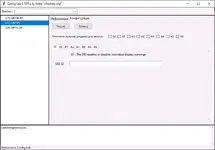
- Access configuration DIDs that control cluster options and warning indicators, including enabling or disabling individual display warnings to match the vehicle equipment.
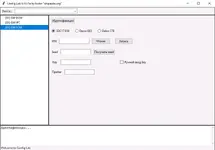
- Support for common GM ECM types such as EDC17 E59, Delco E83 and Delco E78, allowing VIN alignment and configuration matching with BCM and IPC modules.
- Works through industry standard J2534 pass-thru adapters, so it can be used with many GM-capable diagnostic interfaces used in professional workshops.
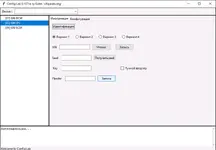
- Simple tabbed interface for BCM, IPC and ECM with status bar, last-operation information and progress indicator to monitor communication in real time.
Package contents
- ConfigLab.exe – main Config Lab 0.1071a executable for Windows.
- \Config\ – module definition and configuration data files for GM BCM, IPC and ECM control units.
- \Logs\ – folder created by the application for saving communication and operation logs.
Compatibility notes
- Intended for late-model GM passenger cars and light commercial vehicles whose BCM, IPC and ECM communicate over CAN and support diagnostic data identifiers (DIDs).
- Actual functions available depend on the specific module hardware, firmware version and market configuration; some ECUs will be read-only for certain parameters.
- Operation requires a compatible J2534 pass-thru interface with working drivers and the correct wiring to the diagnostic connector or bench harness.
- This is not official GM service software; results can differ from factory tools and behaviour may change if the vehicle is updated with newer firmware.
Basic usage
- Install Config Lab into a dedicated folder and make sure the drivers for your J2534 interface are correctly installed on the PC.
- Connect the interface to the vehicle or test bench with stable 12 V power, start Config Lab, choose the J2534 device in the drop-down list and select the target module (GM BCM, GM IPC or GM ECM).
- Use the identification tab to read current VIN, odometer and configuration data, then save a full backup or export the data before attempting any changes.
- When a legitimate repair or module replacement requires it, adjust only the required identification or configuration sections, then write the updated data back and follow official GM service procedures, observing all local laws on VIN and odometer handling.
- After programming, clear any related fault codes with appropriate diagnostic software and verify that all warning indicators, gauges and vehicle functions work correctly during a controlled test.
Operating systems
This build is designed for Microsoft Windows desktop systems.
Recommended environment:
- Windows 7, Windows 8.1 or Windows 10, 32-bit or 64-bit
- Running as Administrator to allow access to J2534 drivers and USB devices
- Windows 11 may work when the J2534 interface provides compatible drivers
Minimum system requirements
- CPU: Dual-core 2.0 GHz or better
- RAM: 2 GB minimum (4 GB or more recommended)
- Storage: 200 MB free disk space for the program, logs and backups
- Display: 1366×768 or higher resolution
- Interfaces: One free USB port or other port required by the J2534 adapter
- Stable 12–14 V power supply for vehicle or ECU bench harness during operations
Disclaimer
Source of Files. All software and resources in this post are collected from public and open sources on the internet. We do not claim authorship or ownership.
File Hosting. This forum does not host files. All links point to third party public cloud storage. We are not responsible for external content.
User Responsibility. Software is provided for educational and evaluation purposes only. You use it at your own risk. Authors of the post and forum administration are not liable for any damage.


