
This multi-version package of Webasto Thermo Test (WTT) brings together several generations of the official PC-based diagnostic software for Webasto air and water heaters. It is intended for workshop technicians and advanced users who need to diagnose, monitor and service Webasto heaters via W-Bus, K-Line or compatible interfaces in passenger cars, vans, trucks, buses, campers and marine applications.

The bundle includes legacy Webasto Thermo Test 2002 builds for very old W-Bus heaters and a newer Webasto Thermo Test 3.x branch for modern Air Top, Thermo Top and Thermo Pro units. With the correct diagnostic interface and heater wiring, WTT can display live operating values, read and clear fault memory, run guided component tests and generate diagnostic reports for documentation.
Highlights
Package contents
Compatibility notes
Webasto Thermo Test is designed for PC diagnosis of Webasto air and water heaters that support a diagnostic interface. Depending on the version used and the heater generation, WTT can communicate via W-Bus, K-Line or a dedicated Webasto USB/serial interface.

Typical heater families covered by the 2.x and 3.x branches include (availability varies by heater hardware and firmware):
For very old W-Bus (<= V3.5) heaters and some analogue units, Webasto Thermo Test 2002 (v1.19–2.16) is often required. Newer W-Bus versions (>= V4.0) and current Evo / Pro platforms are generally handled by WTT v3.x. Heater coverage can differ by market and model year, so availability varies by vehicle and firmware.
Basic usage
Operating systems
The individual versions in this package are intended for classic Windows PCs:
Minimum system requirements
To use the software comfortably on a modern workshop laptop, the following minimum configuration is recommended:
Disclaimer
Source of Files. All software and resources in this post are collected from public and open sources on the internet. We do not claim authorship or ownership.
File Hosting. This forum does not host files. All links point to third party public cloud storage. We are not responsible for external content.
User Responsibility. Software is provided for educational and evaluation purposes only. You use it at your own risk. Authors of the post and the forum administration are not liable for any damage.
The bundle includes legacy Webasto Thermo Test 2002 builds for very old W-Bus heaters and a newer Webasto Thermo Test 3.x branch for modern Air Top, Thermo Top and Thermo Pro units. With the correct diagnostic interface and heater wiring, WTT can display live operating values, read and clear fault memory, run guided component tests and generate diagnostic reports for documentation.
Highlights
- Multi-version package (v1.19, v2.10, v2.14, v2.16, v3.0) to cover both early W-Bus heaters and current Webasto platforms.
- Diagnosis functions for reading heater identification, operating hours, start counters and stored fault codes.
- Live data view of key parameters such as supply voltage, coolant or air temperature, flame detection, pump duty cycles and fan speed.
- Service functions for clearing error memory, performing component activation tests (circulation pump, fuel metering pump, glow plug, fan, relays) and running controlled start/stop sequences.
- Support for data logging and protocol files, allowing saved traces of heater behaviour during test drives or long-term troubleshooting.
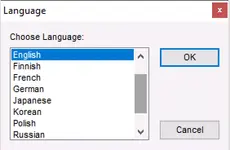
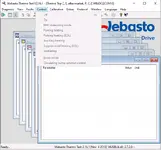
- Multi-language user interface (depending on version) with structured menus for Diagnosis, Faults, Control, Calibration, Protocol and Extras.
Package contents
- 1.19\readme.txt – information and notes for Webasto Thermo Test 2002 v1.19.
- 1.19\WTT2002_D1[1].19_Dongle_ignore.exe – legacy Webasto Thermo Test 2002 v1.19 executable for early W-Bus heaters.
- 2.10\readme.txt – notes and change information for WTT 2002 v2.10.
- 2.10\WTT2002_RU_dongle_ignore.exe – Webasto Thermo Test 2002 v2.10 application build (includes Russian language support).
- 2.14\readme.txt – documentation and operating hints for WTT 2002 v2.14.
- 2.14\WTT-dongle-ignore.exe – Webasto Thermo Test 2002 v2.14 executable for standard W-Bus diagnosis.
- 2.16\readme.txt – operating instructions and update notes for Webasto Thermo Test v2.16.
- 2.16\WTT 2.16 Setup.zip – installer archive for Webasto Thermo Test v2.16.
- 2.16\WTT-dongle-ignore.exe – portable Webasto Thermo Test 2.16 executable.
- 3.0\WTT_V3.0_Setup.zip – setup package for Webasto Thermo Test v3.0 (Diagnosis Framework + main application).
- 3.0\Dongle Ignore\wtt.exe – Webasto Thermo Test 3.0 executable used by the included portable build.
- 3.0\Dongle Ignore\DataAccess.MatrixDongle.dll – support library required by the WTT 3.0 portable executable.
- 3.0\Dongle Ignore\readme.txt – short readme file for the WTT 3.0 portable folder.
Compatibility notes
Webasto Thermo Test is designed for PC diagnosis of Webasto air and water heaters that support a diagnostic interface. Depending on the version used and the heater generation, WTT can communicate via W-Bus, K-Line or a dedicated Webasto USB/serial interface.
Typical heater families covered by the 2.x and 3.x branches include (availability varies by heater hardware and firmware):
- Air Top 2000 / 2000 ST / 3500 / 5000 and related Evo variants.
- Thermo Top C / E / P / Z, Thermo Top Evo series, Thermo Top Pro 120/150.
- Thermo Pro 50 / Thermo Pro 90, Dual Top and selected DW/BW water heaters.
- Various OE-installed Webasto heaters in passenger cars, light commercial vehicles, trucks, buses, construction and agricultural machinery, as long as a compatible diagnostic line is accessible.
For very old W-Bus (<= V3.5) heaters and some analogue units, Webasto Thermo Test 2002 (v1.19–2.16) is often required. Newer W-Bus versions (>= V4.0) and current Evo / Pro platforms are generally handled by WTT v3.x. Heater coverage can differ by market and model year, so availability varies by vehicle and firmware.
Basic usage
- Install the Webasto Thermo Test version that matches your operating system and the heater generation you want to diagnose (legacy 2002 builds for older heaters, 3.0 for current units).
- Install the drivers for your Webasto USB or serial diagnostic interface and note the assigned COM port.
- Connect the PC interface to the heater’s diagnostic line (W-Bus, K-Line or designated service connector) and supply correct power to the heater according to Webasto wiring diagrams.
- Start the selected WTT version, choose the correct COM/USB port, select the heater type from the device list and begin diagnosis to read identification data, fault codes and live parameters.
- Use the component test and control menus only on properly installed heaters in a safe environment, following the official Webasto service documentation for each heater model.
Operating systems
The individual versions in this package are intended for classic Windows PCs:
- Webasto Thermo Test 2002 v1.19–2.16 – documented for Microsoft Windows 98, Me, NT4, 2000 and XP, running on standard IBM-compatible PCs.
- Webasto Thermo Test v3.0 – documented for Microsoft Windows Vista, 7 and 8 (32-bit and 64-bit) with .NET Framework 4.0 installed.
- Later 3.x releases of Webasto PC diagnostics are known to operate on Windows XP, Vista, 7, 8, 8.1 and 10 with a free COM or USB port; compatibility can depend on drivers and specific builds.
Minimum system requirements
To use the software comfortably on a modern workshop laptop, the following minimum configuration is recommended:
- CPU: 800 MHz or faster x86/x64 processor.
- RAM: 128 MB minimum (512 MB or more recommended for newer Windows versions).
- Storage: At least 50 MB of free disk space for installation, plus extra space for logs and reports.
- Display: 1024×768 resolution or higher.
- Interfaces: One free RS-232 serial port or USB port for the Webasto diagnostic adapter.
- Software: Microsoft .NET Framework 4.0 (for WTT 3.0), up-to-date Windows service packs and Webasto interface drivers.
- Permissions: Local administrator rights for installation and driver setup.
Disclaimer
Source of Files. All software and resources in this post are collected from public and open sources on the internet. We do not claim authorship or ownership.
File Hosting. This forum does not host files. All links point to third party public cloud storage. We are not responsible for external content.
User Responsibility. Software is provided for educational and evaluation purposes only. You use it at your own risk. Authors of the post and the forum administration are not liable for any damage.


