
Yamaha Diagnostic System 1.33 is a Windows-based service application for Yamaha marine engines and personal watercraft. It communicates with the ECU or EMM on EFI four-stroke and HPDI two-stroke outboards as well as many WaveRunner and jet boat models. The software reads fault codes, monitors live sensor data, runs basic tests and logs engine parameters for troubleshooting.

The archive combines the YDS 1.33 program with an updated database installer, FTDI USB drivers for the diagnostic cable and a large factory workshop manual library. Quick guides and video tutorials are included to help install the software on modern Windows systems and connect to the engine safely.
Highlights
Package contents
Compatibility notes
The software and manuals target Yamaha marine engines that use the original Yamaha Diagnostic System PC interface. Based on the manuals in the archive, coverage includes a broad range of 2-stroke and 4-stroke outboards from small 9.9 hp engines up to large V6 200–300 hp models, plus certain jet boat and AR/SR series units. Many engines with EFI, HPDI or advanced ignition systems are covered, but very new models that require YDIS 2 or later tools may not be fully supported.
Vehicle coverage for each engine depends on the installed database and the model codes printed on the engine label. For best results always select the workshop manual that exactly matches the model designation and production year.
Basic usage
Operating systems
Yamaha Diagnostic System 1.33 was originally designed for earlier Windows versions, but the supplied video guides and driver sets are tailored for running it on modern PCs. The package has been used successfully on:
Minimum system requirements
Disclaimer
Source of Files. All software and resources in this post are collected from public and open sources on the internet. We do not claim authorship or ownership.
File Hosting. This forum does not host files. All links point to third party public cloud storage. We are not responsible for external content.
User Responsibility. Software is provided for educational and evaluation purposes only. You use it at your own risk. Authors of the post and forum administration are not liable for any damage.
The archive combines the YDS 1.33 program with an updated database installer, FTDI USB drivers for the diagnostic cable and a large factory workshop manual library. Quick guides and video tutorials are included to help install the software on modern Windows systems and connect to the engine safely.
Highlights
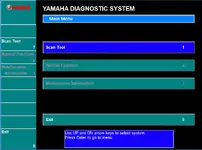
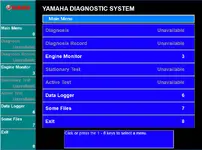
- Dealer-style scan tool menus: Diagnosis, Diagnosis Record, Engine Monitor, Stationary Test, Active Test, Data Logger and file management.
- Live engine monitoring for RPM, throttle position, manifold pressure, temperatures, battery voltage and other key parameters while the engine runs.
- Reads and clears diagnostic trouble codes and stores diagnosis records so you can document intermittent issues and repair history.
- Active and stationary tests on supported models to trigger fuel pump, injectors, ignition coils and other actuators from the PC.
- Data logging mode to capture engine behaviour during sea trials and replay it later with graphs and numeric traces.
- Extensive PDF workshop manuals for a wide range of Yamaha outboards and jet models stored directly in the package.
Package contents
- QUICK USER QUIDE YDS.rtf – short text guide explaining YDS basics, cable connection and main functions.
- VIDEO QUIDE FOR WIN 7.wmv – step-by-step screen recording that shows how to install YDS and drivers on Windows 7 and make the first connection.
- VIDEO QUIDE FOR WIN 10.wmv – similar tutorial focused on Windows 10, including driver installation and compatibility notes.
- YDS 133 Update 2017.exe – program and database update for Yamaha Diagnostic System 1.33, used to extend coverage for later engine models.
- USB FTDI FT232RL drivers for Windows – complete FTDI driver set:
CDM 2 08 30 Release Info.rtf, CDM v2.08.30 WHQL Certified.exe, CDM v2.08.30 WHQL Certified.zip plus separate Ver 2.08.30 and Ver 2.10.00 folders with their own EXE installers, ZIP archives and release notes for different Windows builds. - Workshop manuals – main service manual folder with model-specific PDFs for Yamaha outboards and related systems:
130BETO_6E5_28197_Z9_L1.PDF, 150-175-200-225.pdf, 150FETO,200FETO,L200FETO_64C-28197-Z8-11.PDF, 2011 AR-SR240 242 LIT.pdf, 20CMH_6A9_28197_5F_B1.PDF, 20d_25n.pdf, 25BMH_WC_E25BMH_30HMH_W_WC_69R_28197_ZA_C1.PDF, 3.0L_4cycl.pdf, 30DMH_6K9_28197_Z8_C2.PDF, 40VEO_63B_28197_Z7_11.PDF, 60FET_ETO_90AETO_6H2_28197_Z9_11.PDF, 9.9F.pdf, 9.9FMH_15FMH_63V_28197_Z6_11.PDF, E60HWD_MHD_69D_28197_ZA_C1.PDF, EK25BMH_69T_28197_ZA_11.PDF, electrical_system-yamaha-25b_30h.pdf, F10-15.pdf, F100B-C.pdf, F100CET_60C-28197-5D-11.PDF, F115AET_68V_28197_ZA_C1.PDF, F150AET_63P_28197_3F_11.PDF, F20-25.pdf, F200-225.pdf, F200AET_FL200AET_60L_28197_3D_1X.PDF, F25AMH_E_65W_28197_Z8_C2.PDF, F30-40.pdf, F40BET_67C-28197-Z9-C1.PDF, F4A.pdf, f50-f60.pdf, f50.pdf, F6-8.pdf, F80AET_67F_28197_Z9_CY.PDF, FT50C.pdf, Z150-175-200.pdf, Z150P.pdf, Z200N_LZ200N.pdf, Z300AETO_6D0_28197_3F_1X.PDF.
These cover classic carbureted, EFI four-stroke and HPDI engines from small portable units up to V6 offshore models. - Workshop manuals\Manuals2008 – additional LIT-coded factory manuals and rigging documents:
Index.pdf, LIT-18514-00-05.pdf, LIT-18616-01-64.pdf, LIT-18616-01-66.pdf, LIT-18616-01-79.pdf, LIT-18616-02-19.pdf, LIT-18616-02-51.pdf, LIT-18616-02-54.pdf, LIT-18616-02-59.pdf, LIT-18616-02-65.pdf, LIT-18616-02-66.pdf, LIT-18616-02-72.pdf, LIT-18616-02-73.pdf, LIT-18616-02-76.pdf, LIT-18616-02-78.pdf, LIT-18616-02-82.pdf, LIT-18616-02-85.pdf, LIT-18616-02-86.pdf, LIT-18616-02-96.pdf, LIT-18616-02-97.pdf, LIT-18616-02-98.pdf, LIT-18616-03-02.pdf, LIT-18616-03-03.pdf, LIT-18616-03-04.pdf, LIT-18616-03-05.pdf, LIT-18616-03-06.pdf, LIT-18616-F7-50.pdf, LIT-18616-JD-16.pdf, LIT-18616-JD-41.pdf, LIT-18616-JD-61.pdf, LIT-18616-JD-91.pdf, LIT-18616-T8-00.pdf, LIT-18616-VZ-20.pdf, LIT-18616-VZ-30.pdf.
Compatibility notes
The software and manuals target Yamaha marine engines that use the original Yamaha Diagnostic System PC interface. Based on the manuals in the archive, coverage includes a broad range of 2-stroke and 4-stroke outboards from small 9.9 hp engines up to large V6 200–300 hp models, plus certain jet boat and AR/SR series units. Many engines with EFI, HPDI or advanced ignition systems are covered, but very new models that require YDIS 2 or later tools may not be fully supported.
Vehicle coverage for each engine depends on the installed database and the model codes printed on the engine label. For best results always select the workshop manual that exactly matches the model designation and production year.
Basic usage
- Install the FTDI driver package from the USB FTDI FT232RL drivers for Windows folder so that the Yamaha diagnostic cable appears as a COM port in Device Manager.
- Run the base Yamaha Diagnostic System installer if required, then launch YDS 133 Update 2017.exe to update the program and database before first use.
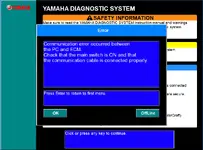
- Connect the Yamaha three-pin diagnostic connector on the engine to your USB interface, then connect the cable to the PC. Switch the engine main switch to ON and confirm that the battery is in good condition.
- Start YDS, choose Scan Tool from the main menu and select functions such as Diagnosis, Engine Monitor, Active Test or Data Logger as needed.
- Open the appropriate PDF from the Workshop manuals or Manuals2008 folders to follow the recommended troubleshooting steps, wiring diagrams and service specifications.
- After diagnostics or service, save the logged data or diagnosis records if needed and always close the software before disconnecting the USB cable or switching off power.
Operating systems
Yamaha Diagnostic System 1.33 was originally designed for earlier Windows versions, but the supplied video guides and driver sets are tailored for running it on modern PCs. The package has been used successfully on:
- Windows XP and Windows Vista workshop laptops.
- Windows 7 systems using the included FTDI CDM 2.08.30 drivers.
- Windows 8 and Windows 10 PCs with either the 2.08.30 or 2.10.00 FTDI driver versions.
Minimum system requirements
- CPU: 1 GHz or faster x86 or x64 processor suitable for desktop Windows.
- Memory: 1 GB RAM minimum, 2 GB or more recommended when viewing PDF manuals while YDS is running.
- Storage: At least 1 GB free disk space for the program, update, drivers, logs and the PDF manual collection.
- Display: 1024×768 or higher resolution so that full YDS menus and data tables fit on screen.
- Ports: One free USB port for the FTDI-based Yamaha diagnostic cable.
- Permissions: Local administrator rights for installing drivers and software.
Disclaimer
Source of Files. All software and resources in this post are collected from public and open sources on the internet. We do not claim authorship or ownership.
File Hosting. This forum does not host files. All links point to third party public cloud storage. We are not responsible for external content.
User Responsibility. Software is provided for educational and evaluation purposes only. You use it at your own risk. Authors of the post and forum administration are not liable for any damage.


