This is a practical, real-world guide to J2534 Pass-Thru: what it does, when it makes sense, how the workflow actually looks, what can go wrong, and how to choose a device.
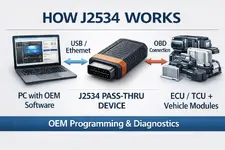
Key idea: the J2534 device is not “the tuner.” It’s the transport layer. The actual programming logic is performed by the software you use (often OEM tools).
Common use cases:
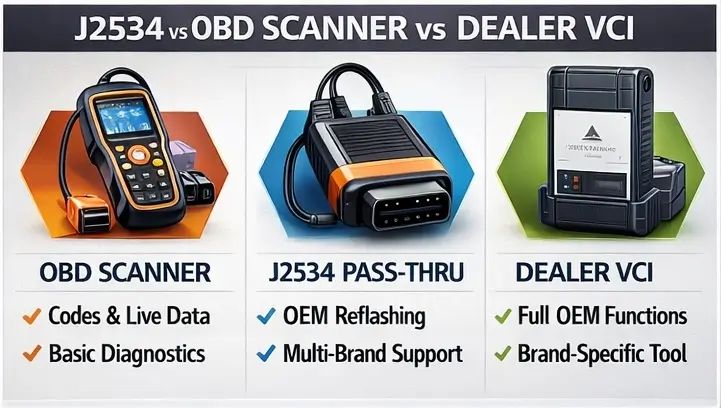
Plain-English summary:
So the correct question isn’t “does it say J2534 on the box?”
It’s “does it reliably work with my target OEM software for my vehicles?”
Practical takeaway: treat it as a compatibility signal, not a guarantee. Always verify device + OEM software + vehicle coverage in real terms.
That’s why pros obsess over setup more than “clicking the flash button.”
Important: This post focuses on legitimate diagnostics/programming workflows and general knowledge. We do not cover bypassing security, immobilizer circumvention, emissions “defeat” modifications, or anything intended to break laws or safety rules.
The 30-second definition
J2534 (Pass-Thru) is a standardized interface between your computer and the vehicle. You run OEM or service software on a PC, and the J2534 device acts as the “bridge” that carries programming/diagnostic traffic between the PC and the modules over the car’s network.Key idea: the J2534 device is not “the tuner.” It’s the transport layer. The actual programming logic is performed by the software you use (often OEM tools).
Why J2534 matters in the real world
A lot of people buy an OBD scanner and assume it’s enough for everything. In practice:- Basic OBD tools are great for reading/clearing codes and simple live data.
- Programming modules (ECU/TCU, BCM, ABS, etc.) is a different category: it demands stable comms + stable power + correct software workflow.
- J2534 exists specifically to support those programming workflows in a more standardized way.
Common use cases:
- OEM updates / reflashes (bug fixes, drivability improvements, module updates).
- Module replacement where programming/initialization is required.
- Multi-brand environment where you don’t want separate hardware for every manufacturer (when supported).
J2534 vs OBD scanner vs dealer VCI — what’s the difference?
Think of it as three “tiers” of tooling:
J2534 vs OBD Scanner vs Dealer VCI (Comparison)
Comparison graphic showing differences between a consumer OBD scanner, a J2534 Pass-Thru...
Plain-English summary:
- OBD scanner (consumer) → diagnostics first (codes/live data).
- J2534 Pass-Thru → programming/updates via OEM software (plus some diagnostics depending on software).
- Dealer VCI → full vеrsiоn brand ecosystem (powerful, but usually expensive and brand-locked).
A common misconception: “J2534 = one device for all cars”
Not exactly. J2534 is a standard, but the real-world experience depends on:- Driver quality (stability on your OS).
- OEM software requirements (some are picky).
- Protocol coverage (CAN, ISO9141/K-Line, etc.).
- Device firmware/support updates.
- Your exact car/model/year/module.
So the correct question isn’t “does it say J2534 on the box?”
It’s “does it reliably work with my target OEM software for my vehicles?”
J2534-1 vs J2534-2 (why you’ll see both)
You’ll often see two labels:- J2534-1 — the classic baseline Pass-Thru programming interface (core functions).
- J2534-2 — optional extensions (extra capabilities/protocols depending on implementation).
Practical takeaway: treat it as a compatibility signal, not a guarantee. Always verify device + OEM software + vehicle coverage in real terms.
The real “enemy” is not software — it’s conditions
Most programming horror stories start with one of these:- Voltage drops (weak battery, wrong charger, unstable supply)
- Laptop goes to sleep / power saving
- USB disconnect (loose port, bad cable, cheap hub)
- Wi-Fi/Internet drops (when OEM tools require online authentication)
- Wrong vehicle/module selected
That’s why pros obsess over setup more than “clicking the flash button.”
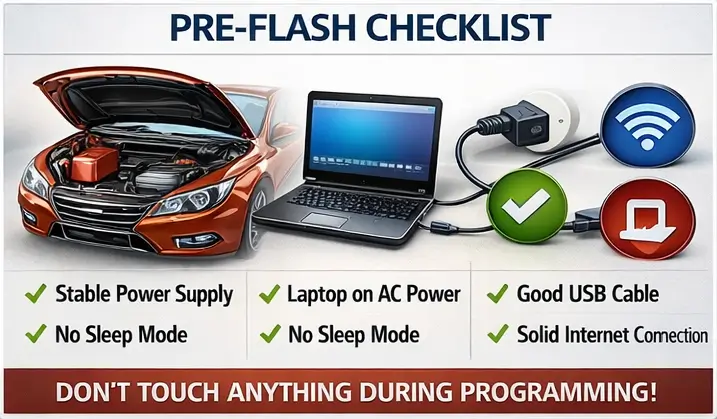
Pre-Flash Checklist (J2534 / OEM Programming)
Pre-flash checklist for OEM programming: stable power supply, laptop on AC, good USB cable, no...
Pre-flash checklist (the boring stuff that saves you)
Before any programming session:- Stable vehicle power (proper charger/maintainer; do not rely on “battery is fine”).
- Laptop on AC power. Disable sleep/hibernation. No “USB selective suspend.”
- Use a solid USB cable. Avoid long cables and cheap hubs.
- Install and test the J2534 driver first (confirm OEM software can see it).
- If the OEM software needs it: stable internet and active subscription.
- Verify VIN / model / module selection is correct in software.
- During programming: don’t touch anything (doors, ignition, connectors).
What to look for when choosing a J2534 device (review checklist)
If you’re writing reviews, these points matter more than marketing:1) Stability & driver support
- How often does the vendor update drivers/firmware?
- Does it behave on Windows 10/11 consistently?
- Does it randomly disconnect under load?
2) Real OEM compatibility
- Which OEM tools are explicitly supported?
- Any known limitations by make/model/year?
- Does it handle the protocols your target cars use?
3) Workflow ergonomics
- Connection options: USB / Ethernet
- Indicator LEDs, robust housing, strain relief
- How easy it is to recover from a session issue
4) Support quality
- Do they answer tickets quickly?
- Do they publish clear documentation?
- Are there real release notes?
Troubleshooting: “OEM software doesn’t see my J2534”
If you need a quick diagnostic sequence:- Try a different USB port (direct on laptop, no hub).
- Swap cable.
- Reinstall driver, confirm device appears correctly in Device Manager.
- Run OEM tool as admin if required.
- Check the OEM tool’s “interface selection” / “Pass-Thru” settings.
- Confirm ignition state and vehicle power are correct.
- Try a different PC to isolate OS/driver conflicts.
Mini FAQ
- Can J2534 read fault codes? Sometimes yes (depends on the software). But dedicated diagnostic tools are usually better for day-to-day scanning.
- Is J2534 the same as a tuning tool? No. It’s a standardized communication interface often used for OEM-style programming.
- Will one device cover all cars? Not guaranteed. Coverage depends on the OEM software + device + vehicle combination.
- Why do people “brick” modules? Power instability, comms dropouts, wrong workflow or selection — usually not “bad luck.”
References & further reading
- SAE J2534 overview/standard pages: https://www.sae.org/standards
- General explanation of Pass-Thru concepts: search “J2534 Pass-Thru explained” on reputable diagnostics sites
Next post ideas (if this format works)
- OBD vs Bench/Boot: what it means for risk and reliability (no pinouts, no bураss content)
- How to review Pass-Thru devices: a scoring rubric you can use in /reviews
- A comparison of licensing/subscriptions: where the hidden costs actually are
Last edited:

