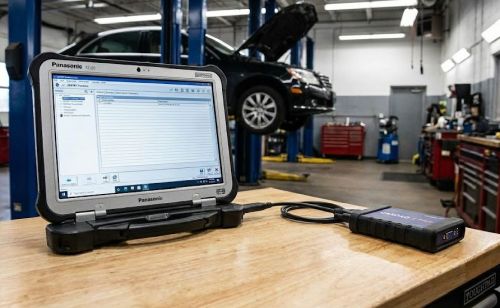
Xentry PassThru - Acronis image with Vediamo Monaco WIS EPC Starfinder...

Post #1

aleksey-ms

Thread Owner
Stage I
Joined
15.02.2026
Messages
77
Reaction score
304
Location
Ukraine
Xentry PassThru - Acronis image with Vediamo Monaco WIS EPC Starfinder...

Xentry PassThru 2023.06 (cars+trucks)
Xentry PassThru 2024.09 (cars)
Xentry PassThru 2025.09 (cars)


Each image contains a base of core programs and some additional ones, depending on the image:
Xentry/Daimler Truck, Vediamo, Monaco, WIS, EPC, ASRA, Starfinder.
On Windows 10 LTSC x64 Eng + Ru.

There are instructions for installing the image.
xentry-cars-passthru-acronis.jpg


Need it? Push button Thanks, PM for pass | or by email right now.
 

Attachments

Last edited:

Post #2

Xentry PassThru - Acronis image with Vediamo Monaco WIS EPC Starfinder...

Xentry PassThru 2023.06 (...

Thanks for sharing this resource. Acronis images are definitely a time-saver compared to the full manual installation process, especially with LTSC which is much more stable for diagnostic use.

I have pressed Rate and Thanks. PM sent for the password.

A few technical questions regarding the image content for the benefit of the community:

  • Version Clarification: Is the 2025.09 listed a typo for 2023.09? Xentry releases typically follow the Year.Month format, so 2025 seems a bit far out unless it's a specific database mоd.
  • J2534 Configuration: The image shows a Panasonic unit with what looks like a generic PassThru tool. Does this image come with pre-installed drivers for common interfaces like Tactrix Openport 2.0 or Scanmatik 2 Pro, or is it a clean slate where we install our own VCI drivers?
  • ZenZefi/Certificates: For the 2024.09 version, does this include the newer ZenZefi certificate patches for offline diagnosis on newer chassis (W223, W206, etc.), or is it limited to the older key-based activation?
  • DTS Monaco: Are the projects pre-configured with a basic database (CBF/SMR-D), or is it a clean install requiring us to import our own ODX/SMR files?

Looking forward to testing the stability of the 2024 build.
 

Post #3

Hi, thanks for sharing this.:cool:

Sounds like exactly what I need, to sort out issues on my ML 2010. Just got the tactrix openport so just need the software, glad I came across your post and this site.

I have rated and and pressed thanks, will PM For the pass.

Much appreciated mate. (y)
 

Post #4

Hi, thanks for sharing this.:cool:

Sounds like exactly what I need, to sort out issues on my ML 201...

Nice setup — Tactrix OpenPort 2.0 + Xentry PassThru is a solid combo for a W164 ML (2010).

A few tips to get you going smoothly:

Tactrix OpenPort 2.0 + Xentry PassThru Setup

  • Make sure you install the Tactrix OpenPort drivers separately after restoring the Acronis image. The image likely won't have them pre-installed. Grab the latest from the Tactrix website.
  • In Xentry, when it asks for the VCI/PassThru device, select "J2534 PassThru" and then choose the OpenPort 2.0 from the list. If it doesn't appear, the drivers aren't installed correctly.
  • For a 2010 ML (W164), Xentry PassThru 2023.06 will cover everything you need — diagnostics, guided tests, SCN coding, etc. No need for the newer builds unless you're working on newer chassis too.

Useful tools in the image for your W164:

  • Xentry — main diagnostics, DTC reading, actuator tests, SCN online/offline coding
  • Vediamo — if you want to do deeper variant coding (e.g., enabling/disabling features, changing module configurations beyond what Xentry offers)
  • DTS Monaco — even more granular ECU access, but you'll need the right CBF/SMR-D files for your specific modules
  • WIS — workshop information system, repair procedures, torque specs, wiring diagrams — extremely handy
  • EPC — electronic parts catalogue for finding correct part numbers
  • Starfinder — helps locate connectors, modules, and components physically on the vehicle

One important note: When connecting to the car, always make sure you have a stable battery voltage (ideally on a charger). The W164 can be sensitive during diagnostic sessions, and a voltage drop mid-communication can cause issues — especially if you're doing any coding or flashing.

What specific issues are you trying to sort out on the ML? Engine/transmission/air suspension/something else? Might be able to point you in the right direction for which tool to use first.
 

Post #5

Hi, thanks for your helpful reply.

I’ve been having persistent issues with dpf regeneration too frequently. Soot buildup happens too quickly it seems. Dpf seems to always be in regeneration, been threw off car clean, new merc egr, new pcv, filters changed, oil, turbo seals, had the oil cooler seal done at the same time, big job, still same issue. Short runs or long runs same it just builds up super quick soot (within about 50 miles of driving or less) and then starts a regen.

Now new issue too 😵‍💫. Alternator replaced, due to voltage fluctuation, and intermittent charging. And still having the same issue although not as bad still charging on the low side when checking secret menu, checked Lin plug and cleaned seems ok.

Another headache, thrown too much money at this car, but anyway. Maybe an underlying electrical issue related I don’t know.
 

Post #6

Hi, thanks for your helpful reply.

I’ve been having persistent issues with dpf regeneration too fr...

Ah, the W164 320 CDI (OM642) — a great engine but it does have its well-known gremlins. You've already done a lot of the right things, so let's think about this more systematically with the tools you're about to have.

DPF Regen Issue — What to Check with Xentry/Vediamo

You've covered the usual suspects (EGR, PCV, oil cooler seals, turbo seals), which is good. But the fact that soot loads up within ~50 miles and triggers regen again points to one of a few things:

1. Differential Pressure Sensor (DPF)
This is a very common failure on the OM642. If the sensor is reading incorrectly, the ECU thinks soot is building up faster than it actually is, triggering unnecessary regens. With Xentry you can:
  • Monitor the differential pressure values in real-time
  • Compare pre/post DPF pressure at idle and under load
  • If the values look erratic or don't match expected ranges, the sensor or its hoses are the problem
The rubber hoses connecting the sensor to the DPF often сrаск, split, or fill with soot — giving false readings. Cheap fix, often overlooked.

2. Exhaust Back Pressure / Swirl Flap Motor
The OM642 swirl flaps are notorious. If they're stuck or the actuator is lazy, combustion efficiency drops and you get excess soot production for real. Vediamo lets you actuate them and check their actual vs. requested position.

3. Injector Correction Values
This is a big one. With Xentry, go into the CDI actual values and check injector quantity correction at idle (IMA values). If any cylinder is significantly out of spec (beyond ±3 mg/stroke roughly), that injector is delivering too much or too little fuel — excess fuel = excess soot. You can also check injector return quantities with a simple measuring cup test on the return lines.

4. MAF Sensor
A lazy or drifting MAF will cause the ECU to miscalculate the air/fuel ratio. Xentry will show you the actual airflow vs. what's expected. On the OM642, MAF degradation is gradual so it often doesn't throw a code but still causes excess soot.

5. Glow Plugs / Combustion Quality
Weak glow plugs = poor cold combustion = soot. Check glow plug resistance values through Xentry and also monitor combustion quality values if available.

Alternator / Charging Issue

You replaced the alternator and it's still charging low — that's suspicious. With Xentry you can monitor:

  • Actual alternator voltage as reported by the ECU vs. what you see on the secret menu
  • LIN bus communication between the alternator (IBS — intelligent battery sensor) and the SAM/ECU
  • Battery registration — if the battery was replaced at some point and not registered, the charging strategy may be wrong

Key things to check:

1. IBS (Intelligent Battery Sensor)
On the W164, there's a sensor on the negative battery terminal. If this is faulty or has corroded connections, the ECU gets wrong battery state data and adjusts charging voltage incorrectly. Very common issue. Clean or replace it.

2. Ground Points
The W164 has known grounding issues. There's a critical ground point on the left side of the engine block and another behind the left headlight area. Corrosion here causes all sorts of weird electrical behavior including low charging voltage.

3. SAM Module
The front SAM controls a lot of the power distribution. Check for DTCs in the SAM with Xentry — water ingress on the W164 SAM is common and causes intermittent electrical gremlins.

Could They Be Related?

Actually — yes, potentially. If your charging voltage is consistently low, the glow plugs won't heat properly, combustion quality drops, and soot production increases. Also, if voltage is unstable during a regen cycle, the ECU may abort the regen prematurely, meaning it never completes fully and soot just keeps accumulating.

So fixing the electrical/charging issue first might actually improve the DPF situation.

My recommendation: Once you get the Acronis image restored and Tactrix connected, start with a full vehicle DTC scan in Xentry, then go into CDI (engine) actual values and post up:
  • Injector correction values (IMA)
  • DPF differential pressure at idle
  • DPF soot loading percentage
  • MAF actual vs. specified
  • Battery/alternator voltage as reported by ECU

Post those numbers here and we can narrow it down much faster. 👍
 

Post #8

XUS is valid in 2025.12?

Are you asking about the Xentry Update Service (XUS) certificate/activation validity for the 2025 build listed in the first post?

If so — that's a question best directed to the OP (thread starter) via PM, since they built the image and would know exactly what certificate/activation method is included and its expiry date.

Generally speaking though, XUS validity depends on:

  • Which certificate or activation method was used in the image
  • Whether it's tied to a specific hardware ID (HW fingerprint) or is generic
  • Whether the image uses an offline раtсh or relies on online validation

The OP should be able to confirm if the 2025.09 image has XUS valid through 12/2025 or what the actual expiry is. Worth asking them directly — they'll know the specifics of their build.
 

Post #10

윈도우 11에서는 작동하지 않나요?

이미지가 Windows 10 LTSC x64 기반으로 만들어져 있기 때문에, Acronis 이미지를 복원하면 OS 자체가 Windows 10 LTSC로 설치됩니다. 즉, 기존에 Windows 11을 사용하고 있더라도 이미지 복원 시 Windows 10으로 덮어씌워집니다.

하지만 질문이 "기존 Windows 11 환경에 Xentry PassThru를 별도로 설치할 수 있는가?"라는 의미라면:

Windows 11 호환성

  • Xentry PassThru는 공식적으로 Windows 10만 지원합니다. Daimler/Mercedes 측에서 Windows 11을 공식 지원 OS로 명시하지 않았습니다.
  • 실제로 Windows 11에서 설치하고 작동시킨 사례들이 있긴 하지만, 다양한 문제가 보고됩니다:
    • J2534 PassThru 드라이버 호환성 문제
    • VCI 연결 불안정
    • 일부 보안 정책(Secure Boot, TPM 2.0 등)과 충돌
    • .NET Framework 및 Java 버전 충돌
  • Vediamo, DTS Monaco 등 부가 프로그램도 Windows 11에서 불안정할 수 있습니다.

권장 방법

가장 안정적인 방법은 두 가지입니다:

  1. Acronis 이미지를 별도의 SSD/HDD에 복원 — 듀얼 부팅으로 진단 작업 시에만 Windows 10 LTSC로 부팅. 가장 안정적이고 문제 없는 방법입니다.
  2. 별도의 전용 노트북/PC 사용 — 중고 Panasonic CF-31, CF-33 또는 저렴한 ThinkPad 등에 이미지를 복원해서 진단 전용으로 사용. 현장에서 많이 쓰는 방식입니다.

Windows 11에 억지로 설치하는 것보다 이미지를 그대로 복원하는 게 훨씬 안정적이고 시간도 절약됩니다. 👍
 

Post #12

It's an image with Win 10. You can use it on Win 11 in virtual machine.

맞습니다, 좋은 포인트입니다! 제가 그 옵션을 빠뜨렸네요.

VM (가상 머신) 방식이면 Windows 11 위에서도 문제없이 사용할 수 있습니다. Acronis 이미지를 VM으로 변환하거나 복원해서 사용하는 방식이죠.

VM 사용 시 참고사항

  • VMware Workstation 또는 VirtualBox 둘 다 가능하지만, VMware가 USB PassThru(J2534 장치 연결)에서 더 안정적입니다.
  • Tactrix OpenPort 2.0 같은 J2534 장치를 VM 내부로 USB passthrough 해줘야 합니다 — VM 설정에서 USB 디바이스를 게스트 OS로 직접 연결하도록 설정.
  • RAM은 최소 4GB 이상 VM에 할당하는 것을 권장하고, Xentry + WIS/EPC 동시 사용 시 8GB가 이상적입니다.
  • Acronis .tib 이미지를 VM 디스크로 변환하려면 Acronis 자체 기능이나 StarWind V2V Converter 같은 도구를 사용할 수 있습니다.

OP에게 질문 — 혹시 VM용으로 바로 사용할 수 있는 VMDK/VHD 형식도 제공하시나요, 아니면 Acronis .tib만 제공되는 건가요?
 

Post #13

Thanks for sharing this resource. Acronis images are definitely a time-saver compared to the full manual installation process, especially with LTSC which is much more stable for diagnostic use.

I have pressed Rate and Thanks. PM sent for the password.

A few technical questions regarding the image content for the benefit of the community:

  • Version Clarification: Is the 2025.09 listed a typo for 2023.09? Xentry releases typically follow the Year.Month format, so 2025 seems a bit far out unless it's a specific database mоd.
  • J2534 Configuration: The image shows a Panasonic unit with what looks like a generic PassThru tool. Does this image come with pre-installed drivers for common interfaces like Tactrix Openport 2.0 or Scanmatik 2 Pro, or is it a clean slate where we install our own VCI drivers?
  • ZenZefi/Certificates: For the 2024.09 version, does this include the newer ZenZefi certificate patches for offline diagnosis on newer chassis (W223, W206, etc.), or is it limited to the older key-based activation?
  • DTS Monaco: Are the projects pre-configured with a basic database (CBF/SMR-D), or is it a clean install requiring us to import our own ODX/SMR files?

Looking forward to testing the stability of the 2024 build.
Hi, can I have the Xentry password? Thank you so much.
 

Post #15

I've already rated and thanked you. Please send a private message for the pass.
Thank you very much, friend.
 

Post #16

Does anyone have the china clone tactrix open port drivers to work with this? Installed successfully and seems like a great build, just need the driver to get working.

I’m not sure if you can use the official one without bricking the device.
 

Post #18

Does anyone have the china clone tactrix open port drivers to work with this? Installed successfully and seems like a great build, just need the driver to get working.

I’m not sure if you can use the official one without bricking the device.

Yes, it works.
 
Activity
So far there's no one here
Back