
Program Schematiq Location Airbag Blocks is an educational reference for locating airbag control units and reading basic SRS schematics on older vehicles. It was created as training material by a Polish automotive training centre and focuses on passenger cars from the mid-1990s to early 2000s. Each model sheet shows where airbag modules, crash sensors and connectors are mounted and gives a simplified wiring diagram of the SRS system.

Highlights
Package contents
Compatibility notes
Basic usage
Operating systems
Minimum system requirements
Disclaimer
Source of Files. All software and resources in this post are collected from public and open sources on the internet. We do not claim authorship or ownership.
File Hosting. This forum does not host files. All links point to third party public cloud storage. We are not responsible for external content.
User Responsibility. Software is provided for educational and evaluation purposes only. You use it at your own risk. Authors of the post and forum administration are not liable for any damage.
Highlights
- Brand-based navigation covering popular marques such as Alfa Romeo, Audi, BMW, Citroen, Daewoo, Fiat, Ford, Honda, Hyundai, Kia, Lancia, Mazda, Mercedes, Mitsubishi, Nissan, Opel, Peugeot, Renault, Rover, Saab, Skoda, Toyota, Volvo and VW.
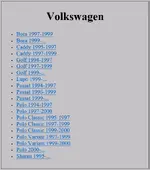
- Model and year selection per brand, for example VW Bora, Caddy, Golf, Lupo, Passat, Polo and Sharan with typical ranges like 1994-1997, 1997-1999 and 1999-2000.
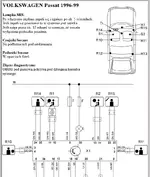
- Per-vehicle pages with SRS warning lamp behaviour, airbag module and sensor locations, side airbag and pretensioner symbols and diagnostic connector positions.
- Clear black-and-white layout diagrams that show component designations, wiring paths and connector numbers for fast orientation.
- Designed as classroom and workshop training material, useful for technicians, instructors and students working with classic airbag systems.
Package contents
- AIRBAG.EXE – main application with brand and model selection.
- START.HTM – HTML start page that can be opened from a browser or CD autorun.
- AIRBAG.INF and AUTORUN.INF – configuration files for CD start and shortcuts.
- IKO.BMP and IKO.ICO – program artwork and icons.
- Schematy – folder with brand and model specific SRS diagrams and location sheets.
- Sylaba – supporting training materials and course text (Polish language).
Compatibility notes
- Content focuses on passenger cars roughly from 1994 up to the early 2000s, mainly European and Asian makes.
- Examples include VW Golf, Bora, Passat, Polo, Sharan, Caddy and Lupo, plus similar era models from Alfa Romeo, BMW, Ford, Mercedes, Opel, Peugeot, Renault, Toyota and others.
- Diagrams are intended as simplified guidance for locating SRS components and understanding basic wiring. They may not reflect mid-life updates or regional variations.
- Use the material together with official workshop manuals and current manufacturer information before carrying out any repair or safety-critical work.
Basic usage
- Mount or extract the CD image and run AIRBAG.EXE or open START.HTM to launch the menu.
- Choose the vehicle manufacturer on the main screen, then select the exact model and year range from the list.
- Open the desired sheet to view SRS lamp notes, diagnostic connector location, airbag module and sensor placement and the simplified wiring diagram.
- Use the diagrams for orientation on the vehicle and as a teaching aid. Always disconnect the battery and follow official safety procedures when working on SRS systems.
Operating systems
- Originally designed for classic 32-bit Microsoft Windows desktop systems of the late 1990s and early 2000s.
- Typically used on Windows 95, Windows 98, Windows ME, Windows 2000 and Windows XP.
- On newer Windows versions it may run in compatibility mode or inside a virtual machine. Behaviour can vary by system.
Minimum system requirements
- Pentium-class CPU or newer.
- At least 256 MB RAM.
- Around 200 MB of free disk space for program files and copied diagrams.
- CD/DVD drive or mounted ISO image for original distribution.
- Display resolution 800×600 or higher.
- Local administrator rights to install or run legacy Windows applications.
Disclaimer
Source of Files. All software and resources in this post are collected from public and open sources on the internet. We do not claim authorship or ownership.
File Hosting. This forum does not host files. All links point to third party public cloud storage. We are not responsible for external content.
User Responsibility. Software is provided for educational and evaluation purposes only. You use it at your own risk. Authors of the post and forum administration are not liable for any damage.


