
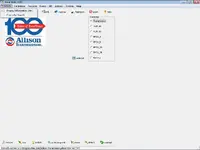
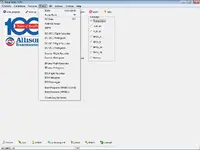
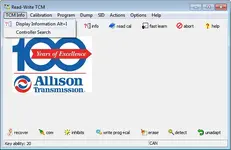
This bundle includes Allison TCM Reflash (TRF) setup archives and a calibration data pack intended for service-level work on Allison transmission controllers. The interface shown in the screenshots provides access to TCM identification, calibration handling, programming actions, controller selection, and multiple dump and logging utilities.

It also includes PCCS data and a calibration library with files labeled for Gen5, 4th Gen, MY09, WTEC, and LCT, with common file types such as .bin, .s2, .fil, and .xml.
Highlights
Package contents
Compatibility notes
Basic usage
Operating systems
Minimum system requirements
Disclaimer
This resource is provided for lawful service and educational use only. Transmission programming and calibration changes can cause vehicle damage, drivability issues, or safety risks if performed incorrectly. Use at your own risk, follow OEM procedures, and ensure you have the required authorization, training, and appropriate interface hardware before working on a vehicle.
It also includes PCCS data and a calibration library with files labeled for Gen5, 4th Gen, MY09, WTEC, and LCT, with common file types such as .bin, .s2, .fil, and .xml.
Highlights
- TCM Info and Display Information views for controller identification details such as boot level, program level, calibration compatibility, configuration number, CIN, MPM version, software part number, date code, TCM assembly, hardware compatibility, serial number, and an active DTC table.
- Controller Search with selectable controller targets shown in the UI: Transmission, TCM_IO, VCM_IO, EPCU_A, EPCU_B, EPCU_2A, EPCU_2B, Battery.
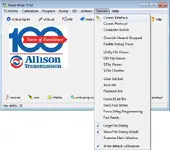
- Options menu items shown in the UI: Comm Interface, Comm Protocol, Controller Switch, Override Neutral-Stopped, Enable Debug Trace, Utility File Viewer, DID File Viewer, S File Viewer, S File Checker, Clear Job List, Save Job, Playback Job, Force 29 bit IDs, Gen3 Fast Writes, Force 1Meg Programming, Fast Reads, plus UI toggles like Large File Dialog, Show File Dialog Details, Autosize Main Window, Write default calibration.
- Dump menu items shown in the UI: RAM, Entire Flash, PO Data, Address Range, MPM, DC-DC 1 Flight Recorder, DC-DC 1 Histogram, DC-DC 2 Flight Recorder, DC-DC 2 Histogram, Inverter Flight Recorder, Inverter Histogram, EPump Flight Recorder, EPump Histogram, ESS Flight Recorder, ESS Histogram, ESS Datalogger, Boot Program (MY0
 , Boot Program (MY09+), Create Log Summary.
 - Included calibration and utility file sets for multiple generations, including Gen5 utilities like VCP_Slow_APPONLY_V02.fil, VCP_Slow_CALONLY_V02.fil, VCP_Slow_FULLPROG_V02.fil, erase utilities, CDCF-0033.xml, CDCF-0036.xml, CDCF-0037.xml, and multiple .bin references.
Package contents
- Exact items as provided
1. SETUP 5.2\SETUP.rar
2. Portable Hex Editor\Portable Hex Editor.rar
3. SETUP 6.3\TRF6.3 Setup.rar
4.DATA\PCCS 2021.12.rar
4th Gen\7IE.BIN
4th Gen\7IE.S2
4th Gen\8E5.bin
4th Gen\8E5.s2
4th Gen\8EC.bin
4th Gen\8EC.s2
4th Gen\8G0.BIN
4th Gen\8G0.S2
4th Gen\L09_1F5.bin
4th Gen\L09_A59_1F551.bin
4th Gen\L11_0B3.bin
4th Gen\L11_A59_0B381.bin
4th Gen\W09_1F0.bin
4th Gen\W11_0B3.bin
4th Gen\W11_A59_0B381.bin
LCT\df9.s2
LCT\u2a.s2
MY09\636456523970465832\4H00SE5.002
MY09\636456523970465832\D4H00SE5.002
MY09\636456523970465832\VCP_SLOW_FULLPROG_V02.FIL
MY09\636456523970465832\W11_A59_0B381.bin
A50_FAST_NOCAL_003.FIL
A50_SLOW_NOCAL_003.FIL
A54_250KB_APPANDCAL_UTILITY.FIL
A54_250KB_APPONLY_UTILITY.FIL
A54_250KB_CALONLY_UTILITY.FIL
A5X_FAST_FULLPROG_003.FIL
A5X_SLOW_FULLPROG_003.FIL
A6X_FAST_CALWMPM_V02.FIL
A6X_FAST_FULLPROGWMPM_V02.FIL
A6X_SLOW_CALWMPM_V02.FIL
A6X_SLOW_FULLPROGWMPM_V02.FIL
A6X_SLOW_MPM_V02.FIL
APPANDCAL_G4G5SERV_FAST_UTILITY.FIL
APPANDCAL_G4G5SERV_UTILITY.FIL
APPANDCAL_UDS_H4050_DTIA_UTILITY.FIL
APPANDCAL_UDS_H4050_DTIB_UTILITY.FIL
APPANDCAL_UDS_REARCH_EP4050HGM_UTILITY.FIL
APPANDCAL_UDS_REARCH_EP4050TCM_UTILITY.FIL
APPANDCAL_UDS_REARCH_EP4050VCM_UTILITY.FIL
APPONLY1_G4G5SERV_FAST_UTILITY.FIL
APPONLY1_G4G5SERV_UTILITY.FIL
APPONLY1_UDS_REARCH_EP4050HGMUTILITY.FIL
APPONLY1_UDS_REARCH_EP4050TCMUTILITY.FIL
APPONLY1_UDS_REARCH_EP4050VCMUTILITY.FIL
APPONLY_UDS_H4050_DTIA_UTILITY.FIL
APPONLY_UDS_H4050_DTIB_UTILITY.FIL
APPONLY_UDS_H4050_RESS_BMS_UTILITY.FIL
APPONLY_UTILITY.FIL
CALANDDID_UTILITY.FIL
CALONLY_G4G5SERV_FAST_UTILITY.FIL
CALONLY_G4G5SERV_UTILITY.FIL
CALONLY_UDS_H4050_DTIA_UTILITY.FIL
CALONLY_UDS_H4050_DTIB_UTILITY.FIL
CALONLY_UDS_REARCH_EP4050HGMUTILITY.FIL
CALONLY_UDS_REARCH_EP4050TCMUTILITY.FIL
CALONLY_UDS_REARCH_EP4050VCMUTILITY.FIL
CALONLY_UTILITY.FIL
PDC_C73X_FULLPROG_V03.FIL
POONLY_UTILITY.FIL
PO_DATA_G4G5Serv_Utility.fil
VCP_C73X_CALONLY_V01.FIL
VCP_C73X_FULLPROG_V03.FIL
VCP_SLOW_APPONLYWMPM_V02.FIL
VCP_SLOW_APPONLY_V02.FIL
VCP_SLOW_CALONLYWMPM_V02.FIL
VCP_SLOW_CALONLY_V02.FIL
VCP_SLOW_FULLPROGWMPM_V02.FIL
WTEC\9c2.s2
WTEC\s0s2
Gen5\A6X_Slow_CALwMPM_V02.fil
Gen5\A6X_Slow_FULLPROGwMPM_V02.fil
Gen5\A6X_Slow_FULLPROG_V03.fil
Gen5\CDCF-0033.xml
Gen5\CDCF-0036.xml
Gen5\CDCF-0037.xml
Gen5\ERASE_PO_UDS_Utility.fil
Gen5\L18BCD_PC_868.bin
Gen5\L18BCD_PC_86811.bin
Gen5\mpm_v1.bin
Gen5\VCP_Slow_APPONLY_V02.fil
Gen5\VCP_Slow_CALONLY_V02.fil
Gen5\VCP_Slow_FULLPROGwMPM_V02.fil
Gen5\VCP_Slow_FULLPROG_V02.fil
Gen5\W16BCDPC_5J6996B.bin
Gen5\W17BCD_PC_7N3.bin
Gen5\W17BCD_PC_7N32.bin
Gen5\W18BCD_PC_868.bin
Gen5\W18BCD_PC_86811.bin
Gen5\W18C_PC_8681.bin
Compatibility notes
- A compatible vehicle communication interface is required. Many service tools rely on RP1210-compliant adapters and a stable CAN connection.
- Controller and generation support depends on the connected module and the calibration set in use. This pack includes data explicitly labeled 4th Gen, Gen5, MY09, WTEC, and LCT.
- During any programming activity, ensure stable vehicle power and follow the OEM service procedure for the specific application.
- https://www.allisontransmission.com/parts-service/service-tools
- https://www.allisontransmission.com...ty-program/v6-2-installation-and-training.pdf
Basic usage
- Install the TRF build you intend to use from the included setup archive.
- In the tool, configure Comm Interface and Comm Protocol to match your adapter and vehicle network.
- Use Controller Search to select the target controller shown in the UI, then review TCM Info and Display Information before any changes.
- Use the Program, Calibration, Dump, and SID areas as required by your service workflow, and save logs and jobs for traceability.
Operating systems
- Windows 10 (64-bit)
- Windows 11 (64-bit)
Minimum system requirements
- CPU: 2-core 2.0 GHz or better
- RAM: 4 GB minimum, 8 GB recommended
- Storage: 10 GB free space recommended for installs, logs, and extracted data archives
- Display: 1366x768 or higher
- Software: .NET Framework 4.7.2 or later may be required depending on build
- Hardware: compatible vehicle interface, commonly RP1210-class adapters
Disclaimer
This resource is provided for lawful service and educational use only. Transmission programming and calibration changes can cause vehicle damage, drivability issues, or safety risks if performed incorrectly. Use at your own risk, follow OEM procedures, and ensure you have the required authorization, training, and appropriate interface hardware before working on a vehicle.


