
Bendix® ACom® PRO™ Diagnostics is a PC-based workshop diagnostic suite designed to communicate with Bendix commercial vehicle ECUs and support fast troubleshooting of braking and vehicle safety systems. It is used in fleets and repair shops to identify faults, view live data, run guided tests, and generate reports for heavy duty and medium duty applications.
This software is relevant for:

ACom PRO is built to automatically detect supported systems and collect diagnostic trouble codes from Bendix ECUs, and it can also gather key vehicle ECU information where supported such as engine and transmission data.
Summary Highlights
What this software is used for in real workshops
Common Bendix systems and ECUs you will see in ACom workflows
Coverage depends on the vehicle and installed hardware, but the Bendix ACom software family is positioned to support Bendix electronic systems such as:
Package contents (as provided)
Installation and first launch (safe workflow)
Operating systems
Windows (installer package provided as .exe for PC environments)
Minimum system requirements
Disclaimer
The information in this resource is provided for informational purposes only. The author is not responsible for any direct or indirect damages resulting from the use of the content.
This software is relevant for:
- Heavy-duty trucks and highway tractors equipped with Bendix electronic braking and stability systems
- Commercial trailers equipped with Bendix trailer ABS and stability controllers
- Buses, coaches, and other commercial vehicles using Bendix ABS and related ECUs
ACom PRO is built to automatically detect supported systems and collect diagnostic trouble codes from Bendix ECUs, and it can also gather key vehicle ECU information where supported such as engine and transmission data.
Summary Highlights
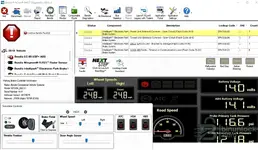
- Read and clear DTCs, save vehicle history, and generate printable diagnostic reports
- Guided troubleshooting workflow and “NextStep” style assistance for common fault paths (where available)
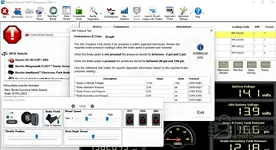
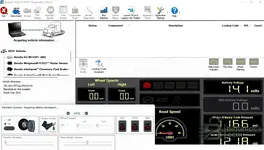
- Live data monitoring for wheel speeds, pressures, voltages, inputs and outputs, and system status
- Bi-directional and functional tests (component tests, routine checks, service functions where supported)
- Supports Bendix electronic platforms used across ABS, stability, ADAS, TPMS, and related systems
What this software is used for in real workshops
- ABS troubleshooting: wheel speed sensor faults, modulator/valve circuits, power and ground checks, communication issues
- Stability and traction events: diagnosing stability control warnings and related sensor plausibility issues
- ADAS diagnostics: supporting Bendix safety technologies and related fault trees (vehicle dependent)
- Trailer ABS diagnostics: controller faults, sensor circuits, power supply, configuration checks (trailer dependent)
- TPMS service actions: where Bendix SmarTire® systems are installed and supported
Common Bendix systems and ECUs you will see in ACom workflows
Coverage depends on the vehicle and installed hardware, but the Bendix ACom software family is positioned to support Bendix electronic systems such as:
- Bendix ABS and stability systems including Bendix ESP® platforms
- Bendix Wingman® Fusion™ and related diagnostics in the Bendix ecosystem
- Bendix Intellipark® electronic parking brake systems
- Bendix SmarTire® (TPMS) solutions where installed
Package contents (as provided)
- a)BendixAcomSetup_430_2023_v1.exe
- b)SetupACom6PackSE_6_18_6_6.exe
- Bendix ACom 6.18.6.6 v1 2023 Installation.txt
- c)ACom Authorization Plugin.exe
- read me.txt
Installation and first launch (safe workflow)
- Install the components in sequence: a) then b) then c)
- Launch the desktop shortcut: “ACom® PRO™ Diagnostics”
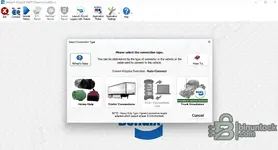
- Use a compatible vehicle communication interface for heavy-duty or trailer connections and connect to the vehicle data link
- Run an auto-detect scan, review DTCs, then open live data and functional tests as needed
Operating systems
Windows (installer package provided as .exe for PC environments)
Minimum system requirements
- CPU: Intel Core i3 / AMD equivalent or better
- RAM: 8 GB minimum (16 GB recommended for shop laptops)
- Storage: 10 GB free space minimum (more recommended for logs and reports)
- Ports: USB for vehicle interface
- Display: 1366×768 minimum (1920×1080 recommended)
Disclaimer
The information in this resource is provided for informational purposes only. The author is not responsible for any direct or indirect damages resulting from the use of the content.


