
This toolkit is built for BMW vehicle order and coding data workflows on platforms that use ZCS or FA style equipment coding. It helps you interpret the GM, SA, and VN strings and work with SA option content offline, which is useful when preparing retrofit coding, replacing modules, or validating configuration before using professional coding software.

Summary Highlights
Package contents
Compatibility notes
ZCS and VO data handling depends on the vehicle platform and production era. Some BMW platforms use ZCS with GM, SA, and VN strings, while later platforms use VO or FA workflows and different tooling.
Output correctness depends on selecting the correct series and working with valid source data. Availability varies by vehicle and module software level.
This package is for offline interpretation and preparation. Applying coding changes to a vehicle should be done only in authorized service contexts and with correct procedures, stable power support, and verified backups.
Basic usage
Operating systems
Minimum system requirements
Disclaimer
Source of Files. All software and resources in this post are collected from public and open sources on the internet. We do not claim authorship or ownership.
File Hosting. This forum does not host files. All links point to third party public cloud storage. We are not responsible for external content.
User Responsibility. Software is provided for educational and evaluation purposes only. You use it at your own risk. Authors of the post and forum administration are not liable for any damage.
Summary Highlights
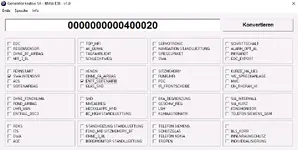
- ZCS key interpretation utility for GM, SA, and VN strings in a structured screen layout
- Offline SA option calculation support for multiple BMW E-series platforms
- Series-specific SA generators for E38, E39, and E46 based on selectable equipment items
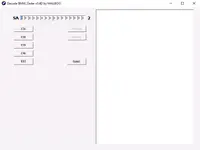
- Order decoder utilities for decoding and encoding SA values for supported chassis families
- Includes chassis index files that map supported series to the decoding database
- Lightweight portable tools suited for bench work and documentation tasks
Package contents
- bmw decoder03\
- bmw decoder04\
- Zeco\
- generator SA E38.exe
- generator SA E39.exe
- generator SA E46.exe
- Zeco\Data\
- Zeco\E31.IDX
- Zeco\E32.IDX
- Zeco\E34.IDX
- Zeco\E36.IDX
- Zeco\E38.IDX
- Zeco\E39.IDX
- Zeco\E46.IDX
- Zeco\E52.IDX
- Zeco\E53.IDX
- Zeco\R50.IDX
- Zeco\ZEKO.INI
- Zeco\ZEKO.INI_german
- Zeco\Zeko_4.2a.exe
- Zeco\ZEKOTEXT.ENG
- Zeco\ZEKOTEXT.GER
Compatibility notes
ZCS and VO data handling depends on the vehicle platform and production era. Some BMW platforms use ZCS with GM, SA, and VN strings, while later platforms use VO or FA workflows and different tooling.
Output correctness depends on selecting the correct series and working with valid source data. Availability varies by vehicle and module software level.
This package is for offline interpretation and preparation. Applying coding changes to a vehicle should be done only in authorized service contexts and with correct procedures, stable power support, and verified backups.
Basic usage
- Extract the folder to a local path with write permissions
- Run the decoder or generator that matches your chassis family
- Enter or paste the GM, SA, and VN values you want to interpret
- Use the chassis selectors and option lists to review the decoded result
- Save your notes and keep original values documented before any vehicle coding work
Operating systems
- Windows desktop environment
- Portable executable tools with no separate 64-bit builds included in this package
- Compatibility may vary on newer Windows versions due to legacy UI components
Minimum system requirements
- CPU: 1.0 GHz or higher
- RAM: 1 GB minimum, 2 GB recommended
- Storage: 50 MB free space
- Network: Not required
- Permissions: Standard user is usually enough, admin rights may be needed depending on system policy
Disclaimer
Source of Files. All software and resources in this post are collected from public and open sources on the internet. We do not claim authorship or ownership.
File Hosting. This forum does not host files. All links point to third party public cloud storage. We are not responsible for external content.
User Responsibility. Software is provided for educational and evaluation purposes only. You use it at your own risk. Authors of the post and forum administration are not liable for any damage.


