
This small utility is designed for BMW Ethernet based diagnostic and coding setups where you need to forward ZGW and NBT or MGU SSH IPs quickly. When the tool runs it closes any other TCP or UDP connections on ports 6811, 6801 and 22 and then sets up a clean forwarding tunnel for your current session.
Highlights
Package contents
This resource describes the use of a single Windows utility that you can place in any tools folder on your diagnostic laptop.
Compatibility notes
The utility is intended for workshop laptops that connect to BMW vehicles over Ethernet through ENET or ICOM. It assumes that the gateway and head unit communication uses the standard BMW ports 6811 and 6801 plus SSH on port 22. If your environment uses different ports or a custom firewall you should adjust your network rules accordingly before using the tool. Only one active forwarding session should be used at a time to avoid confusion.
Basic usage
Operating systems
Suitable for common workshop systems that run Windows 7, Windows 8.1, Windows 10 or Windows 11 in 64 bit or 32 bit editions. The tool requires a working Ethernet adapter and permission to manage TCP and UDP connections on the system.
Minimum system requirements
Disclaimer
Source of Files. All software and resources in this post are collected from public and open sources on the internet. We do not claim authorship or ownership.
File Hosting. This forum does not host files. All links point to third party public cloud storage. We are not responsible for external content.
User Responsibility. Software is provided for educational and evaluation purposes only. You use it at your own risk. Authors of the post and forum administration are not liable for any damage.
Highlights
- Automates port forwarding for ZGW and NBT or MGU head units for SSH based access.
- Forces all existing connections on ports 6811, 6801 and 22 to close before forwarding to avoid conflicts.
- Simple interface with four buttons so even occasional users can run it safely.
- Useful in multi tool environments where several diagnostic applications may try to use the same ports.
- Helps keep one stable forwarding route active during coding or advanced service tasks.
Package contents
This resource describes the use of a single Windows utility that you can place in any tools folder on your diagnostic laptop.
- ZGW NBT MGU SSH Forwarder executable
- Optional short readme explaining your own workshop specific IP layout
Compatibility notes
The utility is intended for workshop laptops that connect to BMW vehicles over Ethernet through ENET or ICOM. It assumes that the gateway and head unit communication uses the standard BMW ports 6811 and 6801 plus SSH on port 22. If your environment uses different ports or a custom firewall you should adjust your network rules accordingly before using the tool. Only one active forwarding session should be used at a time to avoid confusion.
Basic usage
- Connect your laptop to the vehicle network with ENET or ICOM and make sure you can reach the gateway and NBT or MGU modules.
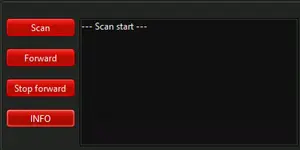
- Start the forwarder utility on your Windows system and wait for the main window with the Scan, Forward, Stop forward and INFO buttons.
- Press Scan so the tool checks available interfaces and prepares the forwarding rules for ZGW and the selected head unit.
- Press Forward. The program will close all other TCP and UDP connections that currently use ports 6811, 6801 or 22 and then create its own forwarding tunnel for these ports.
- Run your diagnostic or coding software while the forwarder stays open. When you finish press Stop forward to remove the forwarding rules and free the ports again.
Operating systems
Suitable for common workshop systems that run Windows 7, Windows 8.1, Windows 10 or Windows 11 in 64 bit or 32 bit editions. The tool requires a working Ethernet adapter and permission to manage TCP and UDP connections on the system.
Minimum system requirements
- CPU: 1 GHz or faster x86 compatible processor
- RAM: 2 GB or more recommended
- Storage: 20 MB free disk space for the utility and logs
- Network: Ethernet adapter configured for ENET or ICOM connection
- Rights: Local administrator rights to close connections and bind to ports 6811, 6801 and 22
Disclaimer
Source of Files. All software and resources in this post are collected from public and open sources on the internet. We do not claim authorship or ownership.
File Hosting. This forum does not host files. All links point to third party public cloud storage. We are not responsible for external content.
User Responsibility. Software is provided for educational and evaluation purposes only. You use it at your own risk. Authors of the post and forum administration are not liable for any damage.


