
CarProKey is a Windows desktop utility used in workshop environments to support selected Mercedes, Smart, and Nissan Infiniti service workflows. The interface focuses on guided functions such as authorized key teach-in operations, retrofit option enablement, and control unit assignment, based on supported vehicle families and module identifiers.

This build is typically used as a helper alongside OEM diagnostic workflows, where technicians may need a quick way to reference supported functions, prepare service inputs, or validate configuration variants before performing work with official tools and procedures.
Highlights
Package contents
Compatibility notes
Compatibility depends on model family, module generation, and the exact data and algorithms included in this build. Availability varies by vehicle and firmware.
Based on the functions visible in the interface, commonly referenced areas include:
Always confirm support by vehicle VIN, control unit part number, and the official service information for your market.
Basic usage
Operating systems
CarProKey 1.02 is a Windows program and is commonly installed as a 32-bit desktop application under Program Files (x86).
Minimum system requirements
Disclaimer
This build is typically used as a helper alongside OEM diagnostic workflows, where technicians may need a quick way to reference supported functions, prepare service inputs, or validate configuration variants before performing work with official tools and procedures.
Highlights
- Authorized key teach-in support for immobilizer related service procedures on supported Mercedes and Smart vehicles
- Factory option enablement workflows such as Softouch mode, steering wheel gearshift, and Tempomat where supported hardware is present
- Control unit assignment helper for selected configuration tasks after module replacement
- Variant and equipment change support for vehicle option configuration, including Brabus related profiles where applicable
- Module oriented sections for airbag, air conditioning, and instrument cluster workflows
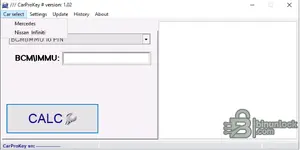
- Brand selection shortcuts for Mercedes, Smart, and Nissan Infiniti families shown in the application menu
Package contents
- CarProKey_setup.exe
Compatibility notes
Compatibility depends on model family, module generation, and the exact data and algorithms included in this build. Availability varies by vehicle and firmware.
Based on the functions visible in the interface, commonly referenced areas include:
- Mercedes-Benz C-Class W204 related workflows
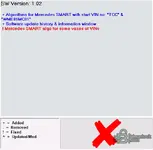
- Smart vehicle coverage references VIN prefixes such as TCC and WME01MC01 in the 1.02 change log
- Nissan Infiniti utilities oriented around BCM, IMMU, ICU, and SEC module categories shown in the menu
Always confirm support by vehicle VIN, control unit part number, and the official service information for your market.
Basic usage
- Install the application on a Windows PC using administrator rights.
- Open the tool and select the brand and vehicle family that matches your job card.
- Choose the required service function, then follow the official OEM procedure for required inputs and prerequisites.
- Record any generated service references or confirmations in the job documentation.
- Complete the operation only with valid authorization, verified ownership, and approved workshop processes.
Operating systems
CarProKey 1.02 is a Windows program and is commonly installed as a 32-bit desktop application under Program Files (x86).
Minimum system requirements
- CPU: 1 GHz or faster x86 or x64 processor
- RAM: 2 GB minimum, 4 GB recommended
- Storage: 200 MB free for program files, plus space for logs and reports
- Network: not required for basic use, optional for documentation access
- Admin rights: required for installation
Disclaimer
- No file hosting: This page does not host or store software, firmware, keys, or archives.
- Editorial reference only: Content is provided for identification and educational purposes.
- No endorsement: Product names and trademarks belong to their respective owners.
- Licensing and authorization: Use only with valid vendor authorization and proof of ownership. We do not provide methods to bураss security or licensing controls.
- Safety: Incorrect configuration can cause faults or unsafe operation. Follow official service information and proceed at your own risk.


