
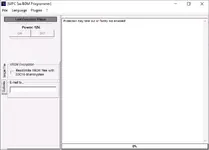
This package combines the EDC16 OBD flasher with the MPC 5xx BDM Programmer front end to service Bosch EDC16 and related ECUs on the bench or through the vehicle diagnostic connector. The flasher application is aimed at controlled reading and writing of ECU firmware, while the BDM software and manual focus on safe bench connections to MPC5xx based controllers such as Bosch EDC16, EDC16+, ME9 and several Siemens and Marelli units used in modern diesel and petrol engines.

The included EDC 16 ECU Flasher Application Lists document shows coverage for a long list of vehicles from Alfa Romeo, Audi, BMW, Citroën, Fiat, Ford, Iveco, Jeep, Lancia, MAN, Mercedes-Benz, Opel, Peugeot, Seat, Škoda, Suzuki, Volkswagen, New Holland and others, with notes where reading and writing over OBD are supported.
MPCProg 5xx style BDM operation is described in detail in the BDM manual. It explains how to identify the BDM pad area on the PCB, solder 10-pin headers, align the MPC5xx adapter and apply stabilized 12 V power for bench work on Bosch EDC16/EDC16+/ME9, Delphi Ford/Jaguar/SsangYong, Marelli MJet/MJet+, Siemens SID803, MS45, MSV70, MSS65, SIM266 and PPD1.1 VAG ECUs.
As a combined toolkit it is useful for workshops that need to back up original ECU contents, restore bricked controllers, update software for technical campaigns and perform controlled calibration work on a wide range of EDC16 based applications. EDC16 OBD BDM utilities are commonly described as professional tools for service, analysis, backup and firmware management of Bosch EDC16 units, with support for both OBD-II communication and bench BDM access.

Highlights
Package contents
Compatibility notes
The EDC16 flasher component targets Bosch EDC16 diesel ECUs as fitted to many European vehicles, including Alfa Romeo JTD and Multijet engines, Audi and Volkswagen TDI, Peugeot and Citroën HDI, Fiat and Opel Multijet, Mercedes CDI, Ford TDCi, Iveco Daily, MAN TG-A trucks, New Holland agricultural machines and Suzuki DDiS models. Supported engines and control units are explicitly listed in the application PDF, with separate notes for read and write capability and in some cases write-only operation over OBD.
The MPC 5xx BDM Programmer and accompanying manual describe bench connections for a broad set of MPC5xx based controllers, including Bosch EDC16/EDC16+/ME9, Delphi Ford and Jaguar diesels, Marelli MJet and MJet+ for Fiat/Opel/Suzuki, Siemens 5WS SID803, Siemens MS45/MSV70/MSS65 for BMW, Siemens SIM266 for Mercedes and Siemens PPD1.1 VAG ECUs. Actual support depends on the interface hardware you pair with the software and on the adapter set used to contact the pads or test points.
Availability of full read and write functionality can vary by ECU firmware version, immobilizer configuration and OBD protocol. For some EDC16 units only OBD writing is documented while others support complete R/W access. When in doubt the safer workflow is to perform a full BDM backup on the bench before attempting any write via OBD or BDM.
Basic usage
Operating systems
Minimum system requirements
Disclaimer
Source of Files. All software and resources in this post are collected from public and open sources on the internet. We do not claim authorship or ownership.
File Hosting. This forum does not host files. All links point to third party public cloud storage. We are not responsible for external content.
User Responsibility. Software is provided for educational and evaluation purposes only. You use it at your own risk. Authors of the post and forum administration are not liable for any damage.
The included EDC 16 ECU Flasher Application Lists document shows coverage for a long list of vehicles from Alfa Romeo, Audi, BMW, Citroën, Fiat, Ford, Iveco, Jeep, Lancia, MAN, Mercedes-Benz, Opel, Peugeot, Seat, Škoda, Suzuki, Volkswagen, New Holland and others, with notes where reading and writing over OBD are supported.
MPCProg 5xx style BDM operation is described in detail in the BDM manual. It explains how to identify the BDM pad area on the PCB, solder 10-pin headers, align the MPC5xx adapter and apply stabilized 12 V power for bench work on Bosch EDC16/EDC16+/ME9, Delphi Ford/Jaguar/SsangYong, Marelli MJet/MJet+, Siemens SID803, MS45, MSV70, MSS65, SIM266 and PPD1.1 VAG ECUs.
As a combined toolkit it is useful for workshops that need to back up original ECU contents, restore bricked controllers, update software for technical campaigns and perform controlled calibration work on a wide range of EDC16 based applications. EDC16 OBD BDM utilities are commonly described as professional tools for service, analysis, backup and firmware management of Bosch EDC16 units, with support for both OBD-II communication and bench BDM access.
Highlights
- Dual-mode ECU handling: OBD flasher for in-vehicle programming of supported Bosch EDC16 diesel controllers and bench BDM access through the MPC 5xx BDM Programmer interface.
- Extensive vehicle coverage documented in the EDC 16 ECU Flasher Application lists, including popular passenger cars, light commercial vehicles, heavy duty trucks and agricultural machinery from European manufacturers.
- Dedicated BDM procedures for Bosch EDC16/EDC16+/ME9 plus Siemens and Marelli ECUs, with PCB photos, pad locations, pin strip orientation and power supply notes for each family to reduce connection mistakes.
- Support for operations typically required in ECU service such as full flash backup, restore after failed OBD programming, transferring software between matching ECU part numbers and updating control software revisions.
- Compact Windows executables and driver set (MapObdII driver stack and ObdII library) that can be installed on a workshop laptop together with USB BDM interfaces and OBD adapters.
- PDF documentation for both OBD application coverage and BDM hardware connection so technicians can verify compatibility and wiring before starting any read or write session.
Package contents
- EDC16\EDC 16 ECU Flasher Application lists.pdf – PDF list of supported vehicles and ECU variants for the EDC 16 OBD flasher, grouped by manufacturer, engine size and power output with read or write capability noted.
- EDC16\EDC 16 ECU Flasher.doc – editable document version of the same application list for quick lookup or printing in the workshop.
- EDC16\EDC16 OBD-BDM XP 1.1.exe – main EDC16 OBD flasher executable providing read and write functions over the diagnostic connector on compatible Bosch EDC16 ECUs.
- EDC16\EDC16.exe – launcher or alternate flasher binary used together with the application lists for specific EDC16 variants.
- EDC16\Instructions.txt – brief text instructions describing how to install the drivers and start the flasher and BDM tools.
- EDC16\Manual-BDM.pdf – MPC 5xx BDM Programmer user manual with photos and step-by-step connection examples for Bosch, Siemens, Delphi and Marelli ECU families including power supply diagrams.
- EDC16\ObdII.dll – core OBD communication library used by the flasher.
- EDC16\System + drivers\CMD1.crt – certificate file used by the legacy driver stack.
- EDC16\System + drivers\MapObdII.inf – installation information file for the MapObdII device driver.
- EDC16\System + drivers\MapObdII.PNF – precompiled setup data for the MapObdII driver.
- EDC16\System + drivers\MapObdII.sys – kernel-mode driver providing USB or virtual COM access for the OBD interface.
- EDC16\System + drivers\ObdII.dll – additional OBD helper library referenced by the main applications.
Compatibility notes
The EDC16 flasher component targets Bosch EDC16 diesel ECUs as fitted to many European vehicles, including Alfa Romeo JTD and Multijet engines, Audi and Volkswagen TDI, Peugeot and Citroën HDI, Fiat and Opel Multijet, Mercedes CDI, Ford TDCi, Iveco Daily, MAN TG-A trucks, New Holland agricultural machines and Suzuki DDiS models. Supported engines and control units are explicitly listed in the application PDF, with separate notes for read and write capability and in some cases write-only operation over OBD.
The MPC 5xx BDM Programmer and accompanying manual describe bench connections for a broad set of MPC5xx based controllers, including Bosch EDC16/EDC16+/ME9, Delphi Ford and Jaguar diesels, Marelli MJet and MJet+ for Fiat/Opel/Suzuki, Siemens 5WS SID803, Siemens MS45/MSV70/MSS65 for BMW, Siemens SIM266 for Mercedes and Siemens PPD1.1 VAG ECUs. Actual support depends on the interface hardware you pair with the software and on the adapter set used to contact the pads or test points.
Availability of full read and write functionality can vary by ECU firmware version, immobilizer configuration and OBD protocol. For some EDC16 units only OBD writing is documented while others support complete R/W access. When in doubt the safer workflow is to perform a full BDM backup on the bench before attempting any write via OBD or BDM.
Basic usage
- Install the MapObdII driver stack and supporting DLLs on a Windows laptop, then connect your OBD or BDM interface according to the vendor documentation and confirm that it appears correctly in Device Manager.
- Use the EDC 16 ECU Flasher Application Lists to confirm that the target vehicle and engine code are covered and to check whether OBD read, write or both are supported for that ECU type.
- For in-vehicle work connect through the diagnostic socket with a stable power supply on the vehicle, start the EDC16 flasher executable, select the correct ECU family and follow the on-screen workflow to create a full backup before writing any updated file.
- For bench operations open the ECU carefully, install the BDM pin headers as described in the BDM manual, mount the appropriate adapter and supply stabilized 12 V power to the correct pins before using the MPC 5xx BDM Programmer to read or write the ECU.
- After programming verify checksum handling as required by your interface, reinstall or reconnect the ECU, clear any diagnostic trouble codes and confirm that the engine starts and all related systems operate correctly.
Operating systems
- Designed for legacy Windows platforms typically used in ECU programming environments. The executable names and driver stack indicate primary support for Windows XP, with many users reporting operation under 32-bit Windows 7 when correct drivers are installed.
- 32-bit editions are recommended because most early BDM and OBD tools and their USB drivers were written for 32-bit Windows and may not install cleanly on 64-bit systems without compatibility layers or virtual machines.
- Operation on newer Windows versions may be possible through virtualized XP or dedicated 32-bit installations but is not guaranteed. Always test the interface and driver stack on non-critical hardware before live ECU work.
Minimum system requirements
- CPU: 1 GHz or faster x86 processor suitable for running Windows XP or Windows 7 32-bit together with ECU programming tools.
- Memory: 1 GB RAM minimum, 2 GB or more recommended if running diagnostic suites, documentation and flasher or BDM software at the same time.
- Storage: At least 500 MB of free disk space for the software package, USB drivers, vehicle files and multiple ECU backups.
- Display: Screen resolution from 1024x768 or higher so that the MPC 5xx BDM Programmer and EDC16 flasher windows fit without scaling.
- Connectivity: Free USB port or supported interface port for the OBD and BDM hardware, plus optional internet access to download updates or reference documentation.
- Permissions: Local administrator rights during driver installation and when configuring USB interfaces and virtual COM ports.
Disclaimer
Source of Files. All software and resources in this post are collected from public and open sources on the internet. We do not claim authorship or ownership.
File Hosting. This forum does not host files. All links point to third party public cloud storage. We are not responsible for external content.
User Responsibility. Software is provided for educational and evaluation purposes only. You use it at your own risk. Authors of the post and forum administration are not liable for any damage.


