
Honda Multi Editor for DTC Review and ECU File Handling
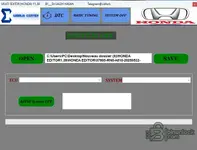
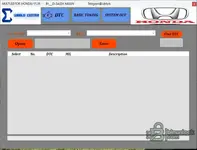
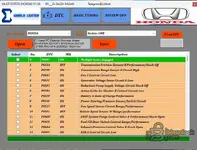
This fully configured build presents Honda-focused ECU file review, DTC inspection, and selected service editing functions in one desktop interface. The layout separates DTC work, basic tuning values, and system-related options into dedicated tabs, which helps workshops move between review and file preparation with a simple workflow.

Highlights
- Dedicated DTC page with code list, MIL status, and description columns
- Basic tuning page with visible speed limiter and RPM limiter fields for supported ECU groups
- Multiple ECU size groups shown in the interface, including Keihin 1MB, 2MB, 2.5MB, and 3MB
- Separate system options page for supported configuration tasks
- Open and save workflow for handling working files from the main window
Package contents
- HONDA EDITOR-V1.39
- HONDA EDITOR-V1.39_Loader
- liсеnsе.dat
Compatibility notes
- Intended for Honda-related ECU file workflows shown in the interface
- Visible ECU groups include Keihin 1MB, 2MB, 2.5MB, and 3MB
- Some functions depend on the selected ECU family and the loaded file structure
- Availability varies by vehicle and firmware
- Always keep the original file unchanged and verify support before writing any edited data
Basic usage
- Launch the program and open a supported working file
- Select the required brand or ECU group where applicable
- Review DTC data or adjust the available values for the active module
- Save the result as a separate output file
- Validate the result on non-production equipment before vehicle use
Operating systems
- Windows desktop environment
- Local installation is recommended for direct file access and save operations
- Run with administrator rights if installation or folder permissions require it
- Compatibility with older Windows releases, virtual machines, and emulation layers should be verified before deployment
Minimum system requirements
- CPU: Dual-core 1.8 GHz or better
- RAM: 4 GB minimum
- Storage: 200 MB free space for program files and working data
- Network: Optional internet access for update checks and official resource access
- Admin rights: Required for installation and for writing to protected folders
Disclaimer
- This page is an editorial reference only and does not host software, keys, or archives
- Product names, logos, and trademarks belong to their respective owners
- Users are responsible for licensing, local law compliance, and safe workshop practice
- Do not request protection bураss methods or activation abuse
- Vehicle and ECU operations can cause damage if handled incorrectly, so back up original data and work carefully


