
Knorr-Bremse Diagnostics Systems 2.6.7.3 (07.2025) is a PC based diagnostic suite for Knorr-Bremse electronic braking systems on trailers and semi-trailers. It is used to read and clear fault memories, perform full system tests and configure trailer EBS and ABS functions in workshop and fleet environments.

This 07.2025 full package combines the Diagnostics Systems application for trailer control units with the latest ECUtalk TEBS G2 / G2.x diagnostics v3.15.3.0 and an extended set of language packs, so you can work with TEBS G2.2, G2.1 and earlier Knorr-Bremse trailer modules using one consistent toolset.

Highlights
Languages included
Core database and interface languages in this 07.2025 build are English and German.
Additional TEBS G2 language packs supplied in the EXTRAS folder:
Package contents
Compatibility notes
This 07.2025 release of Knorr-Bremse Diagnostics Systems is designed for trailer applications that use Knorr-Bremse electronic brake control units. It covers TEBS G2 / G2.1 / G2.2 modules and compatible ABS systems. The exact functionality available depends on the ECU hardware generation, loaded firmware and any active options on the trailer. Some advanced features, such as integration with cloud based OCT configuration services, require valid online access and an up to date Knorr-Bremse account.
Basic usage
Operating systems
Vendor information for the 2.6.7.x line lists support across several Windows generations.
Typical environments for the 07.2025 full package:
Minimum system requirements
Disclaimer
Source of Files. All software and resources in this post are collected from public and open sources on the internet. We do not claim authorship or ownership.
File Hosting. This forum does not host files. All links point to third party public cloud storage. We are not responsible for external content.
User Responsibility. Software is provided for educational and evaluation purposes only. You use it at your own risk. Authors of the post and forum administration are not liable for any damage.
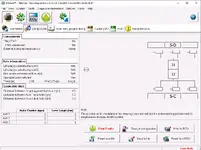
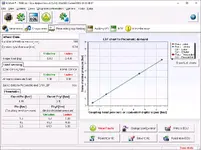
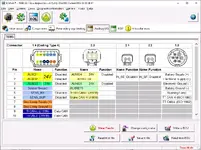
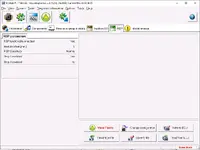
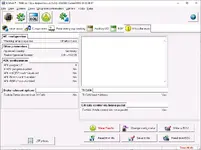
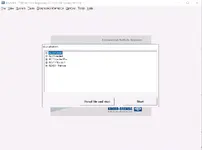
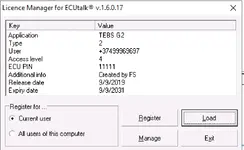
This 07.2025 full package combines the Diagnostics Systems application for trailer control units with the latest ECUtalk TEBS G2 / G2.x diagnostics v3.15.3.0 and an extended set of language packs, so you can work with TEBS G2.2, G2.1 and earlier Knorr-Bremse trailer modules using one consistent toolset.
Highlights
- Dedicated diagnosis for Knorr-Bremse trailer ECUs including ABS, EBS, MGX and related modular brake systems with guided fault finding and live data views.
- ECUtalk TEBS G2 / G2.x environment with configuration pages for vehicle data, axle geometry, load sensing parameters, auxiliary I/O, RSP and miscellaneous approval data.
- Full system test capability, including EOL checks, actuator tests, pressure vs demand charts and connector pinout visualisation for rapid wiring diagnostics.
- Support for saving and loading ECU configuration files, LSF plates and fault archives, so trailer setups can be cloned or restored after ECU replacement.
- Multi language environment with English and German base program plus TEBS G2 language packs.
- Can be used standalone for Knorr-Bremse braking systems or alongside multibrand Jaltest installations where Knorr-Bremse Diagnostics is offered as an OEM add-on.
Languages included
Core database and interface languages in this 07.2025 build are English and German.
Additional TEBS G2 language packs supplied in the EXTRAS folder:
- Bulgarian (BG)
- Czech (CS)
- Danish (DA)
- Greek (EL)
- Spanish (ES)
- Finnish (FI)
- French (FR)
- Croatian (HR)
- Hungarian (HU)
- Italian (IT)
- Japanese (JA)
- Macedonian (MK)
- Dutch (NL)
- Polish (PL)
- Romanian (RO)
- Russian (RU)
- Slovenian (SL)
- Serbian (SR)
- Swedish (SV)
- Turkish (TR)
- Chinese Simplified (ZH-CHS)
Package contents
- 1 SETUP\
- 2 LICENSE\
- EXTRAS\
- TEBS G2 LangPack BG v3.15.3.0_v0.exe
- TEBS G2 LangPack CS v3.15.3.0_v0.exe
- TEBS G2 LangPack DA v3.15.3.0_v0.exe
- TEBS G2 LangPack EL v3.15.3.0_v0.exe
- TEBS G2 LangPack ES v3.15.3.0_v0.exe
- TEBS G2 LangPack FI v3.15.3.0_v0.exe
- TEBS G2 LangPack FR v3.15.3.0_v0.exe
- TEBS G2 LangPack HR v3.15.3.0_v0.exe
- TEBS G2 LangPack HU v3.15.3.0_v0.exe
- TEBS G2 LangPack IT v3.15.3.0_v0.exe
- TEBS G2 LangPack JA v3.15.3.0_v0.exe
- TEBS G2 LangPack MK v3.15.3.0_v0.exe
- TEBS G2 LangPack NL v3.15.3.0_v0.exe
- TEBS G2 LangPack PL v3.15.3.0_v0.exe
- TEBS G2 LangPack RO v3.15.3.0_v0.exe
- TEBS G2 LangPack RU v3.15.3.0_v0.exe
- TEBS G2 LangPack SL v3.15.3.0_v0.exe
- TEBS G2 LangPack SR v3.15.3.0_v0.exe
- TEBS G2 LangPack SV v3.15.3.0_v0.exe
- TEBS G2 LangPack TR v3.15.3.0_v0.exe
- TEBS G2 LangPack ZH-CHS v3.15.3.0_v0.exe
- TEBS G2 LangPack BG v3.15.3.0_v0.exe
- KNORR-BREMSE DIAGNOSTICS SYSTEMS.chm (local help file)
Compatibility notes
This 07.2025 release of Knorr-Bremse Diagnostics Systems is designed for trailer applications that use Knorr-Bremse electronic brake control units. It covers TEBS G2 / G2.1 / G2.2 modules and compatible ABS systems. The exact functionality available depends on the ECU hardware generation, loaded firmware and any active options on the trailer. Some advanced features, such as integration with cloud based OCT configuration services, require valid online access and an up to date Knorr-Bremse account.
Basic usage
- Install the main Diagnostics Systems application from the 1 SETUP folder, following the on screen steps for your Windows version.
- Apply the license from the 2 LICENSE folder according to your local Knorr-Bremse documentation so the software can communicate with ECUs and save reports.
- Run the required TEBS G2 language pack executables from the EXTRAS folder for the languages you want to add to the ECUtalk environment.
- Connect the approved Knorr-Bremse interface (for example UDIF or NEO) to the trailer EBS ECU and to the diagnostic PC, then provide power to the trailer system.
- Start Diagnostics Systems, choose the TEBS G2 / G2.x session, select the ECU variant such as G2.2 Premium and begin reading configuration, viewing live data or running tests.
- Save configuration files and LSF plates before replacing any ECUs so setups can be restored after module replacement.
Operating systems
Vendor information for the 2.6.7.x line lists support across several Windows generations.
Typical environments for the 07.2025 full package:
- Windows 7 32 bit and 64 bit
- Windows 10 32 bit and 64 bit
- Windows 11 64 bit
Minimum system requirements
- CPU: 2 GHz or faster x86/x64 processor
- RAM: 4 GB minimum, 8 GB recommended when several diagnostic tools run in parallel
- Storage: at least 1 GB free disk space for program, database and logs (installed size around 730 MB)
- Display: 1280x768 or higher for comfortable use of ECUtalk windows and wiring diagrams
- Connectivity: USB port and approved Knorr-Bremse diagnostic interface for trailer ECUs
- Rights: Local administrator rights for installation and driver updates
Disclaimer
Source of Files. All software and resources in this post are collected from public and open sources on the internet. We do not claim authorship or ownership.
File Hosting. This forum does not host files. All links point to third party public cloud storage. We are not responsible for external content.
User Responsibility. Software is provided for educational and evaluation purposes only. You use it at your own risk. Authors of the post and forum administration are not liable for any damage.


