
Mercury Computer Diagnostic System G3 (CDS G3) is a PC-based service application designed for CAN SmartCraft diagnostics and delivery configuration on supported Mercury and MerCruiser systems. It is used to identify connected modules, review operating data, and run supported service functions for systems that match the correct engine control hardware, model year, and software content.

CDS G3 coverage expanded across releases and product lines, so exact availability depends on your installed version, the connected module family, and vessel harnessing. If the tool does not detect modules or does not list a matching eBOM, verify the SmartCraft network termination, adapter harnessing, and that the target system is within the supported scope.
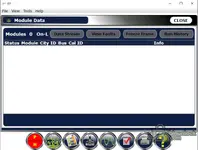
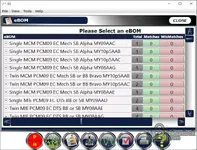
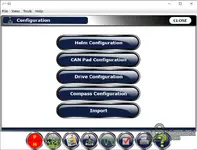
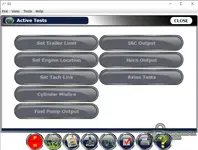
CDS G3 coverage expanded across releases and product lines, so exact availability depends on your installed version, the connected module family, and vessel harnessing. If the tool does not detect modules or does not list a matching eBOM, verify the SmartCraft network termination, adapter harnessing, and that the target system is within the supported scope.
Highlights
- Module identification view with key IDs and supported system pages
- Fault review workflow with freeze frame and run history reporting in supported releases
- Live data monitoring, with record and export features introduced in early v1.x updates
- eBOM selection workflow for PCM-based packages and configured variants
- Configuration pages for helm, CAN pad, drive, and compass on supported installations
- Active tests screen for supported outputs and actuator checks when available
Package contents
Code:
ISSetupPrerequisites
0x0409.ini
autorun.inf
Data1.cab
G3.ico
G3_V1.2_win32.msi
setup.exe
Setup.ini
WindowsInstaller-KB893803-x86.exe
Compatibility notes
- General scope: Mercury service documentation describes CDS G3 as a standalone diagnostic program for select engines and Mercury joystick piloting systems. Availability varies by product family, control module generation, and firmware.
- Early v1.x example coverage: Mercury Marine service bulletin for CDS G3 v1.3 lists Mercury Racing Sterndrive 1100 and 1350 as supported models in that release context.
- Expanded v1.5 coverage example: Service bulletin for CDS G3 v1.5 lists MerCruiser Axius Systems, MerCruiser ECT Engines, 30–60 HP FourStroke EFI (sеriаl 1C104424 and above), 150 EFI FourStroke, Mercury Racing Sterndrive 520, 565, 1100, 1350, plus Joystick Piloting for Outboard and Mercury Zeus Pod Systems.
- Broad 2018 update coverage example: Service bulletin for CDS G3 2018 lists Outboard Joystick Piloting for Outboard, Verado, multiple FourStroke EFI ranges, Two Stroke EFI and OptiMax ranges, MerCruiser Axius and Joystick Piloting systems, MerCruiser ECT and multiple Non-ECT and MPI engine groups, Mercury Diesel DTS and Zeus Pod Systems, and Mercury Racing DSI OptiMax plus Sterndrive 520, 540, 565, 1100, 1350, 1650.
Important: Use the in-app detected module list and eBOM menu as the practical confirmation step. If you are working with a specific engine family, match by model year, ECM type, and SmartCraft port style.
Basic usage
- Install CDS G3 with administrator rights and complete required prerequisites from the installer.
- Connect the SmartCraft diagnostic interface and the correct CAN adapter harness for the vessel layout.
- Power the system and confirm CAN communication indicators before starting diagnostics.
- Select the appropriate eBOM when prompted, then open Module Data or Live Data to verify detection.
- Use View Faults, Freeze Frame, Run History, and supported Active Tests only after confirming stable communication.
Operating systems
- CDS G3 v1.3 bulletin lists Windows XP Professional SP3, with Windows 7 Professional recommended.
- CDS G3 v1.5 bulletin lists Windows 7 Professional or Windows 8 Professional.
- CDS G3 2018 bulletin lists Windows 7 SP1, Windows 8.1, and Windows 10 supported, and notes it will not operate on Windows XP, Windows Vista, or Windows 8.0.
Minimum system requirements
- CPU: Pentium-class 1.2 GHz or higher
- RAM: 2 GB minimum, 4 GB or more recommended
- Storage: 120 GB available disk space recommended
- Network: Wi-Fi or Ethernet for registration and updates where applicable
- Ports: USB 2.0 ports for diagnostic interface, hub allowed depending on setup
- Admin rights: required for installation and updates
Disclaimer
- No file hosting: This post is an editorial reference and does not host binaries, firmware, or liсеnsе keys.
- No bураss guidance: We do not provide methods to bураss licensing, authentication, or protection.
- Licensing: Use only with valid vendor authorization and comply with the applicable EULA and local laws.
- Safety: Incorrect diagnostics or configuration can damage components or affect safe operation. Proceed at your own risk.
- Trademarks: All product names and trademarks belong to their respective owners.


