
This download is a multi-version Parker IQAN software toolkit for configuring, simulating and servicing electronic control systems on mobile machinery. It combines classic IQAN Active / Productive Studio 2.63 components with IQAN 5 and IQAN 6 tools so you can work with older forestry machines and newer MD4/MC4 platforms from one PC. The package covers application design, service and commissioning, CAN bus analysis, automation scripts and classroom simulation for machines using IQAN master and expansion modules.

Highlights
Package contents
Compatibility notes
IQAN software targets Parker IQAN master modules (MD3, MD4, MD5, MC2, MC3/MC4 families) and expansion modules connected over CAN bus. IQANdesign is used to build project files that define modules, buses, inputs, outputs, J1939 and generic CAN channels, HMI pages and safety-related logic. These project files must match the firmware major version on the target hardware (for example, IQANdesign 6 projects are intended for IQAN 6 systems, while older forest machines may still use Active Studio 2.63 based applications).
IQANsimulate and IQANanalyze do not communicate with modules directly; IQANsimulate works from project or clone files and emulates the master module on a PC, while IQANanalyze monitors CAN traffic via a supported CAN adapter or through a master communication bridge. In many cases IQANanalyze is free to use but requires an installed IQANdesign or IQANrun license on the same PC.
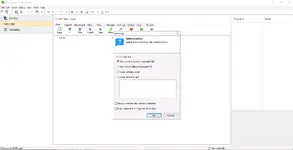
The training PDF in this package describes how service users typically install IQAN Active Studio, enter a valid license code supplied by Parker, generate a public key and obtain an authorised “safe password” from the OEM or service engineer for specific forestry machines. You should always follow the current OEM licensing procedure and local IT policies; do not attempt to use IQAN without a valid license agreement where required.
Because IQAN has evolved over many years, not all tools support all hardware revisions. Some older master modules only work with IQAN 2.xx/3.xx projects, while new MC4x/MD5 hardware is designed for IQAN 5 and 6. When preparing service laptops, match the tool version to the machine family using the IQAN catalog and hardware instruction books supplied by Parker.
Basic usage
Operating systems
IQAN software is designed for Windows PCs. According to Parker catalogs and datasheets, IQANdesign / IQANrun / IQANscript officially support the following desktop operating systems, with later releases moving toward newer Windows versions only.
Minimum system requirements
Official Parker literature lists modest minimum requirements for IQAN design/run/script tools, but real-world use with large projects benefits from stronger hardware.
Disclaimer
Source of Files. All software and resources in this post are collected from public and open sources on the internet. We do not claim authorship or ownership.
File Hosting. This forum does not host files. All links point to third party public cloud storage. We are not responsible for external content.
User Responsibility. Software is provided for educational and evaluation purposes only. You use it at your own risk. Authors of the post and forum administration are not liable for any damage.
Highlights
- Includes IQANdesign, IQANrun, IQANsimulate, IQANscript and IQANanalyze across several generations, covering everything from initial application engineering to production test and after-sales diagnostics.
- Supports typical mobile equipment segments such as forestry harvesters, cranes, wheel loaders, material handlers and other hydraulically controlled machines using Parker IQAN master displays and controllers (MD3/MD4/MD5/MC2/MC4 families).
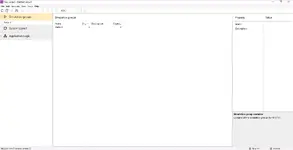
- IQANdesign provides a graphical environment to build complete machine projects with master/expansion modules, J1939 and generic CAN buses, safety functions and HMI pages, even for users without classical programming background.
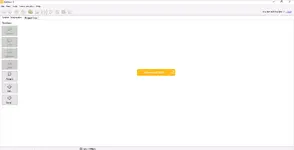
- IQANrun is the main field-service and commissioning tool, offering live measurement, parameter adjustment, log readout, clone handling and firmware updates for IQAN systems, plus script execution for automated test and setup.
- IQANsimulate lets you run full system simulations on a PC using project or clone files, ideal for offline troubleshooting, training and validating changes before touching a real machine; IQANanalyze adds a dedicated CAN bus monitor and recorder.
- Package also includes an official training slide deck that walks through installing IQANrun/IQANsimulate, basic license handling and “safe password” concepts for forestry machines, which can be used as a reference when setting up service laptops.
Package contents
- Training and documentation
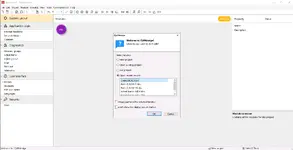
- PI\IQAN_Software_Installation_Final.pdf – “IQAN Software Installation – Module One” training module covering download, installation and basic configuration of IQAN Active Studio with IQANrun and IQANsimulate on Windows.
- PI\Parker-IQAN-V5\HY14-1825_us_parker.pdf – IQAN System Products catalog with overview of IQANdesign platform, master modules, I/O modules and software tools (Design, Run, Script, Simulate, Analyze).
- IQAN 2.63 – legacy Active / Productive Studio components
- PI\Parker-IQAN-V2.63\SetupIQANproductive2.63.exe – installer for IQAN Productive Studio bundle with IQANrun, IQANsimulate, IQANscript and IQANcustomize 2.63.
- PI\Parker-IQAN-V2.63\IQANrun.exe – IQANrun 2.x service and production tool for diagnostics, parameter adjustment and script execution on earlier IQAN systems.
- PI\Parker-IQAN-V2.63\IQANsimulate.exe – IQANsimulate 2.x system simulator used together with IQANrun for desktop support, clone replay and classroom training.
- PI\Parker-IQAN-V2.63\IQANscript.exe – IQANscript 2.x for building automated production and service procedures executed via IQANrun.
- PI\Parker-IQAN-V2.63\IQANcustomize.exe – customization utility for creating branded IQANrun front-ends, documentation pages and update packages.
- IQAN 5 – intermediate generation tools
- PI\Parker-IQAN-V5\SetupIQANanalyze5.00.exe – installer for IQANanalyze 5 general-purpose CAN bus analyzer for IQAN and generic CAN/J1939 traffic.
- PI\Parker-IQAN-V5\SetupIQANdesign5.05.exe – IQANdesign 5.05 application design environment with support for IQAN master modules, safety functions and extended diagnostics.
- PI\Parker-IQAN-V5\SetupIQANrun5.05.exe – IQANrun 5.05 service and commissioning tool for machines running IQAN 4–5 firmware.
- PI\Parker-IQAN-V5\SetupIQANscript5.05.exe – IQANscript 5.05 for authoring service and production automation scripts.
- PI\Parker-IQAN-V5\SetupIQANsimulate5.05.exe – IQANsimulate 5.05 system simulator for offline debugging of applications and clone files.
- PI\Parker-IQAN-V5\IQANanalyze.v5.00.9.1890.build.rar – preconfigured archive containing IQANanalyze 5.00.9 executable for direct deployment on service machines.
- PI\Parker-IQAN-V5\IQANdesign.v5.05.10.5539.build.rar – preconfigured archive containing IQANdesign 5.05.10 executable.
- PI\Parker-IQAN-V5\IQANrun.v5.05.7.5236.build.rar – preconfigured archive containing IQANrun 5.05.7 executable.
- PI\Parker-IQAN-V5\IQANscript.v5.05.6.4748.build.rar – preconfigured archive containing IQANscript 5.05.6 executable.
- PI\Parker-IQAN-V5\IQANsimulate.v5.05.6.4748.build.rar – preconfigured archive containing IQANsimulate 5.05.6 executable.
- IQAN 6.02 – current-generation IQAN tools
- PI\Parker-IQAN-V6.2\SetupIQANanalyze6.00.exe – IQANanalyze 6 CAN bus analyzer with logging and filtering for IQAN and generic CAN systems.
- PI\Parker-IQAN-V6.2\SetupIQANdesign6.02.exe – IQANdesign 6.02 high-level graphical design tool for building IQAN 6 applications, including support for MD4/MD5 displays and MC4x/XC4x controllers.
- PI\Parker-IQAN-V6.2\SetupIQANrun6.02.exe – IQANrun 6.02 for diagnostics, configuration, machine tuning, log management and application downloads on IQAN 4–6 systems.
- PI\Parker-IQAN-V6.2\SetupIQANscript6.02.exe – IQANscript 6.02 for building repeatable production and service procedures that can be executed safely via IQANrun.
- PI\Parker-IQAN-V6.2\SetupIQANsimulate6.02.exe – IQANsimulate 6.02 for full-project simulation and clone replay without IQAN hardware.
- PI\Parker-IQAN-V6.2\Preconfigured\IQANanalyze.exe – fully configured IQANanalyze 6 executable intended for local use after a valid IQAN license has been applied on the PC.
- PI\Parker-IQAN-V6.2\Preconfigured\IQANdesign.exe – fully configured IQANdesign 6 executable.
- PI\Parker-IQAN-V6.2\Preconfigured\IQANrun.exe – fully configured IQANrun 6 executable.
- PI\Parker-IQAN-V6.2\Preconfigured\IQANscript.exe – fully configured IQANscript 6 executable.
- PI\Parker-IQAN-V6.2\Preconfigured\IQANsimulate.exe – fully configured IQANsimulate 6 executable.
Compatibility notes
IQAN software targets Parker IQAN master modules (MD3, MD4, MD5, MC2, MC3/MC4 families) and expansion modules connected over CAN bus. IQANdesign is used to build project files that define modules, buses, inputs, outputs, J1939 and generic CAN channels, HMI pages and safety-related logic. These project files must match the firmware major version on the target hardware (for example, IQANdesign 6 projects are intended for IQAN 6 systems, while older forest machines may still use Active Studio 2.63 based applications).
IQANsimulate and IQANanalyze do not communicate with modules directly; IQANsimulate works from project or clone files and emulates the master module on a PC, while IQANanalyze monitors CAN traffic via a supported CAN adapter or through a master communication bridge. In many cases IQANanalyze is free to use but requires an installed IQANdesign or IQANrun license on the same PC.
The training PDF in this package describes how service users typically install IQAN Active Studio, enter a valid license code supplied by Parker, generate a public key and obtain an authorised “safe password” from the OEM or service engineer for specific forestry machines. You should always follow the current OEM licensing procedure and local IT policies; do not attempt to use IQAN without a valid license agreement where required.
Because IQAN has evolved over many years, not all tools support all hardware revisions. Some older master modules only work with IQAN 2.xx/3.xx projects, while new MC4x/MD5 hardware is designed for IQAN 5 and 6. When preparing service laptops, match the tool version to the machine family using the IQAN catalog and hardware instruction books supplied by Parker.
Basic usage
- Install the required IQAN studio version using the SetupIQAN*.exe installers in each version folder. For older forestry machines, follow the step-by-step installation guidance in the IQAN Software Installation training PDF to configure IQANrun and IQANsimulate correctly on a Windows PC.
- Use IQANdesign to create or open machine projects, define master and expansion modules, configure CAN buses (IQAN proprietary, SAE J1939 and generic CAN), and design MD4/MD5 user interfaces, safety channels and diagnostic pages. Check projects with IQANsimulate before deploying to real hardware.
- For commissioning and service, connect IQANrun to the machine via USB, RS-232, Ethernet or a supported USB–CAN adapter. Use its Measure and Adjust views to monitor live signals, tune parameters, retrieve logs and clone files, and apply firmware or application updates as recommended by the machine builder.
- Automate repetitive production or service tasks with IQANscript by building scripts that set parameters, run tests and store results. Validate each script in IQANsimulate or on a non-critical test system before using it on customer machines.
- When troubleshooting CAN communication or integrating third-party ECUs, run IQANanalyze to capture bus traffic, apply filters and save log files for later review. Combine CAN logs with clone files and simulated systems to reproduce complex issues in the workshop rather than on-site.
- Regularly consult Parker’s official release notes and firmware documentation on https://www.iqan.se to confirm supported hardware, known issues and migration paths between major IQAN versions.
Operating systems
IQAN software is designed for Windows PCs. According to Parker catalogs and datasheets, IQANdesign / IQANrun / IQANscript officially support the following desktop operating systems, with later releases moving toward newer Windows versions only.
- Windows 7, Windows 8 and Windows 10 – listed as the primary supported platforms for IQANdesign, IQANrun and IQANscript in current system product catalogs.
- Earlier IQAN Studio generations also support Windows 2000, XP and Vista; these OS versions are now obsolete but may still be used on legacy workshop PCs running IQAN 2.63.
- Newer IQANdesign 7.x releases require Windows 10 or later and 64-bit support for modern CAN adapters; IQAN 6.02 fits well on mixed fleets where some machines are still on older firmware.
- IQAN tools can often be run on Apple hardware using a virtualized or dual-boot Windows environment (for example, Parallels with Windows 10), as shown in OEM training material.
Minimum system requirements
Official Parker literature lists modest minimum requirements for IQAN design/run/script tools, but real-world use with large projects benefits from stronger hardware.
- CPU: PC-compatible Pentium II 233 MHz or better (official minimum); a modern dual-core 1.6 GHz or faster CPU is recommended for IQAN 5/6 projects.
- RAM: Minimum 256 MB (512 MB recommended in older catalogs); 4 GB or more is recommended on current Windows versions, especially when running IQANdesign and IQANsimulate together.
- Storage: At least 100 MB free for core installations; allocate 2–4 GB for multi-version setups, clone archives, CAN logs and backups.
- Ports: USB or RS-232, and/or Ethernet interface for connecting to MD3/MD4/MD5/MCx modules; support for a USB–CAN adapter (Ixxat, Kvaser, NI) is recommended for robust CAN logging.
- Display: XVGA resolution (1280×1024 recommended) or higher for comfortable viewing of MD4/MD5 screens, wiring views and large project trees.
- Software: Windows PDF reader for manuals and training slides, plus email client/web browser if you follow OEM workflows for license handling and password requests.
- Permissions: Local Windows user account with rights to install applications, handle USB drivers and access IQAN project / clone folders.
Disclaimer
Source of Files. All software and resources in this post are collected from public and open sources on the internet. We do not claim authorship or ownership.
File Hosting. This forum does not host files. All links point to third party public cloud storage. We are not responsible for external content.
User Responsibility. Software is provided for educational and evaluation purposes only. You use it at your own risk. Authors of the post and forum administration are not liable for any damage.


