
S-Line Flasher Ford Lite is a compact flashing utility designed for Ford ECU service tasks using a J2534 passthru interface. The Lite build focuses on core workflows for PCM (engine) and TCM (transmission) modules, including reprogramming, identification, DTC handling, and basic module operations. It also includes calibration related folders and an offline help file for reference.

Supported vehicles and ECU families shown in the Lite build
Highlights
Package contents
Compatibility notes
Basic usage
Operating systems
Minimum system requirements
Disclaimer
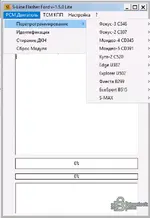
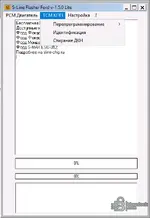
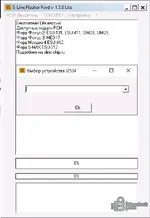
Supported vehicles and ECU families shown in the Lite build
- Ford Focus 2 (C307), PCM modules: ESU-131, ESU-411, SIM28, SIM29
- Ford Focus 3 (C346), PCM module: MED17
- Ford Mondeo 4 (CD345), PCM module: ESU-412
- Ford S-MAX, PCM module: ESU-312
- Ford Mondeo 5 (CD391), PCM reprogramming menu entry
- Ford Kuga 2 (C520), PCM reprogramming menu entry
- Ford Edge (U387), PCM reprogramming menu entry
- Ford Explorer (U502), PCM reprogramming menu entry
- Ford Fiesta (B299), PCM reprogramming menu entry
- Ford EcoSport (B515), PCM reprogramming menu entry
Highlights
- PCM functions: reprogramming, identification, DTC erase, module reset
- TCM functions: reprogramming, identification, DTC erase
- J2534 device selection prompt for passthru workflow
- Calibration oriented structure with dedicated folders for related data
- Includes local help file for quick guidance
Package contents
- S-Line Flasher Ford Lite-1.5.0.exe
- help.chm
- pld (folder)
- VID (folder)
- Калибровочные файлы (folder)
- bcb5mp60.bpl
- borlndmm.dll
- cc3260.dll
- cc3260mt.dll
- crypt.dll
- msvcr100d.dll
- rtl60.bpl
- stlpmt45.dll
- vcl60.bpl
- vclx60.bpl
Compatibility notes
- Function availability depends on the selected vehicle platform and control module family.
- A compatible J2534 passthru interface and correct drivers are required for communication.
- Use stable battery support during programming and follow OEM service precautions to reduce risk of ECU or TCM damage.
- Availability varies by vehicle configuration, calibration level, and module firmware.
Basic usage
- Connect a supported J2534 interface and confirm drivers are installed.
- Launch the tool and select the J2534 device when prompted.
- Choose PCM or TCM menu, then select the vehicle platform entry.
- Run identification first, then proceed with service actions like DTC erase or reprogramming as required.
- Save logs and keep backups of any original data where your workflow supports it.
Operating systems
- Windows 7, Windows 10, Windows 11, 32-bit or 64-bit depending on your J2534 driver support
Minimum system requirements
- CPU: Dual-core 2.0 GHz or better
- RAM: 4 GB minimum, 8 GB recommended
- Storage: 500 MB free space
- Network: Not required
- Admin rights: Recommended for driver installation and interface setup
Disclaimer
- No file hosting. This website does not host or store software, firmware, keys, or archives. Download buttons, if any, point to third-party sources controlled by their owners.
- Editorial index only. Descriptions, screenshots, tags, and file lists are provided for reference to help users identify legitimate materials.
- No endorsement or affiliation. Product names, logos, and trademarks belong to their respective owners.
- Licensing and EULAs. Users are responsible for complying with vendor liсеnsе terms and local laws. We do not provide keys, patches, or methods to bураss protection.
- Safety and compliance. ECU and TCM programming can damage modules or affect emissions and safety systems if done improperly. Use only for lawful service and repair by qualified personnel.


