
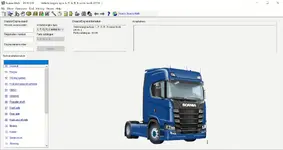
Scania Multi 25.50.0.0 06.2025 is the official Scania electronic parts catalogue and service information system for trucks, buses, industrial engines and marine engines. It brings together genuine spare parts data, workshop manuals, wiring diagrams and standard repair times in one interface that is used by Scania dealer workshops worldwide.

Highlights
Package contents
Compatibility notes
This pack corresponds to the Multi Authorised edition with a full DVD set that includes prerequisites, application and SQL database, language disc and separate illustration discs for parts and workshop drawings. Vehicle and system coverage stretches from late eighties three series trucks up to the latest L P G R S models and current bus, industrial and marine engine ranges. Exact content can vary by language, market and subscription, so some functions, wiring diagrams or very new model variants may not be available for every user. Availability also depends on correct SQL Server configuration and the Multi licence in your environment.
Basic usage
Operating systems
Scania Multi 25.50.0.0 06.2025 is typically installed on modern workshop laptops and desktops with the following systems
Minimum system requirements
Typical recommended configuration for this release
Disclaimer
Source of Files. All software and resources in this post are collected from public and open sources on the internet. We do not claim authorship or ownership.
File Hosting. This forum does not host files. All links point to third party public cloud storage. We are not responsible for external content.
User Responsibility. Software is provided for educational and evaluation purposes only. You use it at your own risk. Authors of the post and forum administration are not liable for any damage.

Highlights
- Complete EPC and workshop information for Scania vehicles with VIN and chassis number search for fast identification of correct parts and technical data.
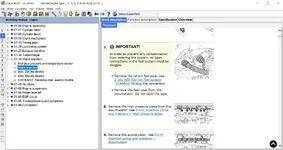
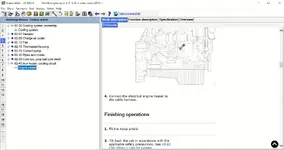
- Workshop manuals with step by step procedures, torque values, tightening sequences, fluids and maintenance intervals for engine, chassis, electrical and body systems.
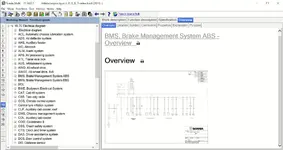
- Wiring and hydraulic diagrams, system overviews and signal descriptions for ABS, ESP, engine management, transmission control, brake management and many other systems.
- Standard times, maintenance packages and labour operations that support quoting, planning and correct invoicing of workshop jobs.
- Coverage for classic three and four series trucks, P G R T series, Next Generation L P G R S trucks, buses and a wide range of industrial and marine engines.
- Multilingual interface and document set that can be switched between many European and international languages during use.
Package contents
- 1-Prerequisite_5_2019.iso
- 2-Multi_DVD_2505_Authorized.iso
- 3-Multi_DVD_2505_Illustrations_Parts_20250711_093930.iso
- 4-Multi_DVD_2505_Illustrations_Ewok.iso
- 5-Multi_DVD_2505_D2_en-GB.iso
- Instruction.pdf
Compatibility notes
This pack corresponds to the Multi Authorised edition with a full DVD set that includes prerequisites, application and SQL database, language disc and separate illustration discs for parts and workshop drawings. Vehicle and system coverage stretches from late eighties three series trucks up to the latest L P G R S models and current bus, industrial and marine engine ranges. Exact content can vary by language, market and subscription, so some functions, wiring diagrams or very new model variants may not be available for every user. Availability also depends on correct SQL Server configuration and the Multi licence in your environment.
Basic usage
- Mount or burn 1-Prerequisite_5_2019.iso and run the setup in order to install SQL Server and the other required third party components for Scania Multi.
- Mount 2-Multi_DVD_2505_Authorized.iso, start the Multi installation program, accept the licence terms, choose the application folder and common data folder, then install the Multi application together with the main database.
- After DVD 1 finishes, mount 5-Multi_DVD_2505_D2_en-GB.iso and run the Multi update so that English document sets and other language specific data are added to the installation.
- Mount 3-Multi_DVD_2505_Illustrations_Parts_20250711_093930.iso and 4-Multi_DVD_2505_Illustrations_Ewok.iso one after another, then run the data update from each disc to import EPC exploded views, technical drawings and linked workshop illustrations.
- Start Scania Multi from the desktop icon, open the Settings window and confirm that the server version shows 25.50.0.0 and that data dates for chassis, engines, workshop manuals, standard times and maintenance are updated to mid 2025.
Operating systems
Scania Multi 25.50.0.0 06.2025 is typically installed on modern workshop laptops and desktops with the following systems
- Windows 10 64 bit
- Windows 11 64 bit
Minimum system requirements
Typical recommended configuration for this release
- CPU 2 GHz or faster x64 compatible processor
- RAM 4 GB minimum, 8 GB or more recommended for large document sets
- Storage 70 GB free disk space for installation, database and future updates
- Display 1366x768 resolution or higher
- Other DVD drive or ISO mounting software and local administrator rights during installation
Disclaimer
Source of Files. All software and resources in this post are collected from public and open sources on the internet. We do not claim authorship or ownership.
File Hosting. This forum does not host files. All links point to third party public cloud storage. We are not responsible for external content.
User Responsibility. Software is provided for educational and evaluation purposes only. You use it at your own risk. Authors of the post and forum administration are not liable for any damage.


