
TestO is a lightweight workshop utility for running predefined ECU jobs and recording live measurement values from supported BMW engine control units. It combines an ECU and job selector with a configurable data logger, making it useful for diagnostics verification, driveability checks, and repeatable service testing where you want consistent logs and charts.
The interface includes an ECU list, a job list, and a Data Logger module with export options designed for spreadsheet workflows. Logging can be configured with time format, delimiter, last-value fill for Excel compatibility, and optional marker entries to highlight events during a test run. A chart view is available for plotting multiple channels over time.

Supported ECUs and variants (as shown in the included lists)
What it does in practice
Highlights
Package contents
Compatibility notes
Basic usage
Operating systems
Minimum system requirements
Disclaimer
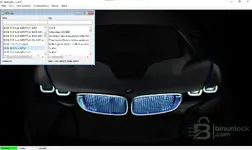
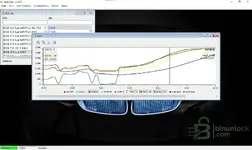
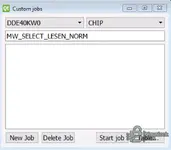
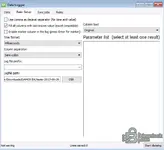
The interface includes an ECU list, a job list, and a Data Logger module with export options designed for spreadsheet workflows. Logging can be configured with time format, delimiter, last-value fill for Excel compatibility, and optional marker entries to highlight events during a test run. A chart view is available for plotting multiple channels over time.
Supported ECUs and variants (as shown in the included lists)
- MSS50 S50 (sеriаl)
- MSS52 DS0 (sеriаl)
- MSS52 DS1 (sеriаl)
- MSS54 (sеriаl)
- MS 41.0 DS1 (sеriаl)
- MS 41.0 DS2 (sеriаl)
- MS 41.0 DS3 (sеriаl)
- MS 41.2 (sеriаl)
- MS42 (sеriаl)
- MS43 (sеriаl)
- Motronic MA2.4 (sеriаl)
- DME 3.3.8 M60 EWS (sеriаl)
- DME 5.2 for M44 (sеriаl)
- DME 5.2 for M62 (sеriаl)
- DME 5.21 for M62 (sеriаl)
- ME 7.2 M62 (sеriаl)
- ME9.2 for N42 (sеriаl)
- DME 5.21 L5 for M73 left bank (sеriаl)
- DME 5.21 R5 for M73 right bank (sеriаl)
- DDE 7.3 US (sеriаl)
- DDE 4.0 for M57
- DDE 5.0 for M57TUE for E53
- DDE 5.0 for M57TUE for E46
- DDE 5.0 for M57TUE for E60
- DDE 5.0 for M57TUE EU4 for E60
- DDE40KW0 (shown as an ECU entry in the selection list)
What it does in practice
- Runs ECU jobs against the selected control unit and displays job output
- Builds repeatable job sets in the Custom jobs window
- Logs selected parameters to a CSV-style file for later review
- Plots multiple channels on a time axis for quick visual comparison
- Useful for diesel logging scenarios where rail pressure, airflow, injection and related channels are monitored, actual channels depend on the selected ECU and job set
Highlights
- ECU list and job list for fast selection
- Custom jobs editor to group and launch repeatable job sequences
- Data Logger with timebase selection and spreadsheet-friendly export options
- Marker support for event tagging during live logging
- Graph window for multi-channel plotting and trend review
Package contents
- testo-2017-06-26 (folder)
Compatibility notes
- Coverage depends on the ECU family and the job definitions included in the package.
- Some entries are labeled sеriаl, communication method and adapter requirements depend on your workshop setup.
- If you add additional ECU definitions or job files, the available ECU and job lists may expand, results depend on correct matching of ECU type and job set.
- Use on non-production systems first and keep backups of any configuration files you change.
Basic usage
- Launch TestO and select the ECU family from the ECU list.
- Select an available job or create a custom job set for repeatable tests.
- Open Data Logger, choose delimiter and time format, then select at least one parameter to record.
- Start the job and start logging, add markers if you need timestamps for events.
- Review the graph view and export the log for spreadsheet analysis.
Operating systems
- Windows 7, Windows 10, or Windows 11, driver support and communication stack availability can affect operation.
Minimum system requirements
- CPU: Dual-core 2.0 GHz or better
- RAM: 4 GB minimum, 8 GB recommended
- Storage: 500 MB free space
- Network: Not required
- Admin rights: Recommended for interface drivers and system configuration
Disclaimer
- No file hosting. This site does not host or store vendor software, firmware, keys, or archives.
- Editorial index only. Descriptions, filenames, and screenshots are provided for reference and identification.
- No endorsement or affiliation. Trademarks and product names belong to their respective owners.
- Licensing and EULAs. Users are responsible for complying with vendor terms and local laws. We do not provide bураss methods or liсеnsе circumvention.
- Safety and warranty risk. ECU operations can damage modules or affect vehicle operation if performed incorrectly. Proceed at your own risk and keep backups.


