
Thermo King CanDiag is a Windows diagnostic utility built for Thermo King CAN-based controller networks.
It is commonly used on bus and special-vehicle HVAC installations to identify modules, monitor live data, review message traffic, and apply supported configuration and firmware packages.

Highlights
Package contents
Compatibility notes
This tool is intended for Thermo King CAN controller networks and requires a supported USB CAN interface and the correct driver package.
Module availability depends on the installed HVAC platform, controller generation, options, and firmware.
Firmware packages must match the controller board type.
Firmware 04.xx.xx is intended only for GREEN boards 42-3795 (G03) and 42-3796 (G04).
Firmware 05.xx.xx is intended only for BLUE boards 42-6984 (G05) and 42-6985 (G06).
Availability varies by vehicle and firmware.
Basic usage
Operating systems
Minimum system requirements
Disclaimer
Source of Files. All software and resources in this post are collected from public and open sources on the internet. We do not claim authorship or ownership.
File Hosting. This forum does not host files. All links point to third party public cloud storage. We are not responsible for external content.
User Responsibility. Software is provided for educational and evaluation purposes only. You use it at your own risk. Authors of the post and forum administration are not liable for any damage.
It is commonly used on bus and special-vehicle HVAC installations to identify modules, monitor live data, review message traffic, and apply supported configuration and firmware packages.
Highlights
- Scan the CAN network and list detected modules with ID, type, version, and hours
- Connect and release sessions safely from the main toolbar
- Monitor received and transmitted CAN messages for troubleshooting and validation
- Read module information and configuration or programming status where supported
- Work with controller groups like CANAIRE, FrontAIRE, main modules, floor modules, FB modules, inverters, and CO2 modules depending on the system
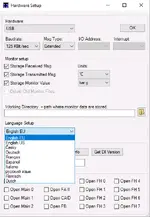
- Store monitor logs and select measurement units and language from Hardware Setup
Package contents
- Blue board.mhx
- CanDiag - Updating config files (07-2025...).pdf
- CanDiagSetup.zip
- CanDiagSetup_1.21.4.exe
- Green board.mhx
- ia3_main.zip
- PeakOemDrv.exe
Compatibility notes
This tool is intended for Thermo King CAN controller networks and requires a supported USB CAN interface and the correct driver package.
Module availability depends on the installed HVAC platform, controller generation, options, and firmware.
Firmware packages must match the controller board type.
Firmware 04.xx.xx is intended only for GREEN boards 42-3795 (G03) and 42-3796 (G04).
Firmware 05.xx.xx is intended only for BLUE boards 42-6984 (G05) and 42-6985 (G06).
Availability varies by vehicle and firmware.
Basic usage
- Install CanDiag and the included USB CAN driver package with administrator rights
- Open Hardware Setup and select USB hardware, message type, and a supported baud rate for your system
- Connect the USB CAN interface to the vehicle or unit service connection
- Click Connect, then use Search Can Network to detect modules
- Use Get Info and the monitoring tabs to review live data and message traffic
Operating systems
- Windows 11 (64-bit)
- Windows 10 (32-bit and 64-bit)
- Windows 8.1 (32-bit and 64-bit, legacy)
- Windows 7 SP1 (32-bit and 64-bit, legacy)
Minimum system requirements
- CPU: Dual-core 2.0 GHz or faster
- RAM: 4 GB minimum, 8 GB recommended
- Storage: 1 GB free space plus additional space for logs and configuration backups
- Network: Optional, only required for online resources
- Admin rights: Required for installation and drivers
- Ports: USB required for CAN interface connection
Disclaimer
Source of Files. All software and resources in this post are collected from public and open sources on the internet. We do not claim authorship or ownership.
File Hosting. This forum does not host files. All links point to third party public cloud storage. We are not responsible for external content.
User Responsibility. Software is provided for educational and evaluation purposes only. You use it at your own risk. Authors of the post and forum administration are not liable for any damage.


