
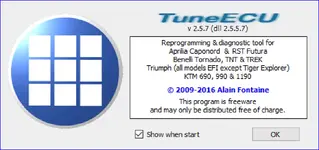
TuneECU 2.5.7 for Windows is a freeware reprogramming and diagnostic tool for engine control units used on many older EFI motorcycles from Triumph, Aprilia, KTM and Benelli. It works with Sagem, Keihin and Walbro ECUs to read and write maps, monitor live sensor data and run workshop-style tests for maintenance or troubleshooting.

The Windows edition is no longer developed but remains useful in a workshop environment for supported legacy models when used with a compatible FTDI-based USB OBD interface and, for some brands, dedicated adapter cables.

Highlights
Package contents
Compatibility notes
TuneECU for Windows is targeted at earlier EFI models only. Later motorcycles usually require the current Android version of TuneECU and are outside the scope of this package.
Typical supported model ranges for the Windows branch include:
Support coverage always depends on ECU type, firmware revision and the availability of a matching tune file. Function availability (for example some tests or adjustments) can differ between brands and even between individual bike models, so all features described in the manual may not be present on every ECU.
Changing ECU mapping can affect emissions compliance and manufacturer warranty and is typically intended for closed-course or off-road use only.
Basic usage
Operating systems
TuneECU 2.5.x for Windows is documented for the following desktop operating systems:
Minimum system requirements
Disclaimer
Source of Files. All software and resources in this post are collected from public and open sources on the internet. We do not claim authorship or ownership.
File Hosting. This forum does not host files. All links point to third party public cloud storage. We are not responsible for external content.
User Responsibility. Software is provided for educational and evaluation purposes only. You use it at your own risk. Authors of the post and forum administration are not liable for any damage.
The Windows edition is no longer developed but remains useful in a workshop environment for supported legacy models when used with a compatible FTDI-based USB OBD interface and, for some brands, dedicated adapter cables.
Highlights
- Map management for supported ECUs, including reading the installed tune, saving a backup and flashing compatible fuel and ignition maps over OBD or RS232 where available.
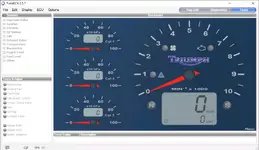
- Full diagnostics mode with live dashboard, individual sensor values, and a list of active and stored DTCs with text descriptions for easier fault finding.
- Test and Adjust panel to trigger components such as ignition coils, injectors, cooling fan, fuel pump, second throttle, EXBV, idle stepper control valve and TPS alignment on supported bikes.
- ECU maintenance functions such as reset adaptation, throttle reset, idle fuel trim adjustment and other brand-specific tasks, helping after hardware changes or map updates.
- Multi-language user interface (English, French, German, Italian, Spanish and Portuguese) with an instrument-style dashboard view familiar to Triumph owners.
- Designed for use with inexpensive FTDI-chip USB OBD KKL cables and brand-specific adapter looms for Aprilia, KTM and Benelli, making it accessible for small workshops and enthusiasts.
Package contents
- TuneECU.exe – Windows application build 2.5.7 for ECU reprogramming, diagnostics and testing on supported EFI motorcycles.
- Supporting documentation and model information files as included in the archive (for example TuneECU 2.5 description and basic usage notes in PDF or text format).
Compatibility notes
TuneECU for Windows is targeted at earlier EFI models only. Later motorcycles usually require the current Android version of TuneECU and are outside the scope of this package.
Typical supported model ranges for the Windows branch include:
- Aprilia – Caponord and RST Futura touring models with Sagem ECUs.
- Benelli – Tornado 900 with Sagem ECU and TNT / TREK 899–1130 models with Walbro ECU, primarily via Windows TuneECU.
- KTM – 690 single-cylinder EFI models (excluding some later Duke 4 variants), plus 990 LC8 and 1190 RC8 twins.
- Triumph – Most Sagem and early Keihin EFI twins and triples, including many Bonneville, Speedmaster, Scrambler, Thruxton and three-cylinder road models, but excluding Tiger Explorer, Trophy and some newer Street Triple and Daytona generations.
Support coverage always depends on ECU type, firmware revision and the availability of a matching tune file. Function availability (for example some tests or adjustments) can differ between brands and even between individual bike models, so all features described in the manual may not be present on every ECU.
Changing ECU mapping can affect emissions compliance and manufacturer warranty and is typically intended for closed-course or off-road use only.
Basic usage
- Install TuneECU.exe on a Windows PC together with the recommended FTDI D2XX USB drivers and Microsoft .NET Framework 2.0 on Windows XP where required. Run the program with administrator rights on newer Windows versions for reliable USB access.
- Connect a USB OBD2 KKL FTDI cable to the PC and to the bike’s diagnostic socket, using the correct adapter harness for Aprilia, KTM or Benelli ECUs when needed. Ensure the motorcycle battery is fully charged or connected to a stabilised power supply.
- In the Options menu select the appropriate interface and COM port, switch the ignition on and use the ECU → Connect command to establish communication. Verify connection by viewing live RPM and sensor values in the Diagnostics screen.
- Before writing any modification, read the current map from the ECU and save a backup file. When flashing a new compatible tune, keep the bike powered, do not disturb the USB connection and wait for the on-screen confirmation that programming has completed.
- After map changes or key component replacement, use the Tasks and Tests functions to reset adaptations where applicable, confirm sensor readings, clear DTCs and perform a short adaptation ride or idle procedure as recommended for the specific model.
Operating systems
TuneECU 2.5.x for Windows is documented for the following desktop operating systems:
- Windows XP (with .NET Framework 2.0 installed)
- Windows Vista
- Windows 7
- Windows 8 and 8.1
- Windows 10, 32-bit and 64-bit editions (excluding Windows RT or Windows Phone variants)
Minimum system requirements
- PC, laptop or netbook with Intel or compatible x86 processor
- Windows XP, Vista, 7, 8, 8.1 or 10
- At least 1 GB RAM and one free USB 2.0 port
- Display resolution 1024×576 or higher
- Microsoft .NET Framework 2.0 or newer on Windows XP
- USB OBD2 KKL cable with FTDI chipset plus correct bike-specific diagnostic adapters, or an RS232 serial interface for Walbro ECUs if required
Disclaimer
Source of Files. All software and resources in this post are collected from public and open sources on the internet. We do not claim authorship or ownership.
File Hosting. This forum does not host files. All links point to third party public cloud storage. We are not responsible for external content.
User Responsibility. Software is provided for educational and evaluation purposes only. You use it at your own risk. Authors of the post and forum administration are not liable for any damage.


