
TunerCalc is a compact, standalone calculator for the “daily math” you constantly do while editing ECU calibrations.
It doesn’t connect to a vehicle and doesn’t write to ECUs — it’s purely a calculation & conversion workstation that helps you avoid mistakes, speed up workflow, and keep values consistent across maps (boost, smoke, load, AFR/lambda, injector flow, etc.).

Read-only compliance note:
This software is a calculator only. No OBD/bench communication, no flashing, no patching, no file writing to an ECU. Use it for personal / educational planning and verification of numbers before you change anything in your editor.
Why it’s useful (real-life tuning workflow)
Modules & what each one does
AIR tab
1) Diesel Boost (Smoke / Turbo target helper)
Two calculator blocks that help translate fueling + AFR targets into boost needs:
2) Lambda Conversion (Fuel-aware AFR ↔ Lambda)
Select fuel type and convert:
3) Load Conversion
A simple helper to translate “requested load / pressure references” into practical boost/pressure values.
You input requested load and atmospheric pressure, and the tool outputs pressure results in commonly used forms.
Use case: When one map is absolute (includes atmosphere) and another is manifold/boost — this keeps you consistent.
4) MAF2MAP Conversion
Designed for scenarios where you want to relate MAF-oriented thinking to MAP/pressure-limiter logic:
5) MAF Housing Calculator
A quick helper for estimating scaling impact when changing MAF housing diameter/size (area-based scaling concept).
Use case: When hardware changes force you to rescale MAF-related values, this provides a fast “first estimate” to start from.
FUEL tab
1) Injector Duty Flow
A practical “injector capacity vs RPM vs duty cycle” calculator:
2) Fuel Pump Calculator
Helps estimate the required fuel delivery for a target setup (planning-oriented).
Use case: Quick sanity check before you blame a tune for pressure drop — confirm whether the pump/flow target even makes sense.
3) MPG Calculator
A utility for fuel-economy related conversions/estimates.
Use case: Converting between measurement standards or doing quick “what-if” comparisons.
POWER tab
Power % Calculator (Stage presets)
A clean way to estimate “before/after” power & torque using percentage deltas:
SPEED tab
Acceleration / ET estimator
A lightweight performance estimator:
MISC tab (Mega Converter Dashboard)
This screen is a “conversion wall” for common tuning units — fast and mistake-proof:
OPTIONS tab
Power Calculator Preset Settings
Save default Stage 1/2/3 percentage presets for BHP and torque so your Power tab becomes a one-click estimator.
ABOUT
Tool branding: Roarcuss Technologies
Author shown in the UI: Leonard Curtis
Version shown in the UI: 1.0.0.8 (copyright date displayed in the app)
OS / Run notes
Package contents
Disclaimer
Any calibration change can damage hardware or violate local regulations depending on use-case.
Use this calculator as a planning/verification tool and apply changes responsibly.
It doesn’t connect to a vehicle and doesn’t write to ECUs — it’s purely a calculation & conversion workstation that helps you avoid mistakes, speed up workflow, and keep values consistent across maps (boost, smoke, load, AFR/lambda, injector flow, etc.).
Read-only compliance note:
This software is a calculator only. No OBD/bench communication, no flashing, no patching, no file writing to an ECU. Use it for personal / educational planning and verification of numbers before you change anything in your editor.
Why it’s useful (real-life tuning workflow)
- Stop guessing boost/smoke targets — calculate required pressure for a chosen AFR and fuel quantity.
- Convert correctly between AFR and lambda for different fuels (petrol/diesel/LPG/ethanol/etc.).
- Keep axes consistent when maps use different pressure units (mbar / kPa / PSI, manifold vs absolute).
- Quick sanity checks for mg/stroke ↔ mm³/stroke, air mass per cylinder, flow conversions.
- Planning tools for injectors & fuel delivery estimates + simple performance estimations.
Modules & what each one does
AIR tab
1) Diesel Boost (Smoke / Turbo target helper)
Two calculator blocks that help translate fueling + AFR targets into boost needs:
- MAF Boost section:
Enter your fuel mass per stroke (mg/stroke) and required AFR, then compute the boost requirement used to support a clean smoke limit / air demand approach. - MBAR Boost section:
Similar logic but oriented around pressure units and engine parameters (engine cc, cylinders) so you can relate air demand to MAP/boost figures more directly.
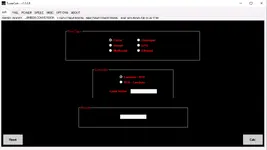
2) Lambda Conversion (Fuel-aware AFR ↔ Lambda)
Select fuel type and convert:
- Lambda → AFR
- AFR → Lambda
- Petrol
- Diesel
- Methanol
- Hydrogen
- LPG
- Ethanol
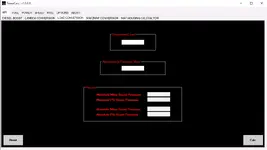
3) Load Conversion
A simple helper to translate “requested load / pressure references” into practical boost/pressure values.
You input requested load and atmospheric pressure, and the tool outputs pressure results in commonly used forms.
Use case: When one map is absolute (includes atmosphere) and another is manifold/boost — this keeps you consistent.
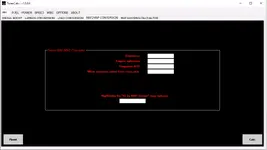
4) MAF2MAP Conversion
Designed for scenarios where you want to relate MAF-oriented thinking to MAP/pressure-limiter logic:
- Inputs include engine displacement (cc), cylinder count, required AFR, and a pressure value from a MAP axis.
- Outputs an air/fuel-related result (e.g., mg/stroke reference for a specific limiter/map column concept).
5) MAF Housing Calculator
A quick helper for estimating scaling impact when changing MAF housing diameter/size (area-based scaling concept).
Use case: When hardware changes force you to rescale MAF-related values, this provides a fast “first estimate” to start from.
FUEL tab
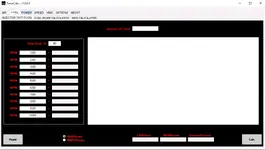
1) Injector Duty Flow
A practical “injector capacity vs RPM vs duty cycle” calculator:
- Set duty cycle (%)
- Evaluate injector flow across RPM points
- Convert outputs between common flow units (as presented by the tool: LBS/hour, mg/minute, grams/second)
2) Fuel Pump Calculator
Helps estimate the required fuel delivery for a target setup (planning-oriented).
Use case: Quick sanity check before you blame a tune for pressure drop — confirm whether the pump/flow target even makes sense.
3) MPG Calculator
A utility for fuel-economy related conversions/estimates.
Use case: Converting between measurement standards or doing quick “what-if” comparisons.
POWER tab
Power % Calculator (Stage presets)
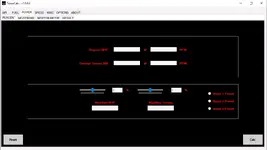
A clean way to estimate “before/after” power & torque using percentage deltas:
- Enter original BHP and original torque (Nm) + their RPM points
- Apply % increase via sliders
- Get resulting modified BHP and torque
- Use Stage 1 / Stage 2 / Stage 3 presets for quick standard jumps
SPEED tab
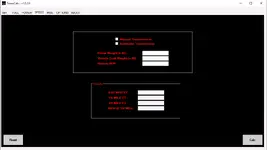
Acceleration / ET estimator
A lightweight performance estimator:
- Transmission type selection (manual/automatic)
- Inputs: weights + BHP
- Outputs: 0–62 mph ET, 1/8 mile ET, 1/4 mile ET, and MPH @ 1/4 mile
MISC tab (Mega Converter Dashboard)
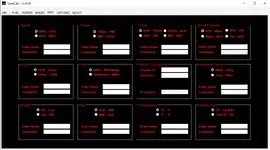
This screen is a “conversion wall” for common tuning units — fast and mistake-proof:
- Speed: MPH ↔ KPH
- Torque: Ft/Lbs ↔ Nm
- Power: BHP ↔ PS/CV ↔ kW
- Boost pressure: kPa ↔ mbar ↔ PSI (and common cross-conversions)
- Boost flow: CFM ↔ g/sec
- Fuel mass/volume: mm³/stroke ↔ mg/stroke
- MG/Air (cc per cylinder helper): uses engine cc + cylinders to convert/reference air mass style values
- Barometric pressure: mbar ↔ inHg
- Weight: kg ↔ lbs
- Size: inch ↔ mm
- Temperature: °C ↔ °F
- Volume flow: cc ↔ lbs/hr (as provided by the tool)
OPTIONS tab
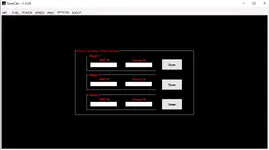
Power Calculator Preset Settings
Save default Stage 1/2/3 percentage presets for BHP and torque so your Power tab becomes a one-click estimator.
ABOUT
Tool branding: Roarcuss Technologies
Author shown in the UI: Leonard Curtis
Version shown in the UI: 1.0.0.8 (copyright date displayed in the app)
OS / Run notes
- Standalone Windows executable: TunerCalc.exe
- If it doesn’t start on your system, install/update Microsoft .NET Framework (common fix for older standalone utilities).
Package contents
- TunerCalc.exe
Disclaimer
Any calibration change can damage hardware or violate local regulations depending on use-case.
Use this calculator as a planning/verification tool and apply changes responsibly.


