
UltraCuttr is a lightweight, file-based RPM limiter editor.
It is designed to work offline on ECU dump/tuning files: you load a file, select the vehicle manufacturer, review the detected RPM limiter setpoint, enter a new setpoint, and save a modified copy.

What this tool is for
How it works (typical workflow)
Interface overview
Safety & flashing notes (read this)
Package contents
Read-only compliance note
This resource is provided for personal/archival use and informational purposes.
No activation-bypass guidance is included. Use at your own risk.
It is designed to work offline on ECU dump/tuning files: you load a file, select the vehicle manufacturer, review the detected RPM limiter setpoint, enter a new setpoint, and save a modified copy.
What this tool is for
- Read the current RPM cut setpoint from a supported ECU file (where supported).
- Write a new RPM cut / rev limiter setpoint into the same file structure.
- Create a clean “edit-and-save” workflow for quick limiter adjustments without digging through maps manually.
- Useful as a small helper utility alongside your main editor/flashing setup (WinOLS, etc.).
How it works (typical workflow)
- Load File → pick your ECU dump (ORI/MOD/ BIN-type file).
- Select Vehicle Manufacturer → choose the manufacturer in the dropdown.
- Review Current RPM Setpoint → the tool shows the current detected value (when supported).
- Enter New RPM Setpoint → type the new limiter target.
- Save File → export a modified file for flashing with your preferred tool.
Interface overview
- MAIN — file loading, manufacturer selection, current/new RPM setpoints, and a summary panel.
- ECU COVERAGE — built-in coverage list (use it to confirm your ECU is supported before editing).
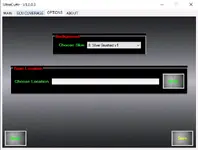
- OPTIONS — UI customization (skin/background) and save-location selection for exports.
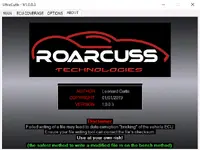
- ABOUT — author/build info plus an important safety warning about ECU writing.
Safety & flashing notes (read this)
- Always keep an original backup of your file before any changes.
- A failed or incorrect write can cause ECU corruption (“bricking”). Use stable power and safe procedures.
- Your flashing method/tool must be able to correct/check checksum after changes.
- The safest method for writing modified files is typically bench (depends on ECU/platform).
- For off-road/track use where applicable; you are responsible for legal compliance in your region.
Package contents
- UltraCuttr.exe
- ultracuttr.txt
Read-only compliance note
This resource is provided for personal/archival use and informational purposes.
No activation-bypass guidance is included. Use at your own risk.


