
Volvo VisFed is a small set of workshop utilities used to prepare, review, and organize Volvo ECU related files. It focuses on handling intermediate storage artifacts, XML data, and database based inputs used in service workflows.

This package is typically used for safe file verification tasks like checksum validation, Base64 conversion, and reading ECU information before further work is performed with approved OEM tooling.
Highlights
Package contents
Note: archive items with licensing related naming are shown as [redacted] and are not described.
Compatibility notes
Basic usage
Operating systems
Minimum system requirements
Disclaimer
This package is typically used for safe file verification tasks like checksum validation, Base64 conversion, and reading ECU information before further work is performed with approved OEM tooling.
Highlights
- Intermediate Storage file workflow with InterSto.MDB support
- Base64 encode and decode helpers for service data
- Checksum calculation and verification for supported artifacts
- ECU Information view to quickly confirm identifiers and metadata
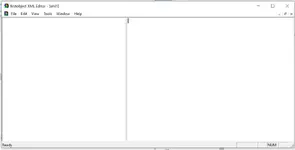
- XML editing workflow via an included XML editor executable
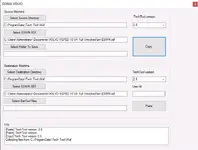
- Data transfer helper for TechTool Waf directories and SDF files
Package contents
Note: archive items with licensing related naming are shown as [redacted] and are not described.
- bn\ (folder)
- Fciom\ (folder)
- Volvo Visfed 0.3.2 + [redacted]\ (folder)
- DatToolGuiLog.txt
- VisFed v3_4.exe
Inside: Volvo Visfed 0.3.2
- Specific Generators\ (folder)
- Utilities\ (folder)
- apcidb.dll
- eldotnet.dll
- Gethwidtool_new.exe
- VISFED.ini
- VISFED_p.exe
- XMLEditor.exe
Compatibility notes
- Availability varies by vehicle and firmware, and by the service dataset you use
- Some functions depend on the presence of TechTool data folders like Waf and related SDF files
- If a module is not supported for your target ECU, do not force changes, use OEM guided procedures
- Use validated inputs and keep backups of original files before any edits
Basic usage
- Install or extract the utilities to a dedicated work folder with write permissions
- Open the relevant tool and select your source files such as XML, SDF, or intermediate storage inputs
- Review ECU information and verify checksum status before making any changes
- If you edit XML, save a new copy and keep the original file unchanged for rollback
- When moving TechTool data between machines, copy only approved datasets and verify integrity
Operating systems
- Microsoft Windows (x64) environment recommended
- Some builds may run on older Windows versions, verify with your vendor documentation
- Administrator rights may be required for access to protected folders and service data locations
Minimum system requirements
- CPU: 2-core 2.0 GHz or better
- RAM: 4 GB minimum, 8 GB recommended
- Storage: 1 GB free for the tools, more for datasets and backups
- Network: optional, only needed for official downloads and documentation access
- Admin rights: required for installation and access to system level service folders
Disclaimer
- No file hosting. This site does not host or store software, firmware, keys, or archives
- Editorial index only. Content is for reference to help identify legitimate vendor resources
- No endorsement. Trademarks and product names belong to their respective owners
- Licensing. Users must follow vendor EULAs and local laws, do not request bypass methods
- Safety. ECU and vehicle operations can cause damage or warranty issues if done improperly
- Security. Always verify hashes, scan downloads, and use official sources where possible


