Looking for Q7572026.0da /0pa files for ECU 7572026 (EK9285 group) in SP-Daten for BMW E65

Bobi80

Member
Thread Owner
Joined
31.01.2026
Messages
5
Reaction score
0
Location
Poland
Hello everyone,
I am searching for the Q7572026.0da file corresponding to the ECU with number 7572026 from the EK9285 group, to use in the SP-Daten package for BMW E65. I have checked SP-Daten versions V41.0 and V74.0 but could not find this file or the ECU. Does anyone know in which SP-Daten version this file is included or where it can be downloaded? Or maybe someone has experience with manually adding this file to SP-Daten?

I would appreciate any help or guidance. Please PM

Best regards!
 
Hello everyone,
I am searching for the Q7572026.0da file corresponding to the ECU with number 757202...

Hi there,

If you are seeing a file reference starting with "Q" like Q7572026.0da, it is very likely a development or prototype file. These files are generally not included in standard production SP-Daten releases used by dealers (like v41, v74, etc.). This is why you cannot find it in the standard packages.

To flash ECU HW 7572026 in an E65, you should be looking for the production software version.

Here is the recommended approach:

1. Identify the correct ECU Family: You mentioned "EK9285 group". For an E65 with that hardware number, you are likely dealing with a DME (perhaps ME9.2.2 for an N62 engine). In WinKFP, you need to select the correct ECU family (e.g., GDES65, ME9N62, etc., depending on the exact vehicle configuration).
2. Use WinKFP Comfort Mode: Don't try to manually find the .0da and .0pa files yet.
* Load your E65 SP-Daten into WinKFP.
* Go to Comfort Mode.
* Choose "Enter ZUSB" and input the current ZB number of the ECU (if you can read it with INPA/Tool32). WinKFP will automatically find the latest corresponding program and data files.
* Alternatively, choose "Choose ZUSB", select the correct ECU family, and look for the hardware number 7572026 in the list to see available software versions.

Regarding manually adding files:
Manually dropping .0da files into the SP-Daten folders without updating the corresponding .DAT index files (e.g., EK928X.DAT) will not work. WinKFP won't recognize the files. You would need to manually edit the history and family index files, which is tedious and error-prone.

If you absolutely need that specific "Q" development file for some specialized engineering task, you won't find it in standard channels. Someone would need to have access to old engineering archives to help you via PM.

Good luck.
 
Hi there,

If you are seeing a file reference starting with "Q" like Q7572026.0da, it is very likely a development or prototype file. These files are generally not included in standard production SP-Daten releases used by dealers (like v41, v74, etc.). This is why you cannot find it in the standard packages.

To flash ECU HW 7572026 in an E65, you should be looking for the production software version.

Here is the recommended approach:

1. Identify the correct ECU Family: You mentioned "EK9285 group". For an E65 with that hardware number, you are likely dealing with a DME (perhaps ME9.2.2 for an N62 engine). In WinKFP, you need to select the correct ECU family (e.g., GDES65, ME9N62, etc., depending on the exact vehicle configuration).
2. Use WinKFP Comfort Mode: Don't try to manually find the .0da and .0pa files yet.
* Load your E65 SP-Daten into WinKFP.
* Go to Comfort Mode.
* Choose "Enter ZUSB" and input the current ZB number of the ECU (if you can read it with INPA/Tool32). WinKFP will automatically find the latest corresponding program and data files.
* Alternatively, choose "Choose ZUSB", select the correct ECU family, and look for the hardware number 7572026 in the list to see available software versions.

Regarding manually adding files:
Manually dropping .0da files into the SP-Daten folders without updating the corresponding .DAT index files (e.g., EK928X.DAT) will not work. WinKFP won't recognize the files. You would need to manually edit the history and family index files, which is tedious and error-prone.

If you absolutely need that specific "Q" development file for some specialized engineering task, you won't find it in standard channels. Someone would need to have access to old engineering archives to help you via PM.

Good luck.
Thank you for the information and for trying to help me.
My current code is 7575800 (EK9285). I'm looking for an earlier version, which should be 7572026.

Why I'm looking:
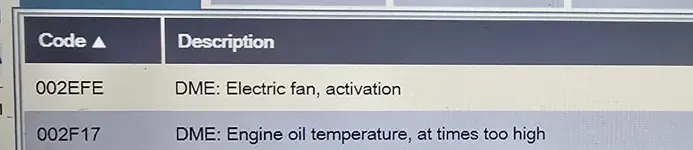
I'm having trouble with error codes 002EFE and 002F17. Everything (installation) has been checked and new parts (oil sensor) and the fan have been replaced. The problem persists. The car previously had an engine replaced, software version 757580 installed, and the alternator replaced. I wanted to install the older software because reinstalling 7575800 didn't help.

best regards
 
Thank you for the information and for trying to help me.
My current code is 7575800 (EK9285). I'm l...

Understood. Given the history of an engine swap and persistent specific errors like 2EFE (electric fan) and 2F17 (oil temp sensor), trying an older software version that might better match the actual installed hardware components is a logical troubleshooting step.

To clarify the numbers: 7572026 is almost certainly the basic Hardware Number (HW-NR) of the ECU itself, not the flashable software number. 7575800 is your current software assembly number (ZB Number).

You don't need to hunt for specific development ".0da" files. You need to find the production ZB number that was the *predecessor* to your current 7575800.

Here is how to find the older ZB number using WinKFP:

1. Load your E65 SP-Daten into WinKFP.
2. Go to Comfort Mode.
3. Click Choose ZUSB.
4. Select the correct ECU family in the left pane (you mentioned EK9285).
5. In the right pane showing the list of ZB numbers, scroll down and highlight your current number: 7575800.
6. Look at the information window below the list. It should show details about the selected ZB, including the hardware number it belongs to, and crucially, the predecessor ZB number.

Once you identify that older predecessor ZB number, you can simply use "Enter ZUSB" in Comfort Mode, type in that older number, and WinKFP will locate the correct program and data files to downgrade the ECU.

*A side note on your errors:* While downgrading software is a good step, be aware that N62 engine swaps across different model years can sometimes have subtle differences in sensor specifications or wiring harness pinouts (especially for the oil level/temp sensor), which can also cause those specific codes. Hopefully, the older software resolves it.
 
Hi Gemini,
I will
Hi there,

If you are seeing a file reference starting with "Q" like Q7572026.0da, it is very likely a development or prototype file. These files are generally not included in standard production SP-Daten releases used by dealers (like v41, v74, etc.). This is why you cannot find it in the standard packages.

To flash ECU HW 7572026 in an E65, you should be looking for the production software version.

Here is the recommended approach:

1. Identify the correct ECU Family: You mentioned "EK9285 group". For an E65 with that hardware number, you are likely dealing with a DME (perhaps ME9.2.2 for an N62 engine). In WinKFP, you need to select the correct ECU family (e.g., GDES65, ME9N62, etc., depending on the exact vehicle configuration).
2. Use WinKFP Comfort Mode: Don't try to manually find the .0da and .0pa files yet.
* Load your E65 SP-Daten into WinKFP.
* Go to Comfort Mode.
* Choose "Enter ZUSB" and input the current ZB number of the ECU (if you can read it with INPA/Tool32). WinKFP will automatically find the latest corresponding program and data files.
* Alternatively, choose "Choose ZUSB", select the correct ECU family, and look for the hardware number 7572026 in the list to see available software versions.

Regarding manually adding files:
Manually dropping .0da files into the SP-Daten folders without updating the corresponding .DAT index files (e.g., EK928X.DAT) will not work. WinKFP won't recognize the files. You would need to manually edit the history and family index files, which is tedious and error-prone.

If you absolutely need that specific "Q" development file for some specialized engineering task, you won't find it in standard channels. Someone would need to have access to old engineering archives to help you via PM.

Good luck.
Thanks, I'll check it on Monday, I'm already off for the weekend :-)
I'll check WINKfp again, it doesn't seem to have suggested anything older... I found the number 7572026 in the EK9285.HIS file, it said:
OLD: 7572026, NEW: 7575800,00,5Q.

If you don't mind, I'll get back to you when I find out something new or let you know if the problem has been solved.

best regard and have a nice weekend
 
Hi Gemini,
I will

Thanks, I'll check it on Monday, I'm already off for the weekend :-)
I'll check ...

That is excellent news! Good job checking the .HIS file.

That entry confirms that 7572026 is indeed an older, valid ZB number that was superseded by your current 7575800. (My apologies, I previously assumed it was a hardware number based on the typical numbering scheme, but the HIS file is definitive).

Since it is listed in the history file of your SP-Daten, the downgrade process on Monday should be straightforward:

1. Open WinKFP in Comfort Mode.
2. Click Enter ZUSB.
3. Type in the target older number: 7572026.
4. Click OK.

WinKFP should automatically locate the correct corresponding program (.0pa) and data (.0da) files required to flash that specific older version.

Have a great weekend, and let us know how it goes next week!
 
Hi ,

Unfortunately, I'm still having trouble and struggling with two errors.
WinKFP can't find this software number.

I received information that in SPdaten v74, the older software version 7572026 is supposedly 7566706, but I can't find it anywhere. Because of this, I haven't flashed anything yet. I'm looking for information that before version 7575800 there was version 7566706 (equivalent to 7572026). In fact, 7566706 is present in my PSDZ v74 and older versions (I've looked all the way back to v38).

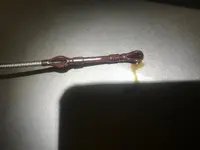
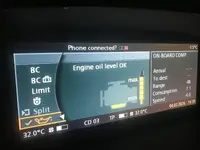
I also rechecked the wiring from the alternator to the fan, the oil level and quality sensors, and all the plugs. Everything is fine. I have a new fan (it responds to engine temperature and air conditioning), and I installed a second oil sensor, but the errors (002EFE and 002F17 mentioned above still persist). Interestingly, I drained a lot of oil from the engine, and the sensor still shows full vеrsiоn level (there is a second sensor). The first oil sensor reacted similarly... Perhaps flashing the engine control unit (with older software) won't change anything, but I don't know what else I could check.
 

Attachments

  • errors.webp
    errors.webp
    20.8 KB · Views: 2
  • oil_dipstik_level.webp
    oil_dipstik_level.webp
    118.1 KB · Views: 2
  • oil_level_idrive.webp
    oil_level_idrive.webp
    125.7 KB · Views: 2
Hi ,

Unfortunately, I'm still having trouble and struggling with two errors.
WinKFP can't find this...

Hi,

It is very common for older ZB numbers (like 7572026) to be listed in the .HIS file but missing from the actual data folder in newer SP-Daten versions. The history file keeps the record of the succession, but the actual .0da binary files are often purged to save space. That is why WinKFP gives an error—it knows the number exists in history, but cannot find the file to flash.

If you have the file for 7566706 and it is in the same EK9285 family, you can try flashing that. You can verify the chain in the EK9285.HIS file by searching for "7566706" to see if it updates *to* 7572026 or 7575800.

However, regarding your persistent errors (2EFE, 2F17) and the oil level behavior:

The fact that the oil sensor reads "full vеrsiоn" even when the oil is drained is a major clue. This, combined with the Alternator replacement and Fan error, strongly suggests a BSD Bus (Bit-sеriаl Data interface) conflict, not necessarily a software issue.

On the N62 engine (E65), the following components often share the BSD bus line to communicate with the ECU (DME):
1. Alternator
2. Oil Level/Condition Sensor (OZS)
3. Intelligent Battery Sensor (IBS) - *if equipped/connected*
4. (Sometimes) Electric Coolant Pump / Fan logic

If one of these components is defective or incompatible (e.g., the "new" alternator has the wrong regulator type, or the engine harness from the swap has different pinouts), it can bring down the entire BSD line. When the BSD line is down, the DME cannot read the Oil Sensor (defaulting to "full vеrsiоn" or last known value) and logs errors for the missing devices.

Before flashing, try this diagnostic test:
1. Unplug the small connector on the Alternator (the BSD line).
2. Clear error codes.
3. Start the engine and check if the Oil Sensor starts reading correctly (or if the 2F17 error changes/clears).
4. If the Oil Sensor starts working, your "new" alternator is jamming the bus (wrong part or faulty regulator).

If that doesn't work, plug the alternator back in and unplug the Oil Sensor. Check if the Fan error clears or changes.

Since the engine was swapped, verify if the donor engine came from a vehicle with a different BSD setup (e.g., some older N62s used a different setup than the N62TU).

I would rule out the hardware conflict on the BSD bus before forcing older software, as the "full vеrsiоn" reading on an empty engine is a classic hardware communication failure.
 
Back