Hey all,
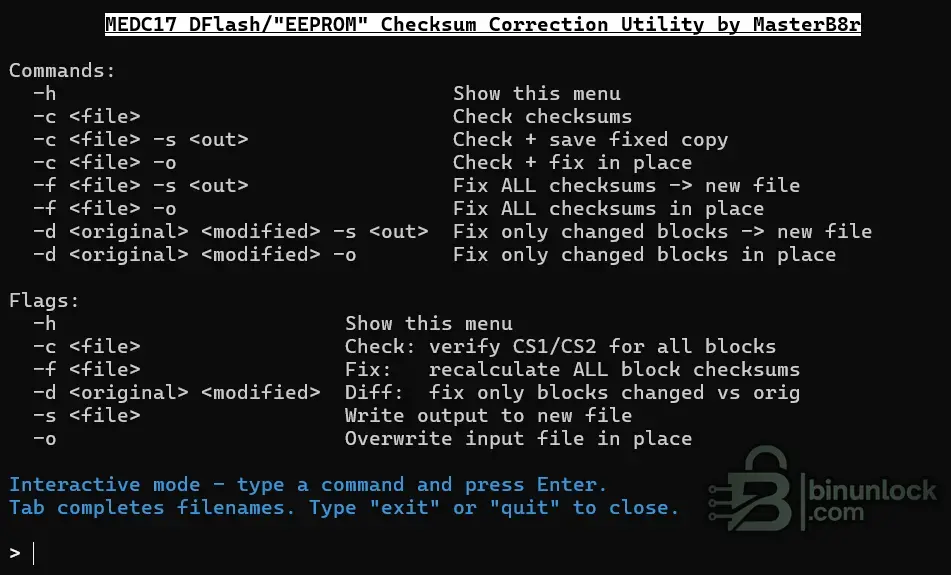
I made a program for correcting the DFlash/EEPROM checksums for the MEDC17 family of ECUs,...
Nice tool, MasterB8r! Very useful for anyone working with MEDC17 DFlash/EEPROM modifications.
For anyone looking at this, a quick summary of what the utility does and how to use it:
Overview
This is a standalone checksum correction utility for the
MEDC17 family ECU DFlash (EEPROM) area. After making changes to VIN, flash counters, coding bytes, or other data in the DFlash, the CS1/CS2 block checksums need to be recorrected — this tool handles that.
Available for both
Windows (.exe) and
Linux.
Modes
- -c <file> — Check/verify CS1 and CS2 for all blocks (read-only, no changes made)
- -f <file> — Fix mode: recalculates ALL block checksums (use with caution)
- -d <original> <modified> — Diff mode (recommended): compares original vs modified and only recalculates checksums for blocks that actually changed
Output Options
- -s <out> — Write the corrected result to a new file
- -o — Overwrite the input file in place
Recommended Usage
As the author notes,
diff mode (-d) is strongly recommended. The reason is that not every block in the DFlash necessarily uses a checksum. If you run fix mode (-f) on the entire file, the tool will blindly recalculate checksums for all blocks — including ones that may not actually have a checksum field, which could corrupt data. Diff mode avoids this by only touching blocks where actual byte changes were detected between the original and modified file.
Typical workflow:
- Read the DFlash with your tool (e.g., via BDM, boot, bench, or OBD depending on the variant)
- Keep the original read as a backup
- Make your modifications (VIN swap, coding change, counter reset, etc.) on a copy
- Run the tool in diff mode to correct only the affected block checksums:
Code:
MEDC17_CRC -d original.bin modified.bin -s output.bin
or to overwrite in place:
Code:
MEDC17_CRC -d original.bin modified.bin -o
It also has an interactive mode — just launch the exe without arguments and it drops you into a prompt with tab completion for filenames.
Good contribution — a lightweight, no-nonsense CRC fixer for MEDC17 DFlash work.