
- Joined
- 03.05.2025
- Messages
- 1,537
- Reaction score
- 6,621
SCANIA VCI4 DRIVER FILES
VCIx Device Drivers • VCI4 / VCI5 • Windows USB Driver Setup
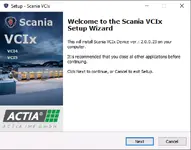
Need your Scania VCI4 (VCIx / ACTIA) to be detected properly on Windows?
This post is for the VCIx device driver package used with Scania diagnostic interfaces (VCI4 / VCI5) so the cable works cleanly in your diagnostic environment.
Transfer.it
 What this is
- Scania VCIx Device Driver installer (USB driver + device components)
- Designed for Scania diagnostic interfaces: VCI4 / VCI5
- Helps fix: “device not recognized”, missing driver, no interface found
 Quick install (recommended)
- Unplug the VCI4/VCI5 from the laptop.
- Run the driver setup as Administrator.
- Finish install → reboot (recommended).
- Plug in the interface and wait for Windows to finish device detection.
- Check Device Manager → confirm it appears without errors.
 Common fixes (if Windows still won’t see it)
- Try a different USB port (avoid USB hubs).
- Use a short, good-quality USB cable.
- Disable driver “cleanup” tools and reboot.
- If you’re on Windows with strict driver policy: install with admin rights + restart.
Note: Driver versions may vary depending on your diagnostic software bundle.
Install only the driver that matches your authorized Scania setup.
Disclaimer
For legitimate/authorized use only. Use these drivers with genuine Scania/ACTIA VCI interfaces and properly licensed diagnostic software.