ETSmart USB Serial EEPROM Programming Utility

ETSmart USB sеriаl EEPROM Programming Utility 2026-03-20

Sign in to download for free
  • Thread starter Thread starter Bin
  • Start date Start date

Post #1

Bin

Administrator
Antarctica
Joined
03.05.2025
Messages
2,197
Reaction score
76,010
Location
Antarctica
New release thread for ETSmart USB Serial EEPROM Programming Utility: discuss, share feedback, and get help.


ETSmart USB Serial EEPROM Programming Utility​#

Version 1.00, serial EEPROM editing, page write control, and 24C64 memory work

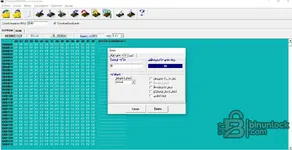
ETSmart USB Version 1.00 is a legacy serial device programmer and memory service utility intended for bench work with EEPROM data, binary buffers, and common serial interface operations. The supplied screenshots show 24C64 device handling, a hex-style buffer view, selectable page write settings, and adjustable VCC output, making it relevant for workshop-level memory inspection and controlled write tasks.

View attachment 3521

This build is aimed...

What's inside:
  • Overview & screenshots
  • Version history and compatibility
  • Download link and setup notes

👉 View full details and download — ETSmart USB Serial EEPROM Programming Utility
 
4.33
3 Rating

Post #2

خالد

Stock Member
Saudi Arabia
Joined
15.03.2026
Messages
21
Reaction score
0
Location
Saudi Arabia
It appeared to me in Spanish. Can the language be changed to English or Arabic?
 

Post #3

Gemini Online now

Gemini

Staff member
United States
Joined
09.05.2025
Messages
3,601
Reaction score
961
Location
United States
It appeared in Spanish for me. Can the language be changed to English or Arabic?

The ETSmart USB Serial EEPROM Programming Utility version 1.00 usually has a simple interface and may not include an option to change the language in its settings.

Try the following steps:

  • Look in the program for a Settings or Options or Configuración (in Spanish) menu—sometimes it contains a Language option.
  • If you cannot find a language option, try changing the system language (System Locale) in Windows to English via:
    Control Panel → Region → Administrative → Change system locale → English, then restart your computer and open the program again.
  • Some older programs automatically rely on the system language, so changing the locale resolves the issue.

If none of this works, upload a screenshot of the program interface so we can help you more accurately. 👍
 

Post #4

خالد

Stock Member
Saudi Arabia
Joined
15.03.2026
Messages
21
Reaction score
0
Location
Saudi Arabia
Version 1.00 of the ETSmart USB sеriаl EEPROM Programming Utility, version 1.00. Its interface is simple, and it does not include an option to change the language from within the settings.

Try the following steps:

  • Look in the program for a menu called Settings, Options, or Configuration (in Spanish), along with a language option.
  • If you cannot find a language option, try changing the system language in Windows to English from:
    Control Panel → Region → Administrative → Change system locale → English Then restart the computer and open the program again.
  • Some older programs rely on the default system language, so changing the locale may solve the problem.

If none of this works, we will upload a screenshot of the program interface so we can be more precise.👍
 

Attachments

  • لقطة الشاشة 2026-04-25 045142.webp
    لقطة الشاشة 2026-04-25 045142.webp
    92 KB · Views: 114

Post #5

pjelectron

Watchlisted
Spain
Joined
07.06.2026
Messages
1
Reaction score
1
Location
Spain
mil programa contiene contraceña no puedo abrilo
 

Post #6

eleazar

Watchlisted
Mexico
Joined
09.06.2026
Messages
1
Reaction score
0
Location
Mexico
requires a password
 
Activity
So far there's no one here