ISN read from EDC16C35

Post #1

vladys

Bolt-On Member
Thread Owner
Romania
Joined
28.03.2026
Messages
37
Reaction score
5
Location
Romania
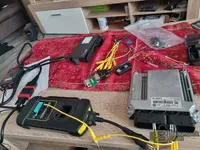
I need help reading ISN from eeprom or full data, (not working with CAS3 V1,3 ) I managed to extract backup from original DDE EDC16C35. EXTEEPROM 8KB and full data 2.5mb. I want to make the car run without errors with original DDE and CAS second. I am an electronics engineer and I don't want to make a mistake with the ISN code, I bought specifically to make my personal car a LAUNCH X431 PRO + X-PROG3 which does not have the option to read ISN from backup. I think the problem is with the original CAS3++ ISTAP, which was corrupted by someone else who said he could make me a new key and tried to rewrite the software in the original CAS, and it shows me FFFFF... when reading ISN from CAS "on the bench", now I have second DDE EDC16C35 and CAS3++ without second ISTAP from a 525d 3.0 2009 LCI same. The car is mine and I want to do it, as it has been sitting in the parking lot for over a year, any help is welcome, THANKS in advance.
 

Attachments

  • DDE
Ratings and Reviews
Total ratings: 0

Post #2

Looking at your EEPROM dump, I can extract some useful information for you.

From the EEPROM (8KB) analysis:

The ISN in EDC16C35 is stored in the external EEPROM, specifically in the encrypted blocks starting at offset 0x40. Looking at your dump:

  • Bosch HW number: HS1037500774
  • SW number: 1037376616
  • Production dates: 24-08-09 / 27-08-09

The ISN-related data in EDC16C35 is stored in the EEPROM area around offsets 0x40–0xBF. In your dump I can see three encrypted ISN blocks (each 32 bytes), all sharing the same first 10 bytes:

Code:
0x40: 00 00 C1 E7 A3 38 4C 9F 18 B7 2C F0
0x80: 00 00 C1 E7 A3 38 4C 9F 18 B7 2C F0
0xC0: 00 00 C1 E7 A3 38 4C 9F 18 B7 2C F0

This is good — the ISN blocks are consistent and not corrupted. However, the ISN in EDC16C35 is AES-encrypted in the EEPROM. You cannot simply read it as plaintext from the dump. The raw ISN is encrypted with a key derived from the Bosch internal flash, so extracting the actual ISN value from a dump alone requires either:

  1. A tool that can read ISN via K-Line/OBD diagnostics from the DDE while powered (e.g., INPA with the correct script, Autohex II, AVDI, Yanhua ACDP, etc.)
  2. A tool that can decrypt the EEPROM ISN blocks using the known algorithm for EDC16C35 (Yanhua ACDP Module 27, Autohex II, or similar)

Your real problem and the practical path forward:

Since your original CAS3++ ISTAP is corrupted (reading FFFFF... for ISN), and you have a second donor CAS3++ + DDE from the same model (525d 3.0 E60 LCI 2009), you have a few options:

Option A — Sync donor CAS + donor DDE (easiest):
If the donor CAS3++ and donor DDE came from the same car, they already share the same ISN. You would:
  • Use the donor CAS + donor DDE together
  • Program a new key to the donor CAS (Yanhua ACDP, Autohex, Xhorse VVDI, or even your Launch X431 if it supports CAS3++ key learning)
  • Code/program the donor DDE VIN to match your car's VIN (via ISTA/P or WinKFP)

Option B — Read ISN from your original DDE and write it to the donor CAS:
  • Read the ISN from your original DDE via OBD (K-Line, pin 7+8) using a tool that supports EDC16C35 ISN read — Yanhua ACDP Module 27 or Autohex II can do this directly
  • Write that ISN into the donor CAS3++
  • Program a new key to the donor CAS

Option C — Virginize/clear ISN on both and re-sync:
  • Clear/virginize the ISN in the DDE EEPROM (write known virgin ISN pattern)
  • Clear ISN in the CAS
  • Let them sync on first start via ISTA/P

My recommendation:

Since your Launch X431 + X-PROG3 cannot read ISN from the dump, and the EEPROM ISN is encrypted, you realistically need Yanhua ACDP with Module 27 (BMW DME/DDE ISN read) — it reads ISN from EDC16C35 via OBD on the bench and also writes ISN to CAS3++. This is the most straightforward path for your situation.

Do NOT attempt to manually edit the encrypted ISN bytes in the EEPROM without the correct tool — you will brick the DDE.

Can you confirm:
  • Does the donor CAS3++ and donor DDE come from the same donor car?
  • Do you want to keep your original DDE or are you okay using the donor DDE?
  • What is the exact CAS3++ part number on both units (original and donor)?

This will help determine the simplest path to get your car running.
Thank you very much for your quick and excellently detailed answer, at first I thought it was an answer from AI :)! I will do what you said and I will keep you updated on what I have solved!
 

Post #3

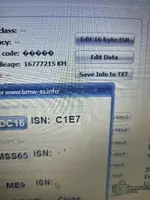
ISN from DDE : C1E7 ?

I confirm:
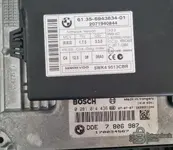
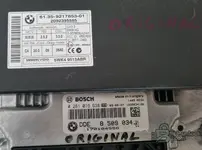
  • YES the donor CAS3++ and donor DDE come from the same donor car , The donor car is not SE BUS EDITION like my car and with the Option A the car starts and runs but it gives me many errors on the dashboard.. I'll try option B and tell you what I solved.

  • Do you want to keep your original DDE or are you okay using the donor DDE?Answer :I'm just interested in making the car run without errors so I can pass the Periodic Inspection.
  • What is the exact CAS3++ part number on both units (original and donor)?
  • Answer:I atached photos
  • Thank you in advance
 

Attachments

  • 20260328_142902.webp
    20260328_142902.webp
    428.7 KB · Views: 112
  • 20260328_143034.webp
    20260328_143034.webp
    496.7 KB · Views: 115
  • 20260328_122730.webp
    20260328_122730.webp
    1.8 MB · Views: 114
  • 20260327_121737.webp
    20260327_121737.webp
    1.2 MB · Views: 140

Post #4

The software doesn't show me the 16 bit ISN when I click "Edit 16 byte ISN" in the BMW-AZ tool
Can you offer me another software to read ISN 16BIT?
I managed to backup the EEPROM from the original DDE and the original CAS. They are saved. I have attached them.
Yes Launch X431 have the option to write ISN to CAS3++
 

Attachments

  • DDEBMW

Post #5


If not, you'll need to program a new key.
 

Post #6

In slot 2,3,4 I tried to make new keys, I still have them physically, but they didn't work when I made them, elv blocked. I made a backup of the key from the CAS when I performed the all key lost operations. I attached them.
 

Attachments

  • KeyData

Post #7

In slot 2,3,4 I tried to make new keys, I still have them physically, but they didn't work when I ma...

OK, now I understand the full picture. Let me analyze the key data timeline and the ELV (steering lock) situation.

Key Data Timeline Analysis

bmw525dfirst.bin — This is your earliest/original backup:
  • Key 1: 012B — Active, working original key
  • Key 2: 004B 0030B23A97 — Learned key (your first attempt)
  • Key 3: 004B 002DE53A97 — Learned key
  • Key 4: 0076 08 FFFFFFFF — Empty slot (no transponder written yet)

keydatabmw525.bin — After programming Key 4:
  • Key 4: 004B 00B9FC1E97 — Now learned

keie4.bin — Later state, Key 2 was reprogrammed + Key 5 appeared:
  • Key 2: 004B 00864F9997 — Different transponder data than before (reprogrammed)
  • Key 4: 004B 00B9FC1E97 — Same as before
  • Key 5: 005B 00864F9997 — Same transponder as Key 2 (duplicate/copy attempt)

key3databmw.bin / keydata2bmw.bin — Key 2 was erased:
  • Key 2: 0076 08 FFFFFFFF — Erased back to empty
  • Key 4: 004B 00B9FC1E97 — Still there

The Real Problem: ELV (Electronic Steering Lock)

You said "ELV blocked" — this is the critical issue. On E60 LCI with CAS3++, the ELV (Elektronische Lenksäulenverriegelung) must be synchronized with the CAS. When someone corrupted the CAS or performed multiple all-keys-lost procedures, the ELV likely went into a permanent lock state.

The ELV on CAS3++ communicates with the CAS via an encrypted challenge-response. If the ELV detects too many failed authentication attempts or a CAS mismatch, it hard-locks and will not release the steering column — even if the key is correctly programmed in the CAS and the ISN matches the DDE.

This explains why:
  • Your new keys were programmed (status 004B = learned)
  • The DDE ISN matches the CAS ISN (C1E7)
  • But the car still won't start — because the ELV refuses to unlock

What You Need To Do

Step 1 — Restore the CAS EEPROM to the earliest clean state

Use bmw525dfirst.bin key data — this is the state where Key 1 was still active (status 01). Write the original EEPROM backup (eprombmw525.bin) back to the CAS EEPROM chip. This restores the CAS to its original state with Key 1 active.

Step 2 — Fix the ELV

This is the critical step. You have several options:

Option A — ELV Reset/Repair via ISTA/P or Tool32
  • Connect to the car with ISTA/P or Tool32
  • Use the CAS function "ELVRESET" or "steuernelv_nachtransport"
  • This requires a valid key in the CAS that can authenticate

Option B — ELV Emulator
  • If the ELV is permanently locked and cannot be reset, you can install an ELV emulator (also called ELV repair module)
  • These are small modules that replace the ELV and always respond "unlocked" to the CAS
  • For E60 CAS3++ this is a common solution — search for "BMW E60 ELV emulator" or "BMW ELV repair"
  • Cost is typically 30–80€

Option C — Send ELV for repair
  • Some specialists can repair/reset the ELV module on bench
  • They read the EEPROM from the ELV motor unit and reset the lock counter

Step 3 — After ELV is resolved

  • If you restored the original EEPROM and you still have the original Key 1 physically (the one that was working before all this started), it should work immediately
  • If you lost the original Key 1, you need to do all-keys-lost again with the Launch X431, but only after the ELV is fixed

Critical Question

Do you still have the original Key 1 physically — the one that was working before the CAS was corrupted? This is the key with transponder data 000C9CCF12.

If yes → restore original EEPROM + fix ELV → Key 1 should work
If no → restore original EEPROM + fix ELV → then do all-keys-lost with Launch X431

Also: when you say "ELV blocked" — what exactly happens? Does the steering column stay locked? Do you get a specific error message on the dashboard? This will help determine if the ELV needs a reset or a full replacement/emulator.
 

Post #8

ELV blocked" — the steering column stay locked.
When I install the Donor DDE +CAS donor kit. the car runs. I only have the key from the donor kit that starts the car. I bought the other 2 keys to program them.
 

Post #9

ELV blocked" — the steering column stay locked.
When I install the Donor DDE +CAS donor kit. the c...

OK, now the full situation is clear. Let me summarize and give you the correct path forward.

Current Situation

  • Your original CAS3++ + original DDE — ISN matched (C1E7), but ELV is hard-locked. Car won't start.
  • Your donor CAS + donor DDE kit — working, car starts with the donor key. ELV accepts the donor CAS.
  • You bought 2 new blank keys to program to the donor CAS.
  • You want to program these 2 new keys to the donor kit so you have 3 working keys total.

Why the ELV works with the donor CAS but not your original CAS

The ELV is paired to a specific CAS. When the previous person corrupted your original CAS, the ELV lost synchronization with it and hard-locked. The donor CAS came already paired with its own ELV data, and when installed, the ELV was either:

  • Reset during the donor kit installation
  • Or the donor CAS ELV authentication data was written to match your car's ELV

Either way — the donor CAS + ELV are now working together. Do not touch this pairing.

Your Goal Now

Program 2 new keys to the donor CAS using your Launch X431.

What You Need

  • The donor CAS ISN — NOT C1E7 (that's your original). You need the ISN from the donor CAS.
  • The donor DDE ISN should already match the donor CAS (since the kit works).

How to get the donor CAS ISN

  • Option 1: Read the donor CAS EEPROM on bench (same way you read your original — 93C86 chip) and I can extract the ISN for you
  • Option 2: Use your Launch X431 → BMW → CAS → Read ISN (some Launch versions can read ISN via OBD if the CAS is not locked)
  • Option 3: Read the donor DDE EEPROM — the ISN will be at offset 0x42–0x43 (same location as your original)

Steps to program the 2 new keys

  • Step 1 — Get the donor CAS ISN (using one of the methods above)
  • Step 2 — Launch X431 → BMW → IMMO → CAS3++ → Add Key / All Keys Lost
  • Step 3 — Enter the donor ISN when prompted
  • Step 4 — Follow the procedure with the working donor key + the 2 new blank keys
  • Step 5 — Test all 3 keys

Important Warnings

  • Do NOT install your original CAS back in the car — the ELV is locked against it. You would need an ELV emulator or ELV repair to use it again.
  • Do NOT attempt all-keys-lost on the donor CAS without the donor ISN — you will lock yourself out.
  • Use "Add Key" mode, NOT "All Keys Lost" — since you have a working donor key, you don't need AKL. Add Key is safer and won't erase the existing working key.

Next Step

Can you read the donor CAS EEPROM (93C86 chip) the same way you read your original? Upload it here and I will extract the donor ISN for you. That's all you need to program the 2 new keys.

Alternatively, if your Launch X431 can read the ISN via OBD from the donor CAS while it's installed in the car — try that first, it's easier.
 

Post #10

I made a second key with the donor DDE×CAS donor kit, but it shows many errors on the dashboard.
 

Post #11

I made a second key with the donor DDE×CAS donor kit, but it shows many errors on the dashboard.

That's expected when using a donor CAS+DDE kit — the donor CAS has a different VIN and different module pairing data than your car's other modules.

The dashboard errors are because:

Your car's other modules (ELV, FRM, KOMBI, JBE, EGS, ABS/DSC, ACSM, etc.) are all coded and paired to your original CAS VIN, but the donor CAS has a different VIN. Every module that does a VIN check or authentication with the CAS will throw a fault.

To fix this you need to:

Step 1 — Write your original VIN into the donor CAS

  • Read the donor CAS EEPROM (93C86)
  • Replace the VIN in the donor CAS EEPROM with YOUR car's original VIN
  • Write it back
  • This makes all other modules recognize the CAS as "their" CAS

Step 2 — Align/code the FA (Vehicle Order / VO)

  • Use ISTA/P or NCS Expert to write your car's original FA/VO into the donor CAS
  • This ensures all coding indexes match your car's equipment

Step 3 — Synchronize modules

  • After VIN correction, use ISTA/P to re-synchronize CAS with all modules
  • Clear all DTCs (fault codes) from every module
  • Some modules like ACSM (airbag) and EGS (gearbox) may need individual re-coding

Important questions:

  1. Do you have access to ISTA/P or NCS Expert with an ICOM or K+DCAN cable?
  2. Do you know your car's original VIN?
  3. Can you upload the donor CAS EEPROM dump? I can show you exactly where to change the VIN and verify the ISN before you write it back.

The key programming itself is fine — the errors are purely a VIN/coding mismatch problem, which is fully fixable.
 

Post #12

What do I need to do to get the original DDE and the donor CAS working? I have access to Launch Pro and ISTAP
 

Post #13

What do I need to do to get the original DDE and the donor CAS working? I have access to Launch Pro ...

This is the key question. You want to use:

  • Donor CAS — because the ELV works with it
  • Original DDE — because it's the correct DDE for your car

The problem: the donor CAS ISN ≠ your original DDE ISN (C1E7). The DDE will not allow the engine to start unless the ISN matches the CAS.

You have 2 options:

Option A — Write the donor CAS ISN into your original DDE

  • Read the donor CAS EEPROM → extract the donor ISN
  • Write that ISN into your original DDE EEPROM at offset 0x42–0x43
  • Install your original DDE back in the car
  • The DDE ISN now matches the donor CAS ISN → engine starts

Option B — Write your original ISN (C1E7) into the donor CAS

  • Read the donor CAS EEPROM
  • Find the ISN location and replace it with C1E7
  • Write it back to the donor CAS
  • The CAS ISN now matches your original DDE → engine starts

Option A is safer — changing 2 bytes in the DDE is less risky than modifying the CAS ISN (which also affects key encryption).

Step-by-step plan:

Step 1 — Read the donor CAS EEPROM (93C86) and upload it here. I will extract the donor ISN.

Step 2 — Take your original DDE EEPROM backup (you already have eprombmw525d.bin) and I will prepare a modified version with the donor ISN at offset 0x42–0x43.

Step 3 — Write the modified EEPROM back to your original DDE.

Step 4 — Install your original DDE in the car with the donor CAS.

Step 5 — Use ISTA/P to:
  • Write your car's original VIN into the donor CAS
  • Re-code the FA/VO
  • Synchronize all modules
  • Clear all DTCs

Step 6 — Re-program your keys to the donor CAS using Launch X431 (you will need the donor CAS ISN from Step 1).

What I need from you now:

  1. Read the donor CAS EEPROM (93C86 chip, same method as before) and upload it
  2. Confirm you still have the original DDE EEPROM file (eprombmw525d.bin)
  3. Confirm your car's original VIN

Once I have the donor CAS EEPROM, I can give you the exact bytes to change and you'll be driving with your original DDE + donor CAS + no dashboard errors.
 

Post #14

The car will have errors with donor CAS how can fix it step by step ?
Your original CAS 9217853 has FSV 2.5.2 — this is a CAS3++ (ISTAP level) with newer software.
The donor CAS 6943834 has FSV 1.7.5 — this is an older CAS3 (not CAS3++, despite the C4 hardware).
 

Post #16

How do I resolve the DTC from the attached report?

This is a significant compatibility issue. Let me break it down clearly.

The Core Problem

Your original CAS (9217853) is a CAS3++ with FSV 2.5.2 — newer hardware/software generation.
The donor CAS (6943834) is an older CAS3 with FSV 1.7.5 — older generation.

When you put an older CAS3 into a car that originally had a CAS3++, every module in the car will reject it because:

  • The VIN stored in the donor CAS doesn't match your car's modules
  • The FSV/software level is incompatible — other modules expect CAS3++ communication protocols
  • The FA/VO (vehicle order) is wrong — the donor CAS has a different car's configuration
  • ISTA/P cannot downgrade a CAS3++ car to work with a CAS3 — the I-level won't match

Why This Cannot Be Fully Fixed With Coding Alone

Even if you:
  • Write your VIN into the donor CAS
  • Re-code the FA/VO
  • Clear all DTCs

The fundamental problem remains: a CAS3 (FSV 1.7.5) cannot replace a CAS3++ (FSV 2.5.2). The encryption level, key handling, and module communication protocols are different. ISTA/P will not allow you to program a CAS3 to CAS3++ level — it's a hardware limitation.

Your Real Options

Option 1 — Get a CAS3++ donor (recommended)

Find a donor CAS that is also CAS3++ (part number 9217853 or equivalent with FSV 2.x.x). Then:
  1. Read the donor CAS3++ EEPROM (93C86)
  2. Write your original VIN into it
  3. Match the ISN between the donor CAS3++ and your original DDE
  4. Use ISTA/P to re-code FA/VO and synchronize all modules
  5. Program keys to the new CAS3++
This will work cleanly with no permanent DTCs.

Option 2 — Repair your original CAS3++ (9217853)

If the original CAS has an ELV (steering lock) problem, the ELV can be repaired or replaced separately without changing the entire CAS. This is often cheaper and avoids all compatibility issues.

  • The ELV motor or microswitch can be replaced
  • The ELV ECU can be renewed via ISTA/P if needed
  • Some specialists can repair the ELV on the bench

Option 3 — ELV emulator on your original CAS3++

Install an ELV emulator on your original CAS3++. This bypasses the faulty steering lock completely while keeping your original CAS3++ in the car. No module mismatch, no DTCs (except the ELV fault itself, which the emulator resolves).

Summary

Do NOT continue with the CAS3 (6943834) donor in a CAS3++ car. The DTCs from the report will never fully clear because the hardware generation is wrong. The errors you're seeing are not just VIN mismatch — they are fundamental protocol/generation incompatibility.

What was the original problem with your CAS3++? If it's an ELV issue, Option 2 or 3 is the fastest and cheapest path. If the CAS3++ itself is dead, you need another CAS3++ — not a CAS3.
 

Post #18

O added the original CAS. Check and read DTC from the attached document

Unfortunately I cannot extract the actual DTC text from this PDF — the attachment data only shows the raw binary/encoded PDF structure (images and compressed streams). The actual fault code text is embedded in the compressed content stream and cannot be read from the hex preview alone.

I need you to do one of the following so I can analyze the DTCs:

Option 1 — Screenshot
Take a screenshot of the Launch Pro DTC report and upload it as a JPG/PNG image.

Option 2 — Type the DTCs
Open the report and list the DTCs manually. I need:
  • The DTC code (e.g., 480A, 4810, A0B4, etc.)
  • Which module reported it (CAS, DDE, ELV, FRM, KOMBI, etc.)
  • The description if shown

Option 3 — Text copy
If Launch Pro allows you to export or copy the report as text, paste it here.

In the meantime — what to expect with the original CAS3++ reinstalled:

Since you put the original CAS (9217853) back in, the module communication and VIN should now be correct across all modules. The remaining DTCs will most likely be:

  • DDE — ISN mismatch / immobilizer fault — because the DDE ISN was never changed, and if you previously attempted to start with the donor CAS, the DDE may have logged a tamper/mismatch event
  • CAS/ELV — steering lock fault — this was presumably the original problem that started everything
  • Historical DTCs from the period when the donor CAS3 was installed (VIN mismatch, communication errors across modules)

Please upload the DTCs in a readable format and I will give you the exact step-by-step fix for each one.
 

Post #19

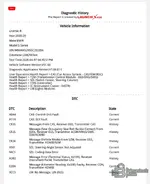
I attached photo of DTC report
 

Attachments

  • Screenshot_20260407_173106_Samsung Notes.webp
    Screenshot_20260407_173106_Samsung Notes.webp
    69.3 KB · Views: 96

Post #20

I attached photo of DTC report

Now I can see the DTCs clearly. Here is the full analysis for your 2009 BMW 5 Series (WBANX52050C292056, 248290 km) with the original CAS3++ (9217853) reinstalled.

DTC Analysis & Fix Plan

1. A0AA — CAS: Control-Unit Fault (Current)

This is the main problem. The CAS3++ itself has an internal fault. This confirms the CAS module is damaged — this is likely why you tried the donor CAS in the first place.

Possible causes:
  • Internal EEPROM corruption
  • Failed processor or power supply circuit inside CAS
  • Water/corrosion damage on the CAS PCB
  • Failed flash memory

Fix: The CAS3++ needs bench repair or replacement with another CAS3++ (not CAS3). A specialist can attempt EEPROM repair on the bench. If the hardware is physically damaged, you need a donor CAS3++ with matching hardware revision.

---

2. A11A — CAS: ELV Fault (Current)

The electronic steering lock (ELV) has a fault. This is very common on E60/E90 CAS3 modules and is often the root cause of the whole problem.

Possible causes:
  • ELV motor failure (most common)
  • ELV microswitch failure
  • ELV communication line broken inside CAS
  • CAS internal fault (A0AA) causing ELV to not initialize

Fix:
  • Option A: Repair the ELV motor/microswitch on the bench — a CAS specialist can replace the ELV components
  • Option B: Install an ELV emulator — bypasses the steering lock entirely
  • Option C: If A0AA is the root cause, fixing the CAS internal fault may also resolve the ELV fault

---

3. 9501 — SZL: Steering-Angle Sensor Not Adjusted (Current)

The steering angle sensor lost its calibration. This happens whenever the CAS is swapped or battery is disconnected for extended time.

Fix: Perform steering angle sensor calibration with ISTA/D, Launch X-431, or any tool that supports SZL calibration. Turn steering wheel full lock left → full lock right → center. Confirm with the tool.

---

4. 94C1 — SZL: Coding-Data Error (Current)

The SZL coding doesn't match the current vehicle configuration. This was likely caused by the donor CAS3 being installed (different FSV/configuration).

Fix: Re-code the SZL using ISTA/P or E-Sys with the correct FA/VO for your vehicle. After coding, the steering angle sensor calibration (9501) should also be repeated.

---

5. E2D6 — Message (Kilometre Reading, 0x330) Faulty, Receiver CON, Transmitter KOMBI (Current)

The controller (CON — likely the headunit/iDrive controller) is receiving an invalid mileage message from the instrument cluster. This can happen when:
  • The CAS was swapped and the mileage broadcast was interrupted
  • KOMBI coding is mismatched

Fix: This should clear after re-coding the vehicle with ISTA/P and performing a full FA/VO write. Clear DTCs after coding. If it persists, check KOMBI coding specifically.

---

6. CF35 — Messages From CAS, Receiver EGS, Transmitter CAS (History)

The EGS (automatic transmission) logged that it lost CAS messages. This was caused by the donor CAS3 swap (different communication protocol/VIN).

Fix: History fault — clear DTC. With the original CAS3++ back in, this should not return.

---

7. CF25 — Message (Seat Occupancy/Seat Belt) From SSFA, Receiver EGS (History)

The EGS lost seat occupancy/belt buckle messages during the CAS swap period.

Fix: History fault — clear DTC. Should not return.

---

8. CF2A — Message (Vehicle Mode) From SZM, Receiver EGS (History)

The EGS lost vehicle mode messages from the center console switch module during the swap.

Fix: History fault — clear DTC. Should not return.

---

9. A3B2 — Message Error (Terminal Status, 0x130), Receiver Instrument Panel, Transmitter CAS (History)

The instrument cluster lost the terminal status (ignition state) message from CAS during the swap.

Fix: History fault — clear DTC. Should not return with original CAS.

---

10. 9CC5 — LM: No Message, LIN (RLS) (History)

The light module lost communication with the rain/light sensor on the LIN bus. Likely unrelated to the CAS swap — could be a loose connector or intermittent RLS issue.

Fix: Clear DTC first. If it returns, check the RLS connector on the windshield and the LIN bus wiring to the light module.

---

Summary — Priority Order

  1. A0AA + A11A (CAS fault + ELV fault) — This is your primary problem. The CAS3++ has an internal fault. Get it bench-repaired by a CAS specialist, or source another CAS3++ (NOT CAS3). If only the ELV is faulty, an ELV repair or emulator solves it.
  2. 94C1 (SZL coding) — Re-code SZL with ISTA/P or E-Sys after CAS is sorted.
  3. 9501 (Steering angle) — Calibrate after SZL coding.
  4. E2D6 (Mileage message) — Re-code with ISTA/P, then clear.
  5. CF35, CF25, CF2A, A3B2 (History faults) — Clear all. These are leftovers from the donor CAS3 period.
  6. 9CC5 (RLS) — Clear and monitor.

Bottom line: Your original CAS3++ has a hardware fault (A0AA). Fix or replace it with another CAS3++, then re-code the car and clear all DTCs. Do not attempt to use the CAS3 donor (6943834) — it will never work properly in this car.
 
Activity
So far there's no one here