
ODIS Engineering is an offboard diagnostic platform used in Volkswagen Group engineering and test environments. It supports ECU communication, vehicle project based diagnostics, DoIP capable sessions, control module lists, logging, and engineering level functions such as flashing and dataset handling, depending on the loaded project data and vehicle platform.

Summary highlights
Included language packs
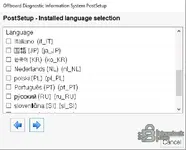
This build is multilingual. Language availability depends on which PostSetup language packs are selected during setup.
Package contents
Compatibility notes
Basic usage
Operating systems
Windows 10, Windows 11 (x64)
Minimum system requirements
CPU: Intel Core i5 class or equivalent
RAM: 8 GB minimum, 16 GB recommended
Storage: 60 GB free space minimum due to projects and PostSetup content
Network: Required only for network based interfaces and DoIP use cases
Rights: Administrator rights recommended for installation and driver setup
Disclaimer
Source of Files. All software and resources in this post are collected from public and open sources on the internet. We do not claim authorship or ownership.
File Hosting. This forum does not host files. All links point to third party public cloud storage. We are not responsible for external content.
User Responsibility. Software is provided for educational and evaluation purposes only. You use it at your own risk. Authors of the post and forum administration are not liable for any damage.

Summary highlights
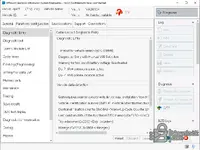
- Diagnostic Entry workflow with options like manual VIN selection depending on configuration
- Vehicle selection with DoIP support when the platform and interface support it
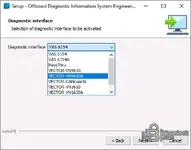
- Interface selection includes VAS6154 family, PassThru, and Vector VN interfaces depending on installed drivers and setup
- Control module list and ECU communication functions for engineering diagnosis sessions
- Logging tools, BZD logs, tracing, and configuration pages for storage paths and support options
- Flashing and writing datasets are available as engineering functions when supported by the selected project data
Included language packs
This build is multilingual. Language availability depends on which PostSetup language packs are selected during setup.
- English
- German
- French
- Italiano (it_IT)
- Español
- Português (pt_PT)
- Nederlands (nl_NL)
- polski (pl_PL)
- русский (ru_RU)
- slovenščina (sl_SI)
- 国語 (JP) (ja_JP)
- 한국어 (KR) (ko_KR)
- Chinese
Package contents
- MCD-Projects-E.zip
- OffboardDiagSetup-Engineering_19_0_0-0401_1.exe
- PostSetup190000.401.50_.zip
- SupportFiles.zip
Compatibility notes
- Vehicle and ECU coverage depends on the included project data, brand scope, model year, and vehicle platform
- Interface compatibility varies by hardware and drivers. VAS 6154 is commonly selected during ODIS installation routines
- DoIP communication depends on vehicle support and Ethernet capable interfaces
- Vector VN interfaces are used for CAN and CAN FD connectivity depending on model and driver support
Basic usage
- Install ODIS Engineering using the included setup file
- Run PostSetup and select the required language packs and components
- Choose your diagnostic interface type during setup, then confirm drivers are installed
- Open the application, select the vehicle project, then start Diagnostic Entry or DoIP vehicle selection
- Use logs and tracing to support troubleshooting and session review when needed
Operating systems
Windows 10, Windows 11 (x64)
Minimum system requirements
CPU: Intel Core i5 class or equivalent
RAM: 8 GB minimum, 16 GB recommended
Storage: 60 GB free space minimum due to projects and PostSetup content
Network: Required only for network based interfaces and DoIP use cases
Rights: Administrator rights recommended for installation and driver setup
Disclaimer
Source of Files. All software and resources in this post are collected from public and open sources on the internet. We do not claim authorship or ownership.
File Hosting. This forum does not host files. All links point to third party public cloud storage. We are not responsible for external content.
User Responsibility. Software is provided for educational and evaluation purposes only. You use it at your own risk. Authors of the post and forum administration are not liable for any damage.


