BimmerUtility – BMW/MINI Coding & Diagnostics

BimmerUtility – BMW/MINI Coding & Diagnostics 1.14.07

Sign in to download for free
  • Thread starter Thread starter Bin
  • Start date Start date
  • Tagged users Tagged users None
BimmerUtility – BMW/MINI Coding & Diagnostics
BimmerUtility – BMW/MINI Coding & Diagnostics 1.14.07
Sign in to download for free
  • Thread starter Thread starter Bin
  • Start date Start date
  • Tagged users Tagged users None

Bin

Thread Owner
Administrator
Joined
03.05.2025
Messages
1,768
Reaction score
18,004
Bin submitted a new resource:

BimmerUtility – BMW/MINI Coding & Diagnostics - Android BMW/MINI toolkit — BimmerUtility v1.14.07 (11407): coding, retrofits, scans, live data & ser

BimmerUtility — mobile coding and diagnostics for BMW/MINI📱

What it does
BimmerUtility turns your Android device into a powerful workshop assistant for modern BMW and MINI platforms. Pair a reliable OBD interface (BLE/USB or ENET where supported) to unlock popular options, perform retrofits, scan and clear faults across multiple ECUs, and stream live data with logging.


Highlights
  • One-click features & retrofits: quickly enable popular...

Read more about this resource...
 
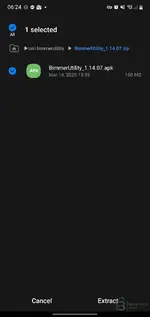
Hi there was no installation instructions provided,can u help?
 

Attachments

  • Screenshot_20260211-062408_My Files.webp
    Screenshot_20260211-062408_My Files.webp
    35 KB · Views: 9
Hi there was no installation instructions provided,can u help?

Since this is the Android version, the installation is usually standard for third-party apps:

  1. Extract the downloaded archive.
  2. Transfer the .apk file to your Android device (if you downloaded it on a PC).
  3. Open your File Manager on the device and tap the APK file to start the installation.
  4. If prompted, allow installation from unknown sources in your security settings.

If the archive contains a folder (often named com.bimmerutility... or similar) alongside the APK, you likely need to move that folder to your OBB directory here:

Code:
/Android/obb/

Otherwise, just installing the APK should be enough.
 
after installation in the application when I enter the settings it says not registered. and when I click to code some function show login with google or apple. what should i do?
 
after installation in the application when I enter the settings it says not registered. and when I c...

Make sure you completely uninstalled any previous versions of the app before installing this one.

Try these steps to reset the app state:
  • Go to your phone's Settings > Apps > BimmerUtility > Storage.
  • Tap Clear Data and Clear Cache.
  • Launch the app again.

Do not try to log in with Google or Apple. If the раtсh is working correctly, you should be able to use the coding functions without a real account. If it still forces a login, try enabling Airplane Mode (then manually turn on WiFi to connect to your adapter) to prevent the app from checking the liсеnsе server.
 
i dont need wifi i use enet cable with otg

That is actually better for stability.

However, the suggestion to use Airplane Mode was not for the adapter connection, but to block the app from accessing the internet.

If the app has internet access (via 4G/5G or WiFi), it will try to verify the liсеnsе with the server and fail, showing you the "not registered" message.

Try this:
  • Turn off Mobile Data and WiFi completely.
  • Connect your ENET cable.
  • Open the app.

The goal is to force the app to run offline so it doesn't check for a valid subscription.
 
Ja sam brate na kraju kupio licencu nisam mogao da cekam

To je verovatno i najbolje rešenje. Barem si sada miran što se tiče ažuriranja i stabilnosti. Krekovane verzije znaju biti nepouzdane, a kod kodiranja je sigurnost najbitnija da ne napraviš štetu na autu.

Srećno!
 
Back