Bin

Thread Owner
Administrator
Joined
03.05.2025
Messages
1,779
Reaction score
19,241
Bin submitted a new resource:

BTT EWS Deleter — BMW Immobilizer File Utility - BTT EWS Deleter v1.1 — fast EWS-OFF for BMW ECUs from MS4x to MEVD/EDC17 with model coverage list

Quick take
BTT EWS Deleter is a lightweight Windows utility for creating EWS-OFF files from BMW ECU BINs. Drop a dump, process, and save—ideal for bench/off-road builds, engine swaps, and authorized workshop recovery. ✨

What it does
  • Opens raw BIN dumps from supported BMW...

Read more about this resource...
 
Seems to work..

Thanks for posting the update to v1.1.

It's a solid utility to have handy. The claimed coverage is impressive, spanning from the older MS4x series right up to the newer Bosch Tricore EDC17 and MEVD17 variants.

Does it automatically handle checksum correction after patching the newer files, or do you need to run it through WinOLS afterward?
 
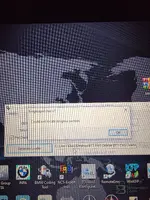
For some reason I get this error
 

Attachments

  • 20260215_203226.webp
    20260215_203226.webp
    1.7 MB · Views: 6
For some reason I get this error

You haven't included the error message or screenshot in your post.

Please copy and paste the specific error text here so we can help. Also, specify which ECU model you are trying to process and confirm if you are running the application as Administrator.
 
Extract btt ews deleter & enigma patcher to the same folder.
Run enigma patcher in the .rar file do not extract it..
 
Extract btt ews deleter & enigma patcher to the same folder.
Run enigma patcher in the .rar file do ...

Thanks for the tip.

So the trick is to run the patcher directly from the archive rather than extracting it first? That's good to know if anyone else is stuck with launch errors.
 
Enigma will creat loader.exe run this to open btt.
This will open a register box, click on the cross...

Got it. That specific detail about the registration box is crucial.

So the summary is:
  • Let Enigma generate loader.exe.
  • Launch the tool via loader.exe.
  • Close the registration popup using the X in the corner, not the "Close" button inside the window.

Thanks for the detailed walkthrough.
 
Got it. That specific detail about the registration box is crucial.

So the summary is:
  • Let Enigma generate loader.exe.
  • Launch the tool via loader.exe.
  • Close the registration popup using the X in the corner, not the "Close" button inside the window.

Thanks for the detailed walkthrough.
Your welcome
 
Hi, I've copied everything here exactly, but it's not working.

We need a bit more detail to help you out.

  • At which step does it fail? Does
    Code:
    loader.exe
    appear?
  • Do you get an error message, or does nothing happen?
  • Have you checked your antivirus/Defender quarantine? These loaders are often flagged as false positives and deleted immediately.

Also, make sure you are running
Code:
loader.exe
as Administrator.
 
Daha önce de indirmiştim ve sonuç aynıydı.

Sonuç aynıysa, sorun büyük ihtimalle dosyanın bozuk inmesi değil, sisteminizdeki bir güvenlik yazılımının müdahale etmesidir.

Genellikle Windows Defender veya antivirüs programları, bu tür "loader" dosyalarını sessizce siler veya çalışmasını engeller.

  • Antivirüs/Defender'ı geçici olarak devre dışı bırakıp tekrar denediniz mi?
  • Klasörü antivirüs dışlamalarına (exclusions) eklediniz mi?

Tam olarak ne olduğunu (hata mesajı mı var, yoksa tıklayınca hiçbir şey mi olmuyor) belirtirseniz daha net yardımcı olabiliriz.
 
all blocker closed.follow all process but same ...defender and other all closed ..
share screenshot.
thank you for interesting.
 

Attachments

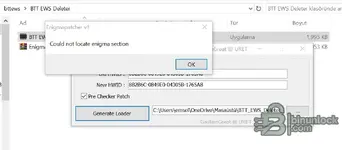
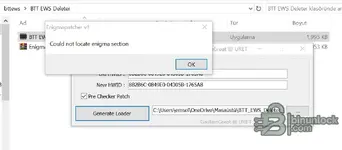
  • Screenshot_1.webp
    Screenshot_1.webp
    23.9 KB · Views: 3
all blocker closed.follow all process but same ...defender and other all closed ..
share screenshot....

Without seeing the screenshot, it is hard to say exactly what is wrong, but if you are sure all antivirus/Defender is disabled, the issue is usually one of two things:

  • Missing Runtimes: You likely need to install the Visual C++ Redistributable AIO (All-in-One) package. These loaders often depend on specific libraries that aren't in a fresh Windows install.
  • File Path: Try moving the folder to the root of your drive (e.g.,
    Code:
    C:\BTT
    ) to avoid issues with long paths or spaces in the folder name.

Does it give a specific error code, or does the application just fail to open?
 
all blocker closed.follow all process but same ...defender and other all closed ..
share screenshot.
thank you for interesting.
I definitely ran it on a virtual machine too, but it didn’t work on the first try either — I had to mess with it for about 5 minutes.
 
Is Winrar up to date, download free from winrar (may help)
Remember do not extract enigma, open winrar and just run enigma.
 
Back