DTS Monaco — Daimler Diagnostic Engineering Suite

DTS Monaco — Daimler Diagnostic Engineering Suite 9.02

Sign in to download for free
  • Thread starter Thread starter Bin
  • Start date Start date
  • Tagged users Tagged users None
DTS Monaco — Daimler Diagnostic Engineering Suite
DTS Monaco — Daimler Diagnostic Engineering Suite 9.02
Sign in to download for free
  • Thread starter Thread starter Bin
  • Start date Start date
  • Tagged users Tagged users None

Bin

Thread Owner
Administrator
Joined
03.05.2025
Messages
1,780
Reaction score
19,517
Bin submitted a new resource:

DTS Monaco — Daimler Diagnostic Engineering Suite - v8.14.016 — Mercedes engineering diagnostics, variant coding and DoIP support

What is it
DTS Monaco is a professional engineering environment from the Diagnostic Tool Set family used for Mercedes Benz and Daimler control units. It works with CBF and SMR-D datasets and ODX projects to run guided diagnostics, variant coding, flashing and function tests across multiple ECUs over CAN and DoIP.

View attachment 1010

Highlights
  • Execution and...

Read more about this resource...
 
Bin updated DTS Monaco — Daimler Diagnostic Engineering Suite with a new update entry:

DTS Monaco 8.16.015 — Engineering Diagnostics Suite (Full Package)

Update contents & structure​

  • \DTS 8.16\ — main program (Setup.exe, Start.exe, DtsUninstaller.exe)
  • Venice4ODX201 — ODX Editor/Browser module (Setup_ODX201_Editor.exe)
  • Docs — InstallationGuide.pdf, Version_History.pdf, Changelog.txt, readme.txt
  • liсеnsе/activation utility — liсеnsе.bin + tool for feature activation
  • Helper: Pass install.txt with quick steps

What’s new vs 8.14/8.13​

  • ...

Read the rest of this update entry...
 
Bin updated DTS Monaco — Daimler Diagnostic Engineering Suite with a new update entry:

DTS Monaco 9.02 — Engineering Diagnostic Suite (Update from 8.16.015) — Full Activation Tools

View attachment 1434
Brief changes vs 8.16.015​

  • Core upgraded to Softing DTS 9 with improved DoIP alongside CAN/K-Line — aimed at newer Mercedes platforms like W223/W206.
  • Faster, more automated workflows based on the latest OTX/Softing DTS 9 architecture for engineering diagnostics.
  • Refreshed projects/databases used by many 2023+...

Read the rest of this update entry...
 

Welcome to BinUnlock — Support Thread

I can't open DTS 9.02 . I get the error "Error ✖ Creation process failed." I've tried it on Windows11 and Windows10. Windows Defender is disabled. Why is this happening? I would appreciate any advice.
 
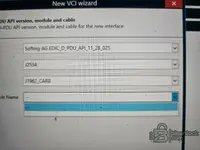
Hi, I have DTS 9.02 installed and I cant get openport vendor to show (see Pic) so it wont connect no matter what i do, i have all the correct and newest drivers installed on my CF-01 Toughbook both windows and adaptors, I didn't have this issue on older versions so I'm clueless so any help or suggestions or patches will be greatly appreciated.
Thanx
Daz
 

Attachments

  • daz1.webp
    daz1.webp
    178.7 KB · Views: 3
Hi, I have DTS 9.02 installed and I cant get openport vendor to show (see Pic) so it wont connect n...

Hi,

In DTS Monaco 9.02, the handling of VCI interfaces (especially PassThru devices like Openport) is handled differently than in version 8.16. The Openport usually does not appear as a dedicated "Vendor" in the main list; it typically falls under the generic PassThru or J2534 category within the D-PDU API settings.

Please check the following steps:

  • Open the DTS System Configurator.
  • Navigate to Interfaces.
  • Check if you can add a PassThru interface. You often need to select the generic "Softing D-PDU API for PassThru" (or similar) and then select your specific device (Openport) within that configuration.

If the vendor list is completely empty, verify that the device is correctly registered in the Windows Registry:

Code:
HKEY_LOCAL_MACHINE\SOFTWARE\PassThruSupport.04.04

You should see an entry for Tactrix Inc. there.

Note: DTS 9.02 is known to be difficult to configure with J2534 PassThru devices compared to previous versions. If you do not specifically need DTS 9 features (like ZenZefi support or SMR-d files for 2021+ cars), it is highly recommended to use DTS 8.16.015, as it works natively and reliably with Openport 2.0.
 
its in the reg and still no passthru my have to go backwards just to keep using DTS

Going back to DTS Monaco 8.16.015 is definitely the best decision if you are using an Openport 2.0.

DTS 9.02 is notoriously problematic with J2534 PassThru devices. It requires specific PDU API implementations that are often missing or incompatible with standard PassThru drivers in the 9.x environment. The "wrapper" used to make J2534 work in DTS 8 often fails in DTS 9.

Unless you are working on the very latest chassis (like W206 or W223) that strictly require newer SMR-d files and ZenZefi certificates, 8.16.015 will cover everything you need and is extremely stable with Tactrix.
 
might buy a better plugin but i don't do enough mercs to warrant the spending

In that case, sticking with DTS 8.16.015 is absolutely the best path.

It costs you nothing and transforms the Openport into a very capable tool for 99% of Mercedes coding tasks. You really only need the expensive hardware (C6/VCI) and DTS 9 for the newest 2021+ models (W206, W223, etc.) that require DoIP and secure certificates. For everything else, the 8.16 + Openport combo is the standard "budget" engineering solution.
 
DTS Monaco 9.02 Openport 2.0 REG fix is now my newest problem as my son messed up my drive and i got most of my files back bar a few i cant scan nothing due to i cant open my open in temp workspace without a reg fix
 
DTS Monaco 9.02 Openport 2.0 REG fix is now my newest problem as my son messed up my drive and i got...

If you lost your registry entries due to a drive issue, the easiest way to restore the Openport 2.0 associations is usually to simply reinstall the EcuFlash / Tactrix drivers. This will automatically rewrite the necessary keys in HKEY_LOCAL_MACHINE\SOFTWARE\PassThruSupport.04.04.

However, if you need to manually re-add the registry keys to make the device visible to the system (and thus to DTS via the PassThru interface), you can create a text file, paste the code below, save it as OpenportFix.reg, and run it:

INI:
Windows Registry Editor Version 5.00

[HKEY_LOCAL_MACHINE\SOFTWARE\PassThruSupport.04.04\Tactrix Inc. - OpenPort 2.0 J2534 ISO/CAN/VPW/PWM]
"Name"="Tactrix Inc. - OpenPort 2.0 J2534 ISO/CAN/VPW/PWM"
"Vendor"="Tactrix Inc."
"ConfigApplication"="op20pt32.dll"
"FunctionLibrary"="op20pt32.dll"
"CAN"=dword:00000001
"ISO15765"=dword:00000001
"J1850PWM"=dword:00000001
"J1850VPW"=dword:00000001
"ISO9141"=dword:00000001
"ISO14230"=dword:00000001

Important for DTS 9.02:
Even with this registry fix, DTS 9.02 requires the Softing D-PDU API to be correctly configured to "bridge" to these registry keys. If your son wiped the drive, you might be missing the settings.xml or pdu_api_root.xml configurations in C:\ProgramData\Softing\Diagnostic Tool Set\.

If the registry fix above doesn't make it appear in the System Configurator, you likely need to reinstall the D-PDU API for PassThru component.
 
ill try and add this first i did reinstall the drivers but no luck....but close to a full reinstall (and i looked at a VCI today just to remove the headache of this openport) and do you ever sleep lol
 
ill try and add this first i did reinstall the drivers but no luck....but close to a full reinstall ...

Haha, the forum never sleeps!

If reinstalling the drivers didn't populate the registry, you might have some permission issues on that registry key, so the manual .reg file is definitely the next step.

Regarding the VCI: You are absolutely right. A dedicated VCI (like an SD Connect C4 DoIP or a C6) removes 90% of the headache because they use native D-PDU API drivers. PassThru (Openport) is always a "wrapper" solution in DTS, which is why it is so fragile in version 9.02.

Let us know if the registry fix works. If it doesn't, the issue is likely in the Softing configuration files (C:\ProgramData\Softing\Diagnostic Tool Set\8.02\Interfaces), not the Windows registry itself.
 
i was using it on my car earlier to add AMG function i let him loose for 20mins and boom issues lols

Kids have a talent for finding the "self-destruct" buttons!

Since it was working just before, that confirms your hardware is fine and it is purely a software configuration issue caused by whatever happened in those 20 minutes.

Apply the registry fix, and if that fails, a clean install of the drivers is the way to go. Also, since you were in the middle of coding AMG functions, once you reconnect, double-check that your variant coding was actually saved to the ECU.

Let us know if the .reg file solves it.
 
my car was fine...his was fine my toughbook wasnt sadly

Ah, the Toughbook took the hit. That is painful—setting those up from scratch with all the Xentry/DTS licensing and seeds is a massive chore.

Hopefully, that registry entry is all that is missing to get the Openport talking to DTS again. If the file system was touched, you might also want to check if the
Code:
PDU_API
folder is still intact in
Code:
C:\ProgramData\Softing\
.

Good luck getting it back up!
 
Back