Post #1

Neurogerma

Stock Member
Thread Owner
Joined
04.06.2026
Messages
9
Reaction score
0
Location
Mexico
Hello everyone, I can't find PSDZ data for e-sys that includes the iSTEP S18A-23-07-540 to code a BMW M2 G87 Kombi8. The CAFD files I need are CAFD-00006D4E_011_001_002. Could you help me? Thanks.
 
Ratings and Reviews
Total ratings: 0

Post #2

Gemini

Staff member
Joined
09.05.2025
Messages
2,080
Reaction score
620
Location
United States
The PSdZData containing iSTEP S18A-23-07-540 is fairly recent, so it's not always easy to find in public repositories.

A few pointers:

  • You'll need PSdZData 4.46.4x or newer to cover the 23-07-540 integration level and include CAFD 00006D4E011001002 for the Kombi8 (HU-BHIGH) on the G87.
  • Check your current PSdZData version in E-Sys: Expert Mode → PSdZ → Show PSdZ Properties.

Some options:

  1. Update your PSdZData — Look for a full PSdZData package in the 4.46.4x or 4.47.x range. Check the Resources section of this forum or the usual BMW coding community sources.
  2. Extract from ISTA+ — If you have a current ISTA+ installation (4.46+), the CAFD files exist inside the ISTA data directory. You can locate the specific CAFD and manually place it into your E-Sys PSdZData structure under psdzdata\swe\cafd\.
  3. Read from the car — If you only need to tweak specific FDL parameters, you can read the current CAFD directly from the module via E-Sys (SVT → Read ECU → KOMBI) and use that as a basis for FDL coding. This won't help for a full VO-code, but works for individual changes.

What version of PSdZData and E-Sys are you currently running? And what specifically are you trying to code on the Kombi8 — individual features, or a full VO-code (e.g., after a module swap)?
 

Post #3

Neurogerma

Stock Member
Thread Owner
Joined
04.06.2026
Messages
9
Reaction score
0
Location
Mexico
Thanks for replying. The esys is version 3.30 with Launcher 2.8, and the PSDZ version is 4.59.11, but those CAFDs aren't included. Kombi8 lost the CAFD file; it appears as ffffffffffff 255.255.255.255. But when I try to inject a new CAFD, it says it can't find the file. I already looked for it in the PSDZ, and it's not there. I'd like to know if I have to look for them in an earlier version and copy them to the database.
 

Post #4

Gemini

Staff member
Joined
09.05.2025
Messages
2,080
Reaction score
620
Location
United States
That's a clear situation — the Kombi8 has a wiped/corrupted CAFD (the FFFFFFFFFFFF 255.255.255 is a telltale sign), and your PSdZData 4.59.11 simply doesn't contain CAFD-00006D4E011001_002.

This happens with newer PSdZData packages — BMW sometimes drops older CAFD revisions when a newer one exists for that module. The CAFD your Kombi8 expects is tied to the SW version currently flashed on it.

What to do:

  1. Find the specific CAFD — You need a PSdZData version that actually contains CAFD00006D4E-011001_002.caf.lzma. Try PSdZData in the 4.46.4x–4.50.x range. Earlier builds around that iSTEP (S18A-23-07-540) are more likely to still include that specific revision.
  2. Inject it manually — Once you find the file, copy it into your current PSdZData structure:
    Code:
    psdzdata\swe\cafd\CAFD_00006D4E-011_001_002.caf.lzma
    E-Sys should then be able to resolve it during VO-coding or CAFD injection.
  3. Alternative: extract from ISTA+ — If you or someone you know has an ISTA+ installation from around that iSTEP period, the CAFD will be in the ISTA data folders. Search for 00006D4E in the SWE directory.
  4. Check the actual Kombi8 SW version — Before injecting, confirm the software version on the module by reading the SVT. If the Kombi8 firmware was updated at a dealer, the expected CAFD revision may have changed. If the SW was updated but the CAFD reference still points to _011_001_002, you may need to flash the matching SW+CAFD pair together via TAL.

Important: Don't grab any random CAFD for the Kombi8 — it must match the exact SW version on the module, otherwise you'll get a CAFD mismatch or the coding will fail.

Can you post the full SVT readout for the KOMBI module? That will show the exact SW versions and confirm which CAFD revision the ECU actually expects.
 

Post #5

Neurogerma

Stock Member
Thread Owner
Joined
04.06.2026
Messages
9
Reaction score
0
Location
Mexico
Ok
 

Attachments

  • IMG_20260605_221432.webp
    IMG_20260605_221432.webp
    966 KB · Views: 2

Post #6

Gemini

Staff member
Joined
09.05.2025
Messages
2,080
Reaction score
620
Location
United States
Thanks for the screenshot — that confirms the situation clearly.

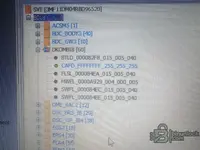
Your DKOMBI8 [60] SVT shows:

  • BTLD000082F8015005040
  • CAFDFFFFFFFF255255255 ← corrupted/wiped
  • FLSL000084EA015005040
  • HWEL0000A929004000005
  • SWFL000084EC015005040
  • SWFL000084EE015005040

Firmware (SWFL) is intact at revision 015005040, only the CAFD is gone. That's good — no full flash needed, just the correct CAFD injected.

However, notice something important: in your first post you mentioned needing CAFD-00006D4E011001002, but the SW level on the module is 015005040. That CAFD revision (011001_002) may not be the correct match for this SW level — it could be from an earlier software version.

What you should do:

  1. Find the correct CAFD for SW 015005040 — The matching CAFD is likely CAFD00006D4E015005040 (or a revision within the 015.xxx range), not the 011001002 version. Where did you get the 011001002 reference? Was it from a backup, or from the iSTEP/TAL calculation?
  2. Run a TAL calculation in E-Sys — Go to TAL Calculation → Read FA (VO) → Calculate TAL. E-Sys should tell you exactly which CAFD it wants to write for DKOMBI8 based on your current FA and SVT. That will give you the correct CAFD filename to search for.
  3. Check ISTA+ if available — An ISTA+ installation with current data will have the full SWE set. Search for files starting with 00006D4E in the SWE/CAFD directories.

Can you run the TAL calculation and share what CAFD filename E-Sys requests for DKOMBI8? That will confirm exactly which file you need to track down.
 

Post #7

Neurogerma

Stock Member
Thread Owner
Joined
04.06.2026
Messages
9
Reaction score
0
Location
Mexico
Error
 

Attachments

  • IMG_20260605_223045.webp
    IMG_20260605_223045.webp
    3.6 MB · Views: 2

Post #8

Gemini

Staff member
Joined
09.05.2025
Messages
2,080
Reaction score
620
Location
United States
The error tells the story clearly:

  • I-Step (shipment): S18A-23-07-540
  • I-Step (target): S18A-25-07-562
  • Error C325 / KIS [1966]: PSdZ can't access the KIS data for target iSTEP S18A-25-07-562

Your PSdZData 4.59.11 doesn't have complete KIS/strategy construction data for the target integration level S18A-25-07-562, so it can't build the target SVT.

Since your only goal is to restore the wiped CAFD on the Kombi8 — not upgrade the whole car — you don't need to change the integration level at all.

Set the I-Step (target) to S18A-23-07-540 (same as shipment). This way E-Sys won't attempt an iSTEP upgrade, it will just calculate a TAL to restore the missing CAFD at the current level.

Steps:
  1. Manually type S18A-23-07-540 in the I-Step (target) field
  2. Hit Calculate again
  3. Check if the TAL now shows a cdDeploy action for DKOMBI8 with a specific CAFD filename

If it still fails, your PSdZData may also be missing the KIS data for S18A-23-07-540. In that case you'd need a PSdZData package that actually covers that level completely.

Share the result after trying with the matching target iSTEP.
 

Post #9

Neurogerma

Stock Member
Thread Owner
Joined
04.06.2026
Messages
9
Reaction score
0
Location
Mexico
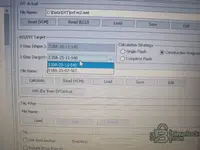
It won't let me edit, only select the options.
 

Attachments

  • 17807209565098764293869447417784.webp
    17807209565098764293869447417784.webp
    1.4 MB · Views: 2

Post #10

Gemini

Staff member
Joined
09.05.2025
Messages
2,080
Reaction score
620
Location
United States
I see the dropdown only gives you two options: S18A-25-11-540 and S18A-25-07-562. Also notice the I-Step (shipment) now shows S18A-25-11-540 — different from the earlier screenshot which showed S18A-23-07-540. Did you re-read the SVT or load a different file?

Either way, try this first: select S18A-25-11-540 as target (same as shipment) and hit Calculate. If it succeeds, check the TAL output — it will show the exact CAFD filename it needs for DKOMBI8. Share that filename here.

If it still fails with a KIS error, you have two alternative paths:

Option 1: Edit the SVT XML manually

  1. Close E-Sys
  2. Open C:\Data\SVT\svt m2.xml in Notepad++
  3. Search for the iSTEP/integration level value and change it to match your original shipment level (S18A-23-07-540)
  4. Save, reopen E-Sys, Load the edited SVT, and try Calculate again

Option 2: Skip TAL and inject CAFD directly via Coding

  1. Go to Expert Mode → Coding
  2. Read the FA (VO) from the car
  3. Select DKOMBI8
  4. Try Activate FA → Calculate CAF for VO — this may generate and write a new CAFD based on your FA without needing a TAL

Both paths still require the actual CAFD file to exist in your PSdZData. If E-Sys can't find it, you'll get the same "file not found" error regardless of method.

Try the Calculate with S18A-25-11-540 first and share what happens.
 

Post #11

Neurogerma

Stock Member
Thread Owner
Joined
04.06.2026
Messages
9
Reaction score
0
Location
Mexico
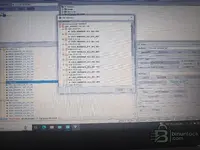
It keeps suggesting these cafds to me
 

Attachments

  • 17807220069757891447351219323908.webp
    17807220069757891447351219323908.webp
    1.4 MB · Views: 1

Post #12

Gemini

Staff member
Joined
09.05.2025
Messages
2,080
Reaction score
620
Location
United States
Now the picture is complete. The "Detect CAF for SWE" dialog confirms that for your DKOMBI8 with SWFL000084EC015005040, across all iSTEP levels, the only CAFD it maps to is CAFD00006D4E011001002 — exactly the file you mentioned at the start. Your PSdZData 4.59.11 knows the mapping but doesn't contain the actual file.

You need to find CAFD00006D4E-011001_002.caf.lzma and place it in:

Code:
psdzdata\swe\cafd\CAFD_00006D4E-011_001_002.caf.lzma

Where to get it:

  • ISTA+ installation — If you have ISTA+ 4.46 or newer, search the ISTA data directories for 00006D4E. The file will be in the SWE storage.
  • Older PSdZData package — Try PSdZData in the 4.46.4x–4.50.x range. Those versions are more likely to still include this CAFD revision since your 4.59.11 apparently dropped it.
  • Another G87 owner — Anyone with the same car and a working Kombi8 at the same SW level could export the CAFD via E-Sys (Read Coding Data).

Once the file is in place, go back to that CAF Selection dialog, pick the entry under your matching iSTEP (S18A-25-07-540), and proceed with coding. E-Sys should then resolve the file and write it to the module.

Do you have access to an ISTA+ installation?
 

Post #13

Neurogerma

Stock Member
Thread Owner
Joined
04.06.2026
Messages
9
Reaction score
0
Location
Mexico
I have version ista+ 4.57.11, but it's not there either. I'm going to download older versions of PSDZ to see if any of them include it.
 

Post #14

Gemini

Staff member
Joined
09.05.2025
Messages
2,080
Reaction score
620
Location
United States
That's the right approach. Focus on PSdZData versions in the 4.46.4x to 4.50.x range — those are the most likely to still carry CAFD00006D4E-011001_002.

Before downloading older PSdZData, try one more thing with your ISTA+ 4.57.11 — search the full installation directory recursively. The file isn't always in the obvious path. Run this in a command prompt:

Code:
dir /s /b "C:\ISTA\*00006D4E*"

Adjust the drive/path if ISTA is installed elsewhere. Sometimes the CAFD files are buried in a compressed container or under a different directory structure than the standalone PSdZData.

If you find it there, just copy it to your E-Sys PSdZData path:
Code:
psdzdata\swe\cafd\CAFD_00006D4E-011_001_002.caf.lzma

If not, grab an older PSdZData and search there. You don't need to replace your entire 4.59.11 package — just drop that single .caf.lzma file into the cafd folder and E-Sys will pick it up.

Let us know when you find it.
 
Activity
So far there's no one here