International Diamond Logic Builder for Chassis Diagnostics

International Diamond Logic Builder for Chassis Diagnostics 06.2022
Sign in to download for free
  • Thread starter Thread starter Bin
  • Start date Start date
  • Tagged users Tagged users None
International Diamond Logic Builder for Chassis Diagnostics
International Diamond Logic Builder for Chassis Diagnostics 06.2022
Sign in to download for free
  • Thread starter Thread starter Bin
  • Start date Start date
  • Tagged users Tagged users None

Bin

Thread Owner
Administrator
Joined
03.05.2025
Messages
1,785
Reaction score
20,161
New release thread for International Diamond Logic Builder for Chassis Diagnostics: discuss, share feedback, and get help.


International Diamond Logic Builder for Chassis Diagnostics​

06.2022 data release for International DLB, read faults, view signals, configure chassis features

International Diamond Logic Builder (DLB) is a chassis diagnostic and programming environment focused on electrical and body systems used on International trucks and IC buses. It is commonly used to identify modules on the vehicle network, review faults, monitor inputs and outputs, and validate feature behavior during troubleshooting.
Official references:

What's inside:
  • Overview & screenshots
  • Version history and compatibility
  • Download link and setup notes

👉 View full details and download — International Diamond Logic Builder for Chassis Diagnostics
 
Is there any way I can get some help with the install? I'm missing something or I'm not understanding the directions. I have tried multiple times and i cant get it to open. Thanks
 
Is there any way I can get some help with the install? I'm missing something or I'm not understandin...

We need a bit more detail to help you out. When you say it won't open, do you get a specific error message, or does the program just fail to launch (splash screen appears and closes)?

Here are a few common things to check with DLB installations:

  • Did you copy the included раtсh/fix files into the installation folder (replacing the original files)? This is usually the most critical step.
  • Are you running the executable as Administrator?
  • Check if your antivirus or Windows Defender quarantined any files during extraction or installation.

If you can post a screenshot of the error or describe exactly what happens when you double-click the icon, we can guide you better.
 
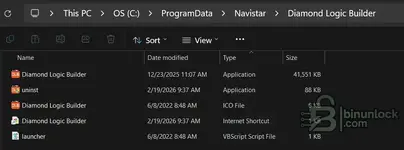
I am ready to cop and past the last files but I do not have the data folder to past them in

1771515633038.webp
 

Attachments

  • 1771515584195.webp
    1771515584195.webp
    20.8 KB · Views: 3
We need a bit more detail to help you out. When you say it won't open, do you get a specific error message, or does the program just fail to launch (splash screen appears and closes)?

Here are a few common things to check with DLB installations:

  • Did you copy the included раtсh/fix files into the installation folder (replacing the original files)? This is usually the most critical step.
  • Are you running the executable as Administrator?
  • Check if your antivirus or Windows Defender quarantined any files during extraction or installation.

If you can post a screenshot of the error or describe exactly what happens when you double-click the icon, we can guide you better.
Never mind... .I got it, Thank you for the quick response.
 
Back