JLR 169 LATES FULL OFFLINE INSTALATION GUIDE AND FILES

Post #1

JLR SDD (Symptom Driven Diagnostics) V169 is a professional dealer-level diagnostic software version for Jaguar and Land Rover vehicles. It is used with a diagnostic interface to perform comprehensive diagnostics, programming, and calibration, typically pre-downloaded with necessary calibration files for newer vehicle models.

Key details about JLR SDD V169:
  • Version: V169 often refers .
  • Purpose: Allows for in-depth diagnostics, fault finding, and coding, often without time limits on activated versions.
  • System Requirements: Frequently paired with Panasonic CF-D1 laptops for optimal performance, often sold as "boot and go" packages.
  • Functionality: Supports calibration file downloads and full system diagnostics for modern Jaguar Land Rover vehicles

 

Attachments

  • _jar
  • JLR 169 read me english.txt

Post #41

Hey, I'm doing everything as per readme.txt but still get the same error as @Danielle253. Looks like ke***n doesn't work because it doesn't create any files inside SDD folder, but I have no idea why.
 

Post #42

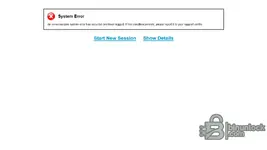
Okay, just to be clear - I'm doing everything as per readme(install all prequisites, install sdd, add lines to the files, run ke***n, create folder, add publickey to the folder, add long name file to the users folder in SDD, run SDD) but still get the
" System Error
An unrecoverable system error has occurred and been logged"
error.
Please see attached log file.
Any help would be appreciated as I need SDD badly as my XF 2.0 is bricked after battery removal.
 

Attachments

  • 1792745363413.webp
    1792745363413.webp
    22.7 KB · Views: 62
  • sdd.log
    sdd.log
    6.7 KB · Views: 69

Post #43

Well I see no-one has posted here for a while. I have a brand new clean install of Windows 10 Pro 1511 (an early version) and I have been through this thread 10 times. I have loaded all the software, Java version, Net Framework, Adobe etc as instructed. I get the same issue as Zaciek and Danielle253 i.e. " System Error - An unrecoverable system error has occurred and been logged"

After running SDD as administrator I am told initially that I need internet connection. Once I press to proceed offline I get the error message above. In the thread it does refer to "right click - Run as administrator" for the keyg*n but this is not possible with Java apps. Right clicking does not bring the "Run as administrator" option. But I ran normally and as administrator via command prompt. Always same result. If anyone (Zaciek or Danielle253) managed to get it to work, I would love to know how.
 

Post #44

Good questions — the readme is a bit unclear on those steps. Let me clarify:

Step 5 — Folder & publickey.bin

The full folder path is the name. You need to create the entire nested directory structure:

Code:
c:\com\cognitran\topix\client\sdd\v3_0\security\

So starting from the root of C:\, you're creating:
  • com → inside it cognitran → inside it topix → inside it client → inside it sdd → inside it v3_0 → inside it security

You can do this quickly by opening Command Prompt as Administrator and running:
Code:
mkdir c:\com\cognitran\topix\client\sdd\v3_0\security

As for publickey.bin — this file is generated by the kеуg** in Step 4. When you run:
Code:
java -jar kеуg**.jar
it should output publickey.bin into the same directory where you ran the kеуg** (the keygen_jar folder). After it's generated, move/copy it into the security folder you just created.

Step 6 — The user hash file

The long string:
Code:
aa3b39f875924856d6cc1149673abe3eaed2ea6dded4703beedd811fac436fa2

That is the filename — it's not a folder. It's a file with that hash as its name (no extension). This file is also generated by the kеуg** in Step 4, same as publickey.bin.

So after running kеуg*.jar, you should find both files in the kеуg* output directory:
  • publickey.bin → move to c:\com\cognitran\topix\client\sdd\v3_0\security\
  • aa3b39f8... (the hash file) → move to C:\ProgramData\JLR\IDS\Users\

Note: The ProgramData folder is hidden by default in Windows. To navigate to it, either type the path directly in File Explorer's address bar, or enable "Show hidden files" in Folder Options.

If the kеуg** doesn't produce both files, make sure Java JRE is properly installed and you're running it from the correct directory where kеуg**.jar and all the .jar dependencies are located.
JLR SDD (Symptom Driven Diagnostics) V169 is a professional dealer-level diagnostic software version for Jaguar and Land Rover vehicles. It is used with a diagnostic interface to perform comprehensive diagnostics, programming, and calibration, typically pre-downloaded with necessary calibration files for newer vehicle models.

Key details about JLR SDD V169:
  • Version: V169 often refers .
  • Purpose: Allows for in-depth diagnostics, fault finding, and coding, often without time limits on activated versions.
  • System Requirements: Frequently paired with Panasonic CF-D1 laptops for optimal performance, often sold as "boot and go" packages.
  • Functionality: Supports calibration file downloads and full system diagnostics for modern Jaguar Land Rover vehicles
Very good information. Thank you for sharing
 

Post #45

Very good information. Thank you for sharing

Glad it was useful, HDW0871 — hope the install goes smoothly for you. If you hit that "unrecoverable system error" that a few others in the thread are seeing, post your sdd.log and I'll take a look.
 

Post #46

Thanks to OP for posting this, I was able to get it up and working today on V169.001 without issue by following these instructions and with this KG.
 
Activity
So far there's no one here