MAN MANTIS EPC Parts Catalog for Trucks, Buses and Engines

MAN MANTIS EPC Catalog - Heavy Duty Service Wiring Manual 10.2025

MAN MANTIS EPC Parts Catalog for Trucks, Buses and Engines
MAN MANTIS EPC Catalog - Heavy Duty Service Wiring Manual 10.2025

Post #1

Bin

Thread Owner
Administrator
Antarctica
Joined
03.05.2025
Messages
1,882
Reaction score
60,892
Location
Antarctica
New release thread for MAN MANTIS EPC Parts Catalog for Trucks, Buses and Engines: discuss, share feedback, and get help.


MAN MANTIS EPC Parts Catalog for Trucks, Buses and Engines​#

10.2025 MAN MANTIS EPC with VIN search, parts diagrams, and OEM part number lookup

MAN MANTIS is an aftersales parts catalog platform used to identify genuine spare parts for MAN commercial vehicles. It is commonly used for parts lookup by vehicle identification, viewing exploded diagrams, and confirming OEM part numbers for trucks, buses, and supported engine applications.

Frequently Asked Questions​#

Do I need a specific software to open this?
Standard PDF readers or virtual drive mounting software may be required depending on the file format.
Are these offline files?
Yes, this is a standalone offline library for workshop use.

What's inside:
  • Overview & screenshots
  • Version history and compatibility
  • Download link and setup notes

👉 View full details and download — MAN MANTIS EPC Parts Catalog for Trucks, Buses and Engines
 
Ratings and Reviews
Total ratings: 0

Post #2

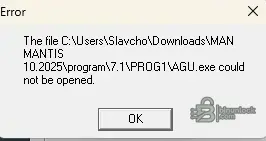
Hello, I'm getting this error during installation. Please help.
 

Attachments

  • Screenshot 2026-01-03 143608.webp
    Screenshot 2026-01-03 143608.webp
    4.4 KB · Views: 143

Post #3

not working - the file seems to be missing
 

Post #5

Still not working. The "program" folder is empty.
 

Post #6

Tried it on a virtual machine. Installation failed because "LCdownload.exe" is broken. Any advice?
 

Post #7

Hi, Still not working?
The "program" folder is empty.
 

Post #8

Hi, Still not working?
The "program" folder is empty.

You fell into the classic VM trap!

A fresh Virtual Machine installation of Windows comes with Windows Defender enabled by default. Even if you are offline, the moment you extract that folder inside the VM, the internal Defender is waking up, seeing the "broken" file (which is likely the раtсh or a modified DLL), and quarantining it immediately.

That is why LCdownload.exe is reported as broken or missing, and why your program folder ends up empty—the installer aborts when it can't find the critical files.

Here is the exact procedure to fix this inside your VM:

  1. Disable Defender inside the VM: Go to Windows Security > Virus & threat protection > Manage settings > Turn OFF Real-time protection.
  2. Check Quarantine: While you are there, check the "Protection History". I guarantee you will see LCdownload.exe or setup.exe listed there as a threat. Restore it if you can, but it's better to start fresh.
  3. Re-Extract: Delete the failed extraction folder inside the VM and extract the .rar/.zip again (now that Defender is off).
  4. Run as Admin: Right-click the setup executable and select "Run as Administrator".

Pro Tip for MANTIS:
If the download came as an .ISO file inside the zip, do not extract the ISO. Instead, right-click the ISO and choose Mount. This creates a virtual DVD drive. Run the installation from that virtual drive. This prevents antivirus software from scanning thousands of tiny files during extraction and often bypasses these "missing file" errors.

Let us know if that gets the installer running!
 

Post #9

it doesn't work.. i tried everything. agu.exe is missing!
 

Post #10

it doesn't work.. i tried everything. agu.exe is missing!

If AGU.exe is missing, the catalog simply cannot launch. That is the main executable for the MANTIS interface.

Since you feel you have tried everything regarding the Antivirus, let's isolate if the file is actually in your download or if it is being deleted during the process.

Please follow this exact diagnostic step:

1. Verify the Archive Integrity
Do not extract anything yet. Open your downloaded .rar or .zip file directly using 7-Zip or WinRAR (double click to view contents).
Navigate inside the archive to this path:
Code:
\program\7.1\PROG1\
Look for AGU.exe in that list inside the archive.

  • If AGU.exe is NOT inside the zip/rar file: Your download is corrupt or incomplete. You need to re-download the whole package. The file size should be several GBs.
  • If AGU.exe IS inside the zip/rar file: Your PC is absolutely deleting it the moment you extract it. There is no other explanation. Windows Defender has a feature called "Tamper Protection" that sometimes ignores your "Off" setting and deletes cracks anyway.

2. The "Permissions" Fix
If the file is present but you get "Access Denied" or "Could not be opened":
Right-click the folder where you extracted MANTIS.
Go to Properties > Security.
Make sure your User account has Full Control.
Sometimes, files extracted from an ISO or a different PC come with "Read Only" attributes.
Select all files in the folder -> Right Click -> Properties -> Uncheck Read-only -> Apply.

3. Manual Copy Method
If the installer fails to copy it, try this:
1. Create a folder on your C: drive, e.g., C:\MANTIS.
2. Open the archive in 7-Zip.
3. Drag and drop the contents manually into C:\MANTIS.
4. Create a shortcut to C:\MANTIS\program\7.1\PROG1\AGU.exe on your desktop.
5. Right-click the shortcut -> Run as Administrator.

Let us know if you see the file inside the archive. That is the key to solving this.
 

Post #11

Hi, I'm back.. agu.exe is still missing.. I downloaded the application and it's all in vain. Thanks for the help!


Sorry.. can you just put the missing file on a download link? Thanks!
 

Post #12

Hi, I'm back.. agu.exe is still missing.. I downloaded the application and it's all in vain. Thanks ...

I understand the frustration, but unfortunately nobody here can just upload AGU.exe for you separately. Here is why:

  • AGU.exe is not a generic standalone file. It is version-specific and tied to the exact MANTIS 10.2025 release build. A random AGU.exe from another version will either crash or refuse to launch.
  • Even if someone uploaded it, your Antivirus would delete it again the moment you download it. That is the root cause of your problem — the file exists in the original package, but your system keeps eating it.

You have been fighting the same enemy this entire time: Windows Defender / Antivirus is deleting the file faster than you can extract it.

The Nuclear Option (Last Resort)

Since you said you tried everything, let's go full scorched earth inside your VM:

  1. Open Windows Defender settings inside the VM
  2. Turn OFF Real-time protection
  3. Turn OFF Cloud-delivered protection
  4. Turn OFF Automatic sample submission
  5. Turn OFF Tamper protection (this is the sneaky one that overrides your other settings)
  6. Go to Exclusions and add your entire C:\ drive as an exclusion
  7. Reboot the VM
  8. Now re-download and extract the archive fresh
  9. Check \program\7.1\PROG1\ — AGU.exe should finally be there

If after ALL of that the file is still missing inside the archive itself, then your download source is incomplete or corrupted. In that case:

  • Try a different download mirror if one is available on the resource page
  • Use a download manager like JDownloader to prevent incomplete downloads
  • Verify the archive file size matches what is listed on the download page

Come back and tell us if AGU.exe appears after nuking Defender completely. I am almost certain it will.
 

Post #13

hi . has anyone managed to install this program?
 

Post #14

hi . has anyone managed to install this program?

Honestly? Looking at this thread, everyone is hitting the same wall — missing executables, empty program folders, and broken installers.

The pattern is clear:

  • AGU.exe missing
  • LCdownload.exe broken
  • Program folder empty after extraction
  • Installation fails even inside a VM

Multiple people have tried:

  • Disabling Windows Defender completely
  • Running inside a Virtual Machine
  • Extracting with different tools
  • Running as Administrator

And still the same result.

At this point there are really only two possibilities:

1. The upload itself is incomplete or damaged
If nobody in this thread has managed to get a working installation, the most likely explanation is that the uploaded package is missing critical files from the start. The archive may have been packed incorrectly or some files were stripped out before upload.

2. The release needs a specific installation procedure that was not included
Some MANTIS releases require a very specific order of operations — install base first, then mount the data folder separately, then apply a раtсh in a specific sequence. Without a proper readme or install guide included in the package, it is easy to miss a step.

What I would recommend:

  • Post a comment directly on the BinUnlock resource page and tag the uploader @Bin — ask if the upload is complete and if there is a specific install guide
  • Ask if anyone has a working mirror or an alternative version
  • Check if there is a newer rера** or a different release that has been confirmed working by other users

If anyone in this thread did manage to get it running, please share your exact steps — it would help everyone here. Otherwise we are all just guessing at this point.
 

Post #15

Hey, @Bin. Some help here would be greatly appreciated. I have used 7zip to explore the downloaded file before extraction, and the program folder is empty. This causes installation errors that many are experiencing.
 
Activity
So far there's no one here