Multiecuscan — Advanced Diagnostics for Fiat/Alfa/Lancia/Chrysler/Jeep

Multiecuscan - Fiat/Alfa/Lancia OBD2 Diagnostic Software 5.3

Sign in to download for free
Multiecuscan — Advanced Diagnostics for Fiat/Alfa/Lancia/Chrysler/Jeep
Multiecuscan - Fiat/Alfa/Lancia OBD2 Diagnostic Software 5.3
Sign in to download for free

Bin

Thread Owner
Administrator
Joined
03.05.2025
Messages
1,825
Reaction score
39,023
New release thread for Multiecuscan — Advanced Diagnostics for Fiat/Alfa/Lancia/Chrysler/Jeep: discuss, share feedback, and get help.


Multiecuscan — Advanced Diagnostics for Fiat/Alfa/Lancia/Chrysler/Jeep​

Diagnose Fiat/Alfa/Lancia/Chrysler/Jeep systems with live graphs, DTC scan, actuators, and guided.

Multiecuscan 5.2 is a Windows diagnostic application for FCA brands (Fiat, Alfa Romeo, Lancia,
Chrysler, Jeep, plus selected Suzuki/Dodge). It helps you identify modules, read/clear DTCs, stream
live data with graphs, run actuator tests, and perform guided adjustments. The UI is simple:
[F2] Select vehicle/module, [F10] Connect, [F11] Scan or start a simulation session for training.

...

Frequently Asked Questions​

Which Windows version is recommended?
For maximum stability during ECU flashing and diagnostics, a clean installation of Windows 10 (64-bit) is recommended.
Is it compatible with J2534 PassThru?
Most modern software versions support standard J2534 interfaces like Scanmatik 2 Pro, OpenPort 2.0, and specific VCI adapters.

What's inside:
  • Overview & screenshots
  • Version history and compatibility
  • Download link and setup notes

👉 View full details and download — Multiecuscan — Advanced Diagnostics for Fiat/Alfa/Lancia/Chrysler/Jeep
 
Bin updated Multiecuscan — Advanced Diagnostics for Fiat/Alfa/Lancia/Chrysler/Jeep with a new update entry:
MultiECUScan updated to v5.3 R1 (expanded Tonale and 124 coverage)

Update summary
This resource has been updated from 5.2 to MultiECUScan 5.3 R1. The 5.3 line expands vehicle and control unit coverage and refreshes ISO code data up to 2012–2024, based on the vendor release history.


What’s new in 5.3 vs 5.2
  • Coverage updates: added information for more ISO codes from 2012–2024 vehicles
  • Alfa Romeo Tonale: new support for 1.3 PHEV and 1.5 MHEV, plus additional Tonale control units including engine...

Read the rest of this update entry...
 
Nouveau sujet de discussion pour Multiecuscan — Diagnostic avancé pour Fiat/Alfa/Lancia/Chrysler/Jeep : discutez, partagez vos commentaires et obtenez de l’aide.


Multiecuscan — Diagnostic avancé pour Fiat/Alfa/Lancia/Chrysler/Jeep​

Diagnostiquez les systèmes Fiat/Alfa/Lancia/Chrysler/Jeep avec des graphiques en direct, un scan DTC, des actionneurs et un guidage.


Foire aux questions​

Quelle version de Windows est recommandée ?
Pour une stabilité maximale lors du flashage et du diagnostic de l'ECU, une installation propre de Windows 10 (64 bits) est recommandée.
Est-ce compatible avec le système PassThru J2534 ?
La plupart des versions logicielles modernes prennent en charge les interfaces J2534 standard telles que Scanmatik 2 Pro, OpenPort 2.0 et certains adaptateurs VCI.

Contenu :
  • Aperçu et captures d'écran
  • Historique des versions et compatibilité
  • Lien de téléchargement et notes d'installation

👉 Consultez les détails complets et téléchargez — Multiecuscan — Diagnostic avancé pour Fiat/Alfa/Lancia/Chrysler/Jeep
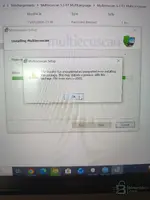
Error installation
 

Attachments

  • IMG_20260420_120723.webp
    IMG_20260420_120723.webp
    597 KB · Views: 4
Error installation

The error 2503 (and its companion 2502) is a Windows Installer permissions issue — the MSI is not running with full admin rights. This is very common on Windows 10/11.

Fix — run the MSI as Administrator via Command Prompt:

  1. Press Win + S, type cmd, right-click Command PromptRun as administrator
  2. Type the following (adjust the path to match your download location):

Code:
msiexec /i "C:\Users\VOTRE_NOM\Téléchargements\Multiecuscan 5.3 R1 MultiLanguage\Multiecuscan 5.3 R1 MultiLanguage\SetupMultiecuscan53R1.msi"

Replace VOTRE_NOM with your actual Windows username. If the path contains spaces, keep the quotes.

If it still fails, also try this:

  • Make sure Windows Installer service is running: Win + Rservices.msc → find Windows Installer → right-click → Start (or Restart)
  • Temporarily disable your antivirus — some AV tools block MSI temp file creation
  • Copy the entire extracted folder to C:\Temp\ and run the MSI from there (avoids permission issues with deep/nested download paths)

This should resolve the 2503 error. Let us know if it installs correctly after that.
 
c'è sempre un antivirus w10 che interrompe il

Capito. Se su Windows 10 l’antivirus “interrompe” sempre l’installazione (MSI/EXE), prova nell’ordine:

  • Esclusione cartella/file (meglio che disattivare tutto):
    Copia/estra i file in una cartella tipo C:\Temp\Multiecuscan e poi aggiungi un’esclusione in Windows Security (Antivirus & protezione minacce) per:
    1) C:\Temp\Multiecuscan
    2) eventualmente anche SetupMultiecuscan53R1.msi
  • Run as Admin: installa sempre con tasto destro → Esegui come amministratore
  • Disattiva “Protezione in tempo reale” solo durante l’installazione:
    Windows Security → Protezione da virus e minacce → Gestisci impostazioni → disattiva “Protezione in tempo reale”.
    Dopo l’installazione riattivala subito.
  • Controlla anche “Controlled folder access”:
    Windows Security → Protezione da ransomware → Accesso cartelle controllato
    → disattivala temporaneamente, oppure consenti msiexec.exe / la cartella di installazione.
  • Usa un’installazione “pulita” dalla cartella locale:
    Non avviare l’MSI da Download</b] o da zip/percorsi strani: estrai tutto in C:\Temp\... e lancia lì.
    [*]Reinstalla/installa Windows Installer component (se continua): fai un repair di Windows Installer dal sistema è raro, ma se l’errore persiste insieme ad AV è quasi sempre l’antivirus a bloccare.


Per darti la soluzione più precisa: che antivirus usi (Defender o altro)? E che messaggio/errore esatto appare (2503/2502 + eventuale testo)? Se mi mandi uno screenshot dell’avviso antivirus va benissimo.
 
Activity
So far there's no one here
Back