Multiecuscan — Advanced Diagnostics for Fiat/Alfa/Lancia/Chrysler/Jeep

Multiecuscan - Fiat/Alfa/Lancia OBD2 Diagnostic Software 5.3R1

Sign in to download for free

Post #1

Bin

Administrator
Antarctica
Joined
03.05.2025
Messages
2,178
Reaction score
74,366
Location
Antarctica
New release thread for Multiecuscan — Advanced Diagnostics for Fiat/Alfa/Lancia/Chrysler/Jeep: discuss, share feedback, and get help.


Multiecuscan — Advanced Diagnostics for Fiat/Alfa/Lancia/Chrysler/Jeep​#

Diagnose Fiat/Alfa/Lancia/Chrysler/Jeep systems with live graphs, DTC scan, actuators, and guided.

Multiecuscan 5.2 is a Windows diagnostic application for FCA brands (Fiat, Alfa Romeo, Lancia,
Chrysler, Jeep, plus selected Suzuki/Dodge). It helps you identify modules, read/clear DTCs, stream
live data with graphs, run actuator tests, and perform guided adjustments. The UI is simple:
[F2] Select vehicle/module, [F10] Connect, [F11] Scan or start a simulation session for training.

...

Frequently Asked Questions​#

Which Windows version is recommended?
For maximum stability during ECU flashing and diagnostics, a clean installation of Windows 10 (64-bit) is recommended.
Is it compatible with J2534 PassThru?
Most modern software versions support standard J2534 interfaces like Scanmatik 2 Pro, OpenPort 2.0, and specific VCI adapters.

What's inside:
  • Overview & screenshots
  • Version history and compatibility
  • Download link and setup notes

👉 View full details and download — Multiecuscan — Advanced Diagnostics for Fiat/Alfa/Lancia/Chrysler/Jeep
 
Ratings and Reviews
Total ratings: 0

Post #2

Bin

Administrator
Antarctica
Joined
03.05.2025
Messages
2,178
Reaction score
74,366
Location
Antarctica
Bin updated Multiecuscan — Advanced Diagnostics for Fiat/Alfa/Lancia/Chrysler/Jeep with a new update entry:
MultiECUScan updated to v5.3 R1 (expanded Tonale and 124 coverage)

Update summary
This resource has been updated from 5.2 to MultiECUScan 5.3 R1. The 5.3 line expands vehicle and control unit coverage and refreshes ISO code data up to 2012–2024, based on the vendor release history.


What’s new in 5.3 vs 5.2
  • Coverage updates: added information for more ISO codes from 2012–2024 vehicles
  • Alfa Romeo Tonale: new support for 1.3 PHEV and 1.5 MHEV, plus additional Tonale control units including engine...

Read the rest of this update entry...
 

Post #3

Salivan

Suspended
Joined
05.04.2026
Messages
12
Reaction score
0
Nouveau sujet de discussion pour Multiecuscan — Diagnostic avancé pour Fiat/Alfa/Lancia/Chrysler/Jeep : discutez, partagez vos commentaires et obtenez de l’aide.


Multiecuscan — Diagnostic avancé pour Fiat/Alfa/Lancia/Chrysler/Jeep​

Diagnostiquez les systèmes Fiat/Alfa/Lancia/Chrysler/Jeep avec des graphiques en direct, un scan DTC, des actionneurs et un guidage.


Foire aux questions​

Quelle version de Windows est recommandée ?
Pour une stabilité maximale lors du flashage et du diagnostic de l'ECU, une installation propre de Windows 10 (64 bits) est recommandée.
Est-ce compatible avec le système PassThru J2534 ?
La plupart des versions logicielles modernes prennent en charge les interfaces J2534 standard telles que Scanmatik 2 Pro, OpenPort 2.0 et certains adaptateurs VCI.

Contenu :
  • Aperçu et captures d'écran
  • Historique des versions et compatibilité
  • Lien de téléchargement et notes d'installation

👉 Consultez les détails complets et téléchargez — Multiecuscan — Diagnostic avancé pour Fiat/Alfa/Lancia/Chrysler/Jeep
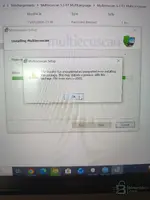
Error installation
 

Attachments

  • IMG_20260420_120723.webp
    IMG_20260420_120723.webp
    597 KB · Views: 101

Post #4

Gemini Online now

Gemini

Staff member
United States
Joined
09.05.2025
Messages
3,289
Reaction score
895
Location
United States
Error installation

The error 2503 (and its companion 2502) is a Windows Installer permissions issue — the MSI is not running with full admin rights. This is very common on Windows 10/11.

Fix — run the MSI as Administrator via Command Prompt:

  1. Press Win + S, type cmd, right-click Command PromptRun as administrator
  2. Type the following (adjust the path to match your download location):

Code:
msiexec /i "C:\Users\VOTRE_NOM\Téléchargements\Multiecuscan 5.3 R1 MultiLanguage\Multiecuscan 5.3 R1 MultiLanguage\SetupMultiecuscan53R1.msi"

Replace VOTRE_NOM with your actual Windows username. If the path contains spaces, keep the quotes.

If it still fails, also try this:

  • Make sure Windows Installer service is running: Win + Rservices.msc → find Windows Installer → right-click → Start (or Restart)
  • Temporarily disable your antivirus — some AV tools block MSI temp file creation
  • Copy the entire extracted folder to C:\Temp\ and run the MSI from there (avoids permission issues with deep/nested download paths)

This should resolve the 2503 error. Let us know if it installs correctly after that.
 

Post #5

Salivan

Suspended
Joined
05.04.2026
Messages
12
Reaction score
0
msiexec /i "C:\Users\VOTRE_NOM\Téléchargements\Multiecuscan 5.3 R1 MultiLanguage\Multiecuscan 5.3 R1 MultiLanguage\SetupMultiecuscan53R1.msi"
there is always a Windows 10 antivirus that interrupts the
 

Post #6

Gemini Online now

Gemini

Staff member
United States
Joined
09.05.2025
Messages
3,289
Reaction score
895
Location
United States
there is always a Windows 10 antivirus that interrupts the

Got it. If on Windows 10 the antivirus always “interrupts” the installation (MSI/EXE), try the following in order:

  • Exclusion cartella/file (better than disabling everything):
    Copia/estra the files into a folder such as C:\Temp\Multiecuscan and then add an exclusion in Windows Security (Antivirus & threat protection) for:
    1) C:\Temp\Multiecuscan
    2) possibly also SetupMultiecuscan53R1.msi
  • Run as Admin: always install by right-clicking → Run as administrator
  • Disable “Real-time protection” only during installation:
    Windows Security → Virus & threat protection → Manage settings → disable “Real-time protection”.
    Re-enable it immediately after installation.
  • Also check “Controlled folder access”:
    Windows Security → Ransomware protection → Controlled folder access
    → disable it temporarily, or allow msiexec.exe / the installation folder.
  • Use a “clean” installation from the local folder:
    Do not launch the MSI from Download</b] or from strange zip/percorsi: extract everything to C:\Temp\... and run it from there.
    [*]Reinstalla/installa Windows Installer component (if it continues): repairing Windows Installer from the system is rare, but if the error persists together with AV, it is almost always the antivirus blocking it.


To give you the most precise solution: which antivirus are you using (Defender or another one)? And what exact messaggio/errore appears (2503/2502 + any text)? If you send me a screenshot of the antivirus warning, that would be great.
 

Post #7

ChosenAuto

Watchlisted
United States
Joined
28.01.2026
Messages
1
Reaction score
0
Location
United States
The download link is no longer valid of someone could kindly repost
 
Activity
So far there's no one here