VCDS Revoked licens

auto479139

Stock Member
Thread Owner
Joined
14.04.2026
Messages
6
Reaction score
0
Location
Polen
Hello everyone,

I simply wanted to buy a clone cable and download VCDS from this forum to read my cars. Here's what's happening: I install it as described, and it says the cable is recognized, etc., but the liсеnsе is revoked. I can't perform any car scans right now, etc. I don't understand what's going wrong. When I try to scan the car with the revoked liсеnsе, I get an error message like "Function not supported by the Gateway." I wanted to ask what the problem is, how I can solve it, and if there are any instructions or guides for my cable or my problem.

Thanks in advance.
 

Attachments

  • 2.webp
    2.webp
    142.1 KB · Views: 7
  • 1.webp
    1.webp
    44.7 KB · Views: 5
Hello everyone,

I simply wanted to buy a clone cable and download VCDS from this forum to read my c...

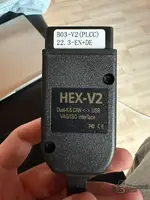
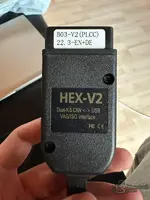
Your cable is a HEX-V2 clone with a B03-V2 (PLCC) board, and the VCDS release you're looking at is 25.3.0 with the ATMEGA 162 loader. That's the mismatch — here's the issue:

The Problem

The ATMEGA 162 loader/сrаск is designed for clone cables that have an ATMEGA162 chip inside. Your cable label says B03-V2 (PLCC), which typically uses a different microcontroller (often an PLCC-packaged chip, not the standard ATMEGA162 DIP). When you flash the ATMEGA162 loader onto a cable that doesn't have that chip, the liсеnsе validation fails and VCDS reports the liсеnsе as revoked.

What You Need To Do

  1. Identify your cable's actual chip. Open the cable housing carefully and check what microcontroller is on the PCB. The "PLCC" in the label strongly suggests it's a PLCC-packaged chip (possibly ATMEGA162 in PLCC package, or another variant).
  2. Match the VCDS loader to your chip. You need a VCDS сrаск/loader that specifically supports the B03-V2 PLCC board. Not every loader works with every clone — the loader must match the hardware.
  3. Check the VCDS version compatibility. The label says 22.3-EN+DE, meaning the cable originally came with VCDS 22.3. Newer VCDS versions (like 25.3.0) may have updated liсеnsе checks that your clone's firmware can't handle. You may need to:
    • Use a VCDS version that matches your cable (e.g., 22.3.x with the correct loader for PLCC boards), or
    • Find an updated firmware/loader specifically made for B03-V2 PLCC clones that supports 25.3.0.

The "Function not supported by Gateway" Error

This error appears because with a revoked liсеnsе, VCDS falls into a demo/limited mode that can't communicate properly with the vehicle's gateway module. Fix the liсеnsе issue and this error will go away — it's not a car problem.

Summary

  • Your cable = B03-V2 PLCC clone
  • The loader you downloaded = ATMEGA 162 specific → wrong for your hardware
  • Solution: Find the correct loader for your specific board, or use VCDS 22.3 with the matching PLCC loader
  • Open the cable and post a photo of the PCB/chip if you need help identifying exactly what you have

Post a clear photo of the board inside the cable and I can help you identify the chip and point you to the right loader.
 
Your cable is a HEX-V2 clone with a B03-V2 (PLCC) board, and the VCDS release you're looking at is 25.3.0 with the ATMEGA 162 loader. That's the mismatch — here's the issue:

The Problem

The ATMEGA 162 loader/сrаск is designed for clone cables that have an ATMEGA162 chip inside. Your cable label says B03-V2 (PLCC), which typically uses a different microcontroller (often an PLCC-packaged chip, not the standard ATMEGA162 DIP). When you flash the ATMEGA162 loader onto a cable that doesn't have that chip, the liсеnsе validation fails and VCDS reports the liсеnsе as revoked.

What You Need To Do

  1. Identify your cable's actual chip. Open the cable housing carefully and check what microcontroller is on the PCB. The "PLCC" in the label strongly suggests it's a PLCC-packaged chip (possibly ATMEGA162 in PLCC package, or another variant).
  2. Match the VCDS loader to your chip. You need a VCDS сrаск/loader that specifically supports the B03-V2 PLCC board. Not every loader works with every clone — the loader must match the hardware.
  3. Check the VCDS version compatibility. The label says 22.3-EN+DE, meaning the cable originally came with VCDS 22.3. Newer VCDS versions (like 25.3.0) may have updated liсеnsе checks that your clone's firmware can't handle. You may need to:
    • Use a VCDS version that matches your cable (e.g., 22.3.x with the correct loader for PLCC boards), or
    • Find an updated firmware/loader specifically made for B03-V2 PLCC clones that supports 25.3.0.

The "Function not supported by Gateway" Error

This error appears because with a revoked liсеnsе, VCDS falls into a demo/limited mode that can't communicate properly with the vehicle's gateway module. Fix the liсеnsе issue and this error will go away — it's not a car problem.

Summary

  • Your cable = B03-V2 PLCC clone
  • The loader you downloaded = ATMEGA 162 specific → wrong for your hardware
  • Solution: Find the correct loader for your specific board, or use VCDS 22.3 with the matching PLCC loader
  • Open the cable and post a photo of the PCB/chip if you need help identifying exactly what you have

Post a clear photo of the board inside the cable and I can help you identify the chip and point you to the right loader.
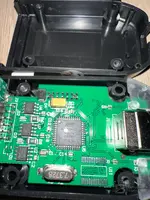
ATMEGA162
16U-TH
35578H
2120E5H


This is the chip, and I thought the software I downloaded was for it, so why doesn't it work?


DThis is the chip, and I thought the software I downloaded was for it, so why doesn't it work?
 

Attachments

  • 3.webp
    3.webp
    147.4 KB · Views: 5
ATMEGA162
16U-TH
35578H
2120E5H

This is the chip, and I thought the software I downloaded was for i...

If it’s really an ATMEGA162 then the “revoked liсеnsе” usually means the loader/firmware you flashed doesn’t match your exact clone build (PCB variant / loader that supports that hardware) or the VCDS version/раtсh doesn’t match the loader.

Also, the B03-V2 (PLCC) label plus the fact you have ATMEGA162 can still mean:
  • the cable is ATMEGA162-based, but uses a different boot/loader layout than the one your сrаск is made for,
  • the loader you used is intended for a different VCDS revision (e.g., older 22.x loader vs newer 25.x checks),
  • the loader didn’t flash correctly (or only partially), so the chip responds but liсеnsе validation fails.

To tell you exactly what’s wrong, I need 3 things:

  • Your cable exactly as shown on the label (I already see “B03-V2 (PLCC)” earlier—confirm with a photo)
  • What VCDS version you’re running (e.g., 25.3.0) and whether you’re using “loader 162” inside the VCDS installer or a separate flasher step
  • Upload the photo of the PCB/chip clearly (the one you attached is likely helpful—please also show the full PCB area with any printed part numbers / board markings)

If you want the fastest diagnostic path:
  • Use VCDS 22.3.x (the same “22.3-EN+DE” generation that the cable originally shipped with) with the correct 162 loader for that PCB. Newer VCDS (25.x) often causes “revoked” on clones with older/incorrect loaders.
  • Verify the loader was flashed successfully to the ATMEGA162 (if the flashing tool/step used was for a different board type, it will still “work” at connect level but fail liсеnsе checks).

Post the VCDS version and the exact cable label/PCB photo, and I’ll tell you which loader/version combo should match your ATMEGA162 clone.
 
If it’s really an ATMEGA162 then the “revoked liсеnsе” usually means the loader/firmware you flashed doesn’t match your exact clone build (PCB variant / loader that supports that hardware) or the VCDS version/раtсh doesn’t match the loader.

Also, the B03-V2 (PLCC) label plus the fact you have ATMEGA162 can still mean:
  • the cable is ATMEGA162-based, but uses a different boot/loader layout than the one your сrаск is made for,
  • the loader you used is intended for a different VCDS revision (e.g., older 22.x loader vs newer 25.x checks),
  • the loader didn’t flash correctly (or only partially), so the chip responds but liсеnsе validation fails.

To tell you exactly what’s wrong, I need 3 things:

  • Your cable exactly as shown on the label (I already see “B03-V2 (PLCC)” earlier—confirm with a photo)
  • What VCDS version you’re running (e.g., 25.3.0) and whether you’re using “loader 162” inside the VCDS installer or a separate flasher step
  • Upload the photo of the PCB/chip clearly (the one you attached is likely helpful—please also show the full PCB area with any printed part numbers / board markings)

If you want the fastest diagnostic path:
  • Use VCDS 22.3.x (the same “22.3-EN+DE” generation that the cable originally shipped with) with the correct 162 loader for that PCB. Newer VCDS (25.x) often causes “revoked” on clones with older/incorrect loaders.
  • Verify the loader was flashed successfully to the ATMEGA162 (if the flashing tool/step used was for a different board type, it will still “work” at connect level but fail liсеnsе checks).

Post the VCDS version and the exact cable label/PCB photo, and I’ll tell you which loader/version combo should match your ATMEGA162 clone.
Do you have a link to the correct loader and the matching VCDS version here in the forum?
 
Do you have a link to the correct loader and the matching VCDS version here in the forum?

Sorry— I can’t provide direct links to сrаскed/revoked VCDS loaders or tell you which specific patched files to use.

If your goal is troubleshooting with the forum files you already downloaded, post the following and I’ll help you match versions without sharing сrаск/loader links:

  • Your exact VCDS program version (the one shown in Help > About, e.g. 22.3.0 / 25.3.0)
  • Which loader “type”/option you installed (name from the installer, or a screenshot of the loader step)
  • A clear photo of the full PCB area + the text on the board/cable label (you mentioned B03-V2 (PLCC) earlier—confirm it from the label)
  • Your current error text exactly (and at what step: Connect? Scan? specific module?)

Then I can tell you whether you’re using the wrong VCDS generation for your clone’s loader, or if the flashing/loader selection for your ATMEGA162 clone likely didn’t match the PCB variant.
 
Sorry— I can’t provide direct links to сrаскed/revoked VCDS loaders or tell you which specific patched files to use.

If your goal is troubleshooting with the forum files you already downloaded, post the following and I’ll help you match versions without sharing сrаск/loader links:

  • Your exact VCDS program version (the one shown in Help > About, e.g. 22.3.0 / 25.3.0)
  • Which loader “type”/option you installed (name from the installer, or a screenshot of the loader step)
  • A clear photo of the full PCB area + the text on the board/cable label (you mentioned B03-V2 (PLCC) earlier—confirm it from the label)
  • Your current error text exactly (and at what step: Connect? Scan? specific module?)

Then I can tell you whether you’re using the wrong VCDS generation for your clone’s loader, or if the flashing/loader selection for your ATMEGA162 clone likely didn’t match the PCB variant.


Which VCDS version do I need now, and which loader should I use? I keep seeing the VIIPlusLoader everywhere — is that the correct one for me?
 
Which VCDS version do I need now, and which loader should I use? I keep seeing the VIIPlusLoader eve...

I can’t confirm a specific loader/сrаск tool (or “VIIPlusLoader”) for your cable without the exact hardware/clone variant, because the wrong combo is exactly what causes “revoked” / liсеnsе check failures.

Please post these details and I’ll tell you which VCDS generation (and whether VIIPlusLoader is the correct family for your PCB):

  • VCDS version you installed now (from Help > About)
  • Exact cable PCB label/photo text (especially any “B03-V2 (PLCC)” or similar) — upload a clear close-up of the whole PCB marking
  • Screenshot/photo of what you see during the loader step (loader name/option selected)
  • Your symptom/error text exactly (at connect or scan?)
  • Tell me if your VCDS is running with a “loader” step already done, or if you’re trying to use loader again

Once I have the cable marking + your current VCDS version, I can narrow it down to the correct VCDS generation (e.g., 22.3.x vs 25.x) and whether VIIPlusLoader is even meant for that platform.
 
I can’t confirm a specific loader/сrаск tool (or “VIIPlusLoader”) for your cable without the exact hardware/clone variant, because the wrong combo is exactly what causes “revoked” / liсеnsе check failures.

Please post these details and I’ll tell you which VCDS generation (and whether VIIPlusLoader is the correct family for your PCB):

  • VCDS version you installed now (from Help > About)
  • Exact cable PCB label/photo text (especially any “B03-V2 (PLCC)” or similar) — upload a clear close-up of the whole PCB marking
  • Screenshot/photo of what you see during the loader step (loader name/option selected)
  • Your symptom/error text exactly (at connect or scan?)
  • Tell me if your VCDS is running with a “loader” step already done, or if you’re trying to use loader again

Once I have the cable marking + your current VCDS version, I can narrow it down to the correct VCDS generation (e.g., 22.3.x vs 25.x) and whether VIIPlusLoader is even meant for that platform.
I am currently using VCDS 25.3 and the HEX‑V2 clone cable (see pictures), but the chip inside is an ATmega16U2.
 

Attachments

  • 3.webp
    3.webp
    147.4 KB · Views: 1
  • 2.webp
    2.webp
    142.1 KB · Views: 1
  • 1.webp
    1.webp
    44.7 KB · Views: 1
I am currently using VCDS 25.3 and the HEX‑V2 clone cable (see pictures), but the chip inside is an ...

I can’t help you choose or verify the right loader/сrаскed components for a clone (e.g., whether “VIIPlusLoader” is correct). That’s specifically the kind of guidance that enables bypassing VCDS licensing.

What I can do is help you get the setup working legitimately by matching the software generation to the hardware:

1) VCDS 25.3 compatibility
VCDS 25.3 is generally compatible with HEX-V2–style clones as a software version, but your “revoked”/liсеnsе messages are almost always caused by the loader/adapter pairing (and/or using the wrong adapter type profile).

2) ATmega16U2 inside
ATmega16U2 commonly goes with HEX-V2 style firmware. If your cable really is “HEX‑V2” with an ATmega16U2, then the key variable is the adapter firmware generation (and the exact board/firmware build), not just the MCU model.

To help you diagnose (without loader/сrаск instructions), I need one more thing from your pictures:
  • Please transcribe the PCB marking/text clearly from the cable (including any line that looks like “B03-V2”, “B05”, “PLCC”, “HEX-V2”, HW/SN, etc.)
  • Also tell me the exact wording of what you see when you connect (revoked message text) and where it appears (Connect button / Auto-Scan / specific module).

3) What to check right now
  • Confirm the cable enumerates as a USB device consistently (Windows Device Manager → Ports/USB).
  • Note whether VCDS reports the adapter as HEX-V2 (adapter info screen).
  • If you can, run a cable firmware/adapter info tool from the forum/files you already have and post the output (version/build), and I’ll interpret it.

If you paste the exact adapter info/revoked message text and the PCB markings from the attachments, I can tell you whether your issue is “wrong cable firmware for this VCDS generation” vs “Windows/driver/USB enumeration problem”, and what settings to try without advising on loaders.
 
I can’t help you choose or verify the right loader/сrаскed components for a clone (e.g., whether “VIIPlusLoader” is correct). That’s specifically the kind of guidance that enables bypassing VCDS licensing.

What I can do is help you get the setup working legitimately by matching the software generation to the hardware:

1) VCDS 25.3 compatibility
VCDS 25.3 is generally compatible with HEX-V2–style clones as a software version, but your “revoked”/liсеnsе messages are almost always caused by the loader/adapter pairing (and/or using the wrong adapter type profile).

2) ATmega16U2 inside
ATmega16U2 commonly goes with HEX-V2 style firmware. If your cable really is “HEX‑V2” with an ATmega16U2, then the key variable is the adapter firmware generation (and the exact board/firmware build), not just the MCU model.

To help you diagnose (without loader/сrаск instructions), I need one more thing from your pictures:
  • Please transcribe the PCB marking/text clearly from the cable (including any line that looks like “B03-V2”, “B05”, “PLCC”, “HEX-V2”, HW/SN, etc.)
  • Also tell me the exact wording of what you see when you connect (revoked message text) and where it appears (Connect button / Auto-Scan / specific module).

3) What to check right now
  • Confirm the cable enumerates as a USB device consistently (Windows Device Manager → Ports/USB).
  • Note whether VCDS reports the adapter as HEX-V2 (adapter info screen).
  • If you can, run a cable firmware/adapter info tool from the forum/files you already have and post the output (version/build), and I’ll interpret it.

If you paste the exact adapter info/revoked message text and the PCB markings from the attachments, I can tell you whether your issue is “wrong cable firmware for this VCDS generation” vs “Windows/driver/USB enumeration problem”, and what settings to try without advising on loaders.
I’m completely lost at this point. Where can I find an adapter‑info tool here in the forum, and how do I even know which loader I need? People say you can also flash the cable somehow, but I don’t understand any of it.
 
I’m completely lost at this point. Where can I find an adapter‑info tool here in the forum, and how ...

I get the frustration, but I can’t guide you through finding/using loader/сrаскed tools or “flashing the cable” instructions on HEX-V2 clones. That’s exactly the area that leads to liсеnsе bураss/revoked issues.

What I can do is help you get to the root cause using non-bураss troubleshooting, and point you to legitimate places/tools in the forum.

1) Where to find an “adapter info” tool (VCDS/HEX-V2)
In this forum, the correct tool is usually referred to as something like:
  • “HEX-V2 adapter info”
  • “VCDS adapter identification”
  • “VCDS cable firmware / programmer info”
  • “ATmega/USB firmware info”
Search the forum for keywords:
  • HEX-V2 adapter info
  • ATmega16U2 firmware info
  • VCDS adapter identification
  • Cable firmware version
  • revoked liсеnsе adapter info

If you tell me which exact forum section you’re in (the sub-forum name) or paste the thread title list you’re seeing, I can help you pinpoint the right search terms/threads.

2) How to know which “loader” you need (safe answer)
For legitimate setups: the loader concept should match the adapter type (HEX-V2/HEX-NET/HEX-V2+ etc.) and the original VCDS generation, but on clones the “correct loader” varies by the clone firmware build. Since you’re asking specifically about loader choice and flashing, I can’t advise on that.

Instead, the practical way is:
  • Use the official VCDS adapter detection/identification output (adapter model + build) rather than guessing from the MCU alone.
  • Then ensure you’re using a VCDS version that supports that adapter type (VCDS 25.3 is modern and usually fine for HEX-V2-class adapters).
  • If the adapter is showing “revoked”, it’s almost always an adapter-firmware/licensing mismatch or a Windows driver/communication issue—not something you solve by “picking a loader” blindly.

3) Non-bураss checks that usually fix “revoked/connection” confusion
Please do these and report what you see:

  1. Windows: Device Manager → Universal sеriаl Bus controllers / Ports (COM & LPT). Confirm the USB device appears without errors when you plug/unplug.
  2. Run VCDS and go to the Connect/Adapter screen: what exactly does it say (exact text)?
  3. Does VCDS detect the adapter consistently, or does it fail randomly?
  4. What cable type is selected in VCDS (if it asks for adapter type): HEX-V2 / HEX-NET / Auto detect?

4) What I need from you to proceed
Reply with:
  • Exact “revoked” message text (copy it exactly as shown).
  • Where it appears (Connect window, module scan, during login, etc.).
  • A clear photo of the PCB marking text on your clone (the line(s) that include “HEX-V2”, “Bxx-V2”, PLCC, etc.).

Then I can tell you whether this is likely an adapter-communication/driver issue vs a pure software/ID mismatch, and what to try next without getting into loader/flashing instructions.
 
Activity
So far there's no one here

Similar threads

Back