Zenzefi Certificates — After-Sales PKCS#12 bundle for XENTRY / Passthru connectivity

Zenzefi Certificates — After-Sales PKCS#12 bundle for XENTRY / Passthru connectivity 2026-05-03

Sign in to download for free
Zenzefi Certificates — After-Sales PKCS#12 bundle for XENTRY / Passthru connectivity

Zenzefi Certificates — After-Sales PKCS#12 bundle for XENTRY / Passthru connectivity 2026-05-03

Sign in to download for free

Bin

Thread Owner
Administrator
Joined
03.05.2025
Messages
1,595
Reaction score
9,873
Bin submitted a new resource:

Zenzefi Certificates — After-Sales PKCS#12 bundle for XENTRY / Passthru connectivity - Install the 12.2025 Zenzefi PKCS#12 certificates to restore XENTRY after-sales online services.

What it is
Zenzefi Certificates 12.2025 is a current PKCS#12 (.P12) bundle used by Daimler/Mercedes after-sales
applications (e.g., XENTRY OpenShell / XENTRY Passthru, online add-ons, content delivery). Installing
the pack refreshes expiring client and intermediate certs so the apps can establish secure TLS sessions
with backend services.

View attachment 774...

Read more about this resource...
 
@suttipong , To download the resource, you need to like it. This is the discussion thread for the resource, and a like here won’t work to grant download access. The password for all resource archives is " binunlock.com "
 
Bin updated Zenzefi Certificates — After-Sales PKCS#12 bundle for XENTRY / Passthru connectivity with a new update entry:

Zenzefi Certificates — After-Sales (Update 12.2025 → 01.02.2026)

Brief changes vs 12.2025:
• Refreshed After-Sales PKCS#12 (*.p12) certificates with new validity window (2026 series) and updated CA/CRL chain.
• Improved compatibility with recent XENTRY/OpenShell builds and Passthru/DoIP connectivity.
• Replaced/rotated intermediate roots to resolve “expired/chain not trusted” prompts; cleaner online login and SCN access.
• Pack structure: \P12\ (new bundle), \CA\ (root/intermediate), \ReadMe\ (import/cleanup steps).
Update tips: remove old Zenzefi certs...

Read the rest of this update entry...
 
Bin updated Zenzefi Certificates — After-Sales PKCS#12 bundle for XENTRY / Passthru connectivity with a new update entry:

Zenzefi Certificates — After-Sales STANDARD exp. 2026-03-04

Brief changes vs 01.02.2026 bundle​

  • New consolidated After-Sales certificate file: After-Sales_STANDARD_exp20260304.p12.
  • Updated validity window through 2026-03-04 with refreshed CA/CRL chain.
  • Intended for use with current XENTRY / OpenShell builds and Passthru/DoIP connections.
  • Simplified pack structure: single PKCS#12 file plus short readme (no separate CA folders).

Update tips​

  1. Remove old...

Read the rest of this update entry...
 
Included sample file (as seen on the screenshot)
• After_Sales_STANDARD_12.2025.p12 (PKCS#12 container)
 
Bin updated Zenzefi Certificates — After-Sales PKCS#12 bundle for XENTRY / Passthru connectivity with a new update entry:

Zenzefi Certificates — After-Sales STANDARD exp. 2026-05-03

Zenzefi Certificates — After-Sales STANDARD exp. 2026-05-03

Brief changes vs 2026-03-04 bundle
  • New consolidated After-Sales certificate file: After-Sales_STANDARD_exp20260503.p12.
  • Validity window extended up to 03.05.2026 with refreshed CA / CRL chain.
  • Tested with current XENTRY / OpenShell builds and Passthru/DoIP connections.
  • Same simplified structure as previous pack – single PKCS#12 file plus short readme (no extra CA folders)...

Read the rest of this update entry...
 

How to import certificate (ZenZefi-UI)​

Don't need the password.
  1. Run Xentry and login with an offline username.
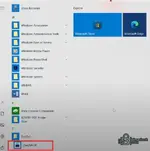
  2. Open ZenZefi-UI from the Start menu.

    Windows Startz Start menu showing ZenZefi-UI shortcut ready to launch.
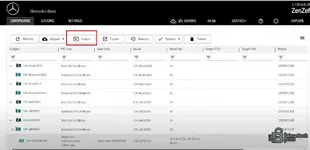
  3. Go to Certificates and click Import, then select your certificate file.

    ZenZefi-UI Certificates tab with the Import button highlighted.
 
Back