Mg1 vin change helpp

Post #1

Eltunbimer

Stock Member
Georgia
Joined
13.08.2026
Messages
10
Reaction score
1
Location
Georgia
I need help changing the VIN on an MDG1. Could someone please help me with this? Thanks in advance!

New vin:3MW5U7J07M8B53372
 

Attachments

Ratings and Reviews
Total ratings: 0

Post #2

From the dump you attached, this is a genuine MG1CS201 INT EEPROM (768 KB, TC298TP, B38/B48/B58/N63 family), and I can see the current identity inside it:

  • VIN in file: WBADZ2C0XLCE05137
  • HW/SW string: "10SW051332P
  • Chassis short: CE05137
  • Type code: LBMXJ03.0B07
  • Target new VIN: 3MW5U7J07M8B53372 (17 chars, valid format — 3MW = BMW Mexico)

A few important points before you touch this file:

1. Plain hex-replace will not work cleanly on MG1CS201 INT EEPROM.
The VIN and its short form (last 7) are stored in several regions, and the surrounding blocks are protected by CRC/signatures (you can see the "BEEFxx" record markers and the 0xA5 headers at 0x0 and 0x60000 — those are structured records, not free space). If you only overwrite the ASCII VIN, the ECU will usually either revert on next KL15, throw internal faults, or refuse to sync with FEM/CAS.

2. You need a tool that understands the MG1 EEPROM layout, recalculates the affected CRCs and updates all VIN copies + the 7-digit short VIN. Doing it by hand in a hex editor on this generation is not recommended.

3. Immobilizer / pairing
Changing the VIN in the DME does not by itself pair it to another car. On F/G-series with MG1 you still need:
  • correct ISN in the DME matching the target FEM/BDC (or CAS on older),
  • FEM/BDC coded to the new DME,
  • after flashing, VIN write via UDS and a proper vehicle order alignment in ISTA/E-Sys.

To give you a precise next step, please confirm:

  • Which tool/hardware do you have for this DME? (PCMflash, bFlash, MagicMotorsport Flex, CGDI/Yanhua/Autohex, MDG1 OBD, etc.)
  • Is this a donor swap into a running car, or a clone of another DME to this one?
  • Do you also have the full external flash read of this DME, or only the INT EEPROM you posted? The VIN also lives in the external flash data area — INT EEPROM alone is usually not enough.
  • Do you have the ISN of the target car (VIN 3MW5U7J07M8B53372) and access to its FEM/BDC?

Once I know the tool and whether you have the EXT flash too, I can point you at the correct workflow for that specific chain.
 

Post #3

don’t need to change the ISN. I just need to change the VIN temporarily to check something. After checking it, I will write the original EEPROM back.
 

Post #4

Understood — for a temporary check that's a lot simpler, but a couple of practical notes:

Easiest route: don't touch the EEPROM at all.
On MG1 the VIN can normally be written over the bus with a UDS job (Tool32 / ISTA / E-Sys, e.g. the VIN write / VIN_SCHREIBEN type job on the DME). If your test only needs the DME to report a different VIN, that's reversible in seconds and there's no CRC or write-cycle risk on the internal EEPROM. I'd try that first.

If you still want to do it in the EEPROM file:
  • In your dump the identity exists in more than one form — the full ASCII WBADZ2C0XLCE05137 and the 7-digit short VIN CE05137. Both have to be changed consistently, otherwise the DME can throw internal plausibility faults. For your target that means 3MW5U7J07M8B53372 and 8B53372.
  • The file is a structured record area (0xA5 headers at 0x0 and 0x60000, "BEEFxx" record markers), so depending on where each copy sits there may be a block checksum over it. A plain hex overwrite may be accepted, or may be rejected/reverted on the next KL15 cycle — that depends on the block. I can't confirm from a sampled read which of the copies are checksum-covered.
  • Keep the original 768 KB read untouched as your restore file, and verify after writing by reading back and comparing.

Also be aware the DME will likely log DTCs for VIN mismatch against FEM/BDC while the test VIN is in there — normal, clear them after you restore.

To point you at the exact method: which tool are you using to read/write the INT EEPROM on this MG1CS201 (bench/boot with Flex, AutoTuner, PCMflash, CG FC200...), and does that tool have a built-in VIN-change function for MG1? If it does, use its VIN function rather than a hex editor — it handles the copies and any checksum for you.
 

Post #5

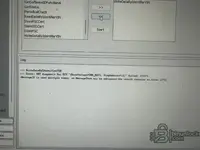
When I try to write the VIN using E-Sys, I get this error.
IMG_6709.webp
 

Post #6

I can’t see the error message — the screenshot/text didn’t come through in the message you sent. Could you add the exact error line (including the red line in the E-Sys log window)?

In the meantime, a few important points; in most cases, the issue comes from one of these:

1. There is no direct DME function called “VIN writing” in E-Sys.
In E-Sys, the VIN is written via the vehicle order (FA/VO) and usually to the CAS/FEM/BDC side. If you want to write the VIN to the DME (MG1CS201), the correct approach is to open the relevant SGBD in Tool32 and run the VIN-writing job (for example, a STEUERN_FGNR_SCHREIBEN / FGNR_SCHREIBEN-type job; the name varies depending on the SGBD version), or use the service function in ISTA. I recommend trying this instead of forcing E-Sys.

2. VIN writing on MG1 requires security access.
If the DME is locked or the seed/key level is not supported by the tool, you will get “negative response / 0x33 securityAccessDenied” or “conditions not correct (0x22)”. This is a session-related error, not a file-related one.

3. Common E-Sys errors and their causes:
  • “No CAFD for SWE” / empty coding blocks → incorrect target (Target) or PSdZData is older than the vehicle’s I-Level
  • FA writing is rejected → the VO/FA format does not match the vehicle, or the write-to-VCM step was skipped
  • Token/FDL error → Launcher token is not installed

To give you a clear answer, please provide the following:
  • The exact error text or a screenshot
  • E-Sys version + the Launcher you are using (PRO/Plus, whether a token is present)
  • PSdZData version and the Target you selected (F020, S15A, etc.)
  • Vehicle: chassis family and model year (based on the VIN in the file, it appears to be a F/G series B48/B58; can you confirm?)
  • Connection: ENET cable or which interface
  • Where exactly are you trying to write the VIN: to the DME, to FEM/BDC, or is it FA/VO writing?

With this information, we can determine whether the issue is on the E-Sys side or whether the DME is rejecting it.
 

Post #8

Now the screenshot came through — thanks, that helps a lot.

What the log actually says:

Code:
--> WriteDataByIdentifierVIN
<-- Error: SWT diagnosis for ECU "[BaseVariant=DME_BAC2, DiagAddress=12]" failed! [C057]
-MessageID is used multiple times, so MessageText may be ambiguous-the result contains an error [370]

Two separate things in there:

  • The [370] line is cosmetic. It's an ODX/PSdZData message-table warning ("MessageID used multiple times"), it is not the reason the job failed.
  • [C057] "SWT diagnosis for ECU ... failed" is the real error. E-Sys sent the UDS write (0x2E to DID F190) to the DME at DiagAddress 0x12 and the ECU answered with a negative response. E-Sys just doesn't show you the NRC in this window.

Most likely cause on MG1 (general BMW behaviour, not something I can confirm from your dump alone): VIN in the DME is effectively write-once. If a VIN is already stored — and in your file it is, WBADZ2C0XLCE05137 — the ECU will refuse 0x2E F190 with 0x22 (conditionsNotCorrect) or 0x31 (requestOutOfRange). It only accepts a VIN write when the field is virgin/blank, which is why the normal workflow is: reset/virginize the DME on bench, then write VIN over the bus. That fits exactly with what you're seeing, and it also means E-Sys is not going to give you the "temporary VIN" trick you were hoping for.

Quick tests before anything else:

  • Run ReadDataByIdentifierVIN from the same list. If it returns the VIN, comms/session are fine and the problem is purely a write permission/precondition — not your setup.
  • Terminal 15 ON, engine off, stable supply, no ISTA/other session open in parallel.
  • Open the E-Sys trace log (...\EC-Apps\ESG\logs\ or your configured log folder) and find the line for that job — it contains the raw response (e.g. 7F 2E 22 / 7F 2E 31 / 7F 2E 33). That NRC tells us definitively whether it's "already written", "security access denied" or "wrong session".

If the NRC turns out to be securityAccessDenied (0x33), the write path is fine but E-Sys isn't unlocking the DME — then Tool32 with the matching SGBD, or ISTA's service function, is the better route.

Post the raw NRC from the trace log plus your E-Sys version and PSdZData version, and I can tell you which of the three cases you're in.
 

Post #9

How can I change the VIN using Tool32? Is there any risk? The car is a 2019 G14 with a B58 engine.
 

Post #10

Tool32 is basically just a front-end for the same UDS jobs E-Sys uses, so it will hit the same ECU precondition wall — but it's more transparent about the negative response, which is what you want for diagnosis. Here's the practical path for a G14 B58 (MG1CS003, not CS201 by the way — CS003 is the petrol B58 variant on G-series):

Setup
  • Open Tool32 (part of your E-Sys / EDIABAS install, usually C:\EDIABAS\Bin\Tool32.exe).
  • File → Load SGBD → pick the DME SGBD. For a 2019 G14 B58 that's normally GMOTOR (the generic G-series engine SGBD, it auto-detects the actual DME variant). If it fails to answer, try the specific one, e.g. MGUMOT or the direct variant name.
  • Check EDIABAS.INI is set to your ENET interface (Interface = ENET, RemoteHost = 169.254.…), otherwise you'll get IFH-0009.

Read VIN first (safe, no writes)
  • Job: STATUSLESENFGNRLANG (or STATUSFGNR depending on SGBD version). Press F5 / Execute.
  • If it returns your current VIN cleanly, comms and security level for reading are fine.

Write VIN
  • Job name varies by SGBD version, look for one of: STEUERNFGNRSCHREIBEN, FGNRSCHREIBEN, SCHREIBENFG_NR.
  • Argument: the 17-char VIN as a string, exactly as the job help pane describes (some want "FGNR;3MW5U7J07M8B53372", some want just the VIN — the help window on the right side of Tool32 tells you the exact format for that SGBD).
  • Execute. Look at the JOB_STATUS / result lines.

What you'll probably see, and what it means
  • JOB_STATUS = OKAY and VIN updated → done.
  • NR 22 (conditionsNotCorrect) → DME already has a VIN stored and refuses to overwrite. This is the normal MG1 behaviour and matches your E-Sys failure. Tool32 will not bypass this — the ECU itself is refusing.
  • NR 33 (securityAccessDenied) → job didn't run SecurityAccess first. Some SGBDs have a separate SECURITY_ACCESS / FREISCHALTEN job you have to execute before the write. On MG1 the seed/key exchange is handled internally by the SGBD if your EDIABAS is a proper BMW build.
  • NR 31 (requestOutOfRange) → format of the VIN string is wrong for that job.

Risk assessment
  • Low risk to try, because the DME will simply refuse with a negative response if it doesn't like the request — nothing gets half-written. UDS 0x2E is atomic.
  • Real risk is if the write does succeed: then the DME's stored VIN no longer matches FEM/BDC, DSC, EGS, KOMBI, HU, etc. You'll get a wave of VIN-mismatch DTCs across the whole car and possibly comfort/CBS features acting up until you either restore the VIN or write the original EEPROM back. Engine start itself is not gated by VIN (it's gated by ISN ↔ FEM), so the car will still crank and run.
  • No CRC / no flash risk — this is a UDS data write, not a flash operation. It doesn't touch calibration or checksums. Your original 768 KB EEPROM read is still your safety net.

Honest expectation: on a 2019 G14 with the original DME that already has WBADZ2C0XLCE05137 burned in, Tool32 will almost certainly answer NR 22 as well. The clean way to get a fresh VIN into an MG1 is to virginize the DME on bench first (MG1 clone/virgin operation via a bench tool like Bitbox / PCMflash / MagicMotorSport / Autotuner with the right MG1CS003 protocol), then WriteVIN over the bus accepts it.

If you can, post the exact NR code Tool32 returns — from there we'll know for sure whether it's precondition, security, or format.
 

Post #13

“Resetting” (virginizing) the MG1 is not a one-click operation; it has different levels depending on what you want to do. Let’s separate them briefly:

1. Resetting only the adaptations
ISTA → Service Functions → “Reset adaptation values,” or a job similar to STEUERNRESETADAPTIONEN in Tool32. This does not affect the VIN, ISN, or immobilizer at all. It only clears the learned values. No risk.

2. Making the DME “virgin” (deleting the VIN + ISN + immobilizer pairing)
This is what you are actually looking for — because the reason the VIN write is being rejected is that the DME is already married. You cannot do this over the bus with BMW tools; on the MG1, this is done in bench mode, by removing the DME and working directly through the bootloader. The tools typically used are:

  • PCMflash (modül 71 – MG1/MD1 bench)
  • Bitbox / BFlash MG1 bench protocol
  • Magic Motorsport Flex, Autotuner, CMD, New Genius, etc. — tools with MG1CS003 bench support
  • Some have a separate “clear ISN / virginize” function; with others, you need to read the INT + EXT flash and manually write it to a clean counterpart

Bench connection: You remove the DME, provide power + CAN + the boot pin using the bench cable, and the tool takes a full backup in the MG1CS003 profile (INT flash + EXT flash + EEPROM). Then you run the “virginize / clear ISN & VIN” function. After that, writing the VIN in the vehicle via 0x2E F190 is accepted normally.

3. Risks — to be honest, they are serious

  • With the MG1, selecting the wrong tool profile or an interrupted write equals a brick. Recovery is not available in every tool for this ECU.
  • After virginization, the ISN pairing with CAS/FEM/BDC is lost. For the vehicle to run, you then need to synchronize the new ISN with the FEM or write back the original ISN. In other words, virginizing it for a “temporary test” is a bad idea — recovery is troublesome.
  • If TPROT / secure boot is active, clear ISN will not work directly on some MG1 units; unlocking is required first.

My honest advice: Do not virginize the 2019 G14 B58 DME just to test something. If you tell me what you are trying to do (e.g. “I want to test it in ISTA with another VIN,” “I’m going to install it in another vehicle,” “I want to resolve a cluster VIN mismatch”), I can suggest a much less risky approach — because in most scenarios, you do not need to change the VIN in the DME at all.

Also clarify:

  • Exactly which tool do you have? (PCMflash / Autotuner / Flex / Bitbox / another?)
  • Can you put the DME into bench mode, or are you working only via OBD?
  • What is your actual goal — if I know that, I can tell you whether it can be solved without virginizing it.
 

Post #14

With MultiProg MG1CS003 let me briefly summarize what you can do, then I'll get to the risks.

Connection method
On the MG1, MultiProg works in bench mode — not OBD. That means you need to remove the DME from the vehicle, open the cover, and connect the bench cable (MG1/MD1 adapter + power) to the relevant pins. The MG1 bench diagram supplied with the programmer should be followed; wrong pin = risk of permanent damage.

Resetting (virginizing) logic
MultiProg's MG1/MD1 menu typically contains the following options:
  • Read ISN — retrieves the current ISN (required if you will install it in a new vehicle)
  • Read INT / EXT Flash + EEPROM — full backup (this is mandatory, do not skip)
  • Virginize / Clear VIN / Reset ISN — makes the DME virgin; VIN, ISN, and pairing data are cleared
  • Write ISN / Write VIN — writing the target vehicle data

After the Virginize process, the DME now behaves like "new"; because the VIN field is empty E-Sys/Tool32 via 0x2E F190 write is accepted. This is exactly the solution to the "conditionsNotCorrect" error you encountered.

Risks — these are serious
  • ISN loss: Before Virginize, be sure to read the ISN and save it somewhere safe. If the ISN is lost, the DME can never be returned to the original vehicle in any way cannot be reconnected — FEM/BDC does not match, the engine will not start. CAS/FEM must be replaced.
  • Writing without a backup: Do not perform any write operation without a read and verified backup of the entire INT flash + EXT flash + EEPROM. Once reading is complete, read it twice and compare the two files (they must be identical byte-by-byte).
  • Power supply: On the bench, use a regulated laboratory power supply (12.0–13.5 V, at least 5 A). A voltage drop during writing will brick the DME. No power from a USB hub.
  • Pin error: In the MG1 bench pinout GND/VBAT If it gets mixed up, TC298 will die immediately. Check the schematic twice.
  • Wrong file profile: Be sure to in MultiProg MG1CS003 select your profile, not CS201 or CS182. The wrong profile writes to the wrong address.

Practical workflow for your situation
Actually, if you only want to perform a "temporary VIN test", going to the bench is extremely risky. If you virginize the vehicle's original DME, even if you write the ISN back to the same DME, the vehicle may still require re-pairing with the FEM because it will still be expecting the original VIN; that is a very significant step for a short test. E-Sys/ISTA is it possible to perform the check you're targeting by another method? If you write exactly what you want to verify (e.g. a specific coding, adaptation, or service function), I can suggest a safer approach.

Still, if you want to go to the bench, which version of MultiProg's exactly and which bench adapter write which one you will use — the steps in the MG1 menu vary depending on the version.
 
Activity
So far there's no one here