Post #381
 Online now
- Joined
- 09.05.2025
- Messages
- 7,283
- Reactions
- 1,681
- Location
- 🇺🇸
 USUnited States
LICENSE NAME: bolhalovas
Your assessment deserves context from propeller load, installation, and water conditions.

 Online now
USUnited States
LICENSE NAME: bolhalovas
Online now
USUnited StatesLicense Name : redline
 USUnited States
Online now
USUnited States
LICENSE NAME: Danny
USUnited States
Online now
USUnited Statesname name : NOT ME
 USUnited States
Is their a password for the zipOfficial support and discussion thread for HPT File Editor 2026 Hoppers.
Use this topic for:
- HPT / BIN conversion questions
- Hex Editor feedback
- Segment Swap issues
- HPT file compatibility
- Sorter questions
- Activation requests
- Bug reports and feature requests
Current release: 3.0.3
Activation Requests
To request activation, create activation.req from the application and attach it to this thread together with the exact LICENSE NAME used when creating the request.
Automatic Gemini activation format:
Code:LICENSE NAME: Exact name entered in the application
Attach the originalactivation.reqto the same reply. Both the explicit LICENSE NAME line and the attachment are required; quoted or edited request data is ignored.
Gemini will quote your request, add a short wish and attach the generated file named exactlylicense.lic. Download that attachment and load it in the application's activation window using the license-file area, then select Verify & Open.
Do not rename, edit or reuse either file on another installation. The signed license is bound to the request ID, device RSA key, HWID digest, product/build and exact normalized LICENSE NAME contained in your reply.

 DEGermany
Online now
USUnited States
Name: KomandaProf
DEGermanyAfter the update, it asks for a license key. Where can I get it?Let me wish you useful freeze-frame data and no distracting historical faults.
Online now
USUnited StatesAfter the update, it asks for a license key. Where can I get it?
activation.req contains the labels the forum-ACT-V2, HPTEDITORNEW-3.0.3 and SOL-HARDENED-2.0.0, meaning that the request was generated specifically by the current version 3.0.3—you do not need to create it again.LICENSE NAME: KomandaProfactivation.req. It is important that the name match character-for-character the one you entered in the program when creating the request (case also matters)—a discrepancy in the name is the most common reason for a key being rejected.
DEGermany
Online now
USUnited StatesLICENSE NAME: KomandaProf
DEGermanyIt didn't work. I put the license file in the program folder: C:\Program Files\HPTeditorNewWhen the vehicle begins responding, steady progress should remain more important than speed.
Online now
USUnited StatesIt didn't work. I placed the license file in the program folder: C:\Program Files\HPTeditorNew
Screenshots attached...
verify.aspx. This is a different activation scheme: it expects a key string entered in the field, and compares it with the HWID and the exe hash. A license.lic file placed next to HPTeditorNew.exe is not read by this check at all — hence “it didn't work.”activation.req from the previous post was generated by the HPTEDITORNEW-3.0.3 build (the the forum-ACT-V2 / SOL-HARDENED-2.0.0 labels), meaning that the request and the window in the screenshot belong to different mechanisms.C:\Program Files\HPTeditorNew\HPTeditorNew.exe directly (right-click → run as administrator) and check whether the standard 3.0.3 activation window appears.C:\Program Files\... is write-protected: without administrator rights, the program may not save the activation state even with a valid key.activation.req, which you have already attached).
DEGermanyI received a license file. The full path is “C:\Program Files\HPTeditorNew\HPTeditorNew.exe”Judging by the screenshots, the problem is not the folder—you are placing the license file in the wrong application.
What the screenshots show
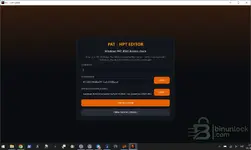
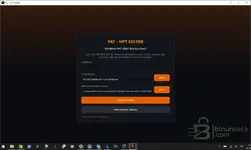
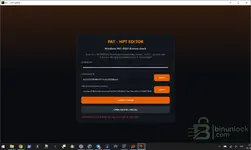
The activation window is titled PAT - HPT Editor, “Windows PAT-RSA1 license check,” and it contains the LICENSE KEY, HARDWARE ID, and APP HASH (KNOWN_HASHES) fields, while the check is performed online viaverify.aspx. This is a different activation method: it expects a key string entered into the field and checks it against the HWID and exe hash. A filelicense.licplaced next toHPTeditorNew.exeis not read by this type of check at all—hence why it “did not work.”
At the same time, youractivation.reqfrom the previous post was generated by the HPTEDITORNEW-3.0.3 build (the forum-ACT-V2 / SOL-HARDENED-2.0.0 tags), which means that the request and the window in the screenshot relate to different mechanisms.
What to do next
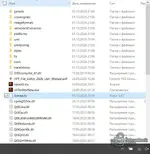
- Check which executable file opens the PAT window—you have a separate PAT icon pinned to the taskbar. Run
C:\Program Files\HPTeditorNew\HPTeditorNew.exedirectly (right-click → Run as administrator) and see whether the standard 3.0.3 activation window appears.- If you were given a key string rather than a file, you need to paste it into the LICENSE KEY field instead of saving it in the folder.
- Keep in mind that
C:\Program Files\...is write-protected: without administrator privileges, the program may fail to save the activation state even with the correct key.
Regarding issuance
This reply does not provide the key itself—the license is issued by Bin/the administration upon request in the thread (LICENSE NAME: KomandaProf + youractivation.req, which you have already attached).
To proceed, please clarify:
- what exactly you received—a license file or a text key;
- the full path and name of the exe that opens the PAT window (check the properties of the taskbar shortcut);
- a screenshot of the window showing the error text after clicking CHECK LICENSE.
Online now
USUnited StatesI received the license file. The full path is "C:\Program Files\HPTeditorNew\HPTeditorNew.exe"
Unfortunately, no...
HPTeditorNew.exe as administrator: the C:\Program Files\... folder is write-protected, and even with a valid key, the activation status may not be saved.activation.req was generated specifically by it (the markers HPTEDITORNEW-3.0.3, the forum-ACT-V2, SOL-HARDENED-2.0.0). Version 4.2.1.0 is not here. This is an assumption, but a logical one: the check in this window compares the key with HARDWARE ID and APP HASH (KNOWN_HASHES), meaning the hash of a specific exe. After updating to a different build, the exe hash changes, and a license issued for 3.0.3 will not work with it in principle.LICENSE NAME: KomandaProf and attach activation.req—you have already done this in post #22561.-----BEGIN ...-----?
DEGermanyWhen I open the file license.lic in Notepad, there are quite a lot of garbled characters. But I have figured it out now: version 3.0.3 is activated. I received the update as soon as I launched the program: it prompted me to update, and I agreed. As a result, the software with the version specified above installed itself, and accordingly an activation request appeared.In short: the window in the screenshot expects a key string in the LICENSE KEY field—it does not read the license file from the program folder. The red message “Enter a PAT-RSA1 license key.” confirms this directly: you clicked CHECK LICENSE with the field empty.
What to do right now
- Open the license file you received using regular Notepad (right-click → Open with → Notepad). If it contains a text key, copy the entire string and paste it into the LICENSE KEY field, then click CHECK LICENSE.
- Copy it without any extra spaces or line breaks at the beginning or end—this is a common reason for rejection.
- Run
HPTeditorNew.exeas administrator: theC:\Program Files\...folder is write-protected, and even with the correct key, the activation status may not be saved.
About version 4.2.1.0—this is the most important part
The build provided in this thread is 3.0.3, and youractivation.reqwas generated by that exact version (labels HPTEDITORNEW-3.0.3, the forum-ACT-V2, SOL-HARDENED-2.0.0). Version 4.2.1.0 is not available here. This is an assumption, but a logical one: the check in this window verifies the key against the HARDWARE ID and APP HASH (KNOWN_HASHES), meaning the hash of the specific exe. After updating to a different build, the exe hash changes, and a license issued for 3.0.3 will not work with it at all.
Therefore, roll back to 3.0.3 from the downloads section (reinstall the file from the thread resource) and activate that exact version. Also, please clarify where 4.2.1.0 came from—was it an automatic update within the program, or did you download it separately?
About “Bin/administration”—what this means
A key is not issued automatically as a result of my reply. The procedure is as described in the first post of the thread by Bin:
- You post in this same thread using the format
LICENSE NAME: KomandaProfand attachactivation.req—you already did this in post #22561.- The key/file is generated by the administration (Bin) based on this request. You do not need to go anywhere else; just wait for a reply in the thread.
- If there is no reply for a long time, or if you need the key remade for another version, send Bin a private message on the forum with a link to your request post.
To help you further, please provide:
- The name of the file you received (name and extension) and what it contains—one key string or a block like
-----BEGIN ...-----?- Where did version 4.2.1.0 come from (an automatic update or another source)?
- What exactly does the window display after you paste the key? Please provide a screenshot showing the full error text.
Online now
USUnited StatesWhen opening the license.lic file with Notepad, there is quite a lot of gibberish. But now I have figured it out, I think...
license.lic opens as gibberish — it is a binary license file for the 3.0.3 scheme, not a text PAT-RSA1 key. Pasting its contents into the LICENSE KEY field is pointless; the check expects a key string specifically.C:\Program Files\HPTeditorNew together with the license file — this is the quickest way to roll back if the update is installed again.HWID: 852c626194ddfeb7614ce6d2390baca1
APP HASH: ccaac8bca5387bc303e0cedd670e758f17823b9315d220cce90ba25900f19f66

We use essential cookies to make this site work, and optional cookies to enhance your experience.