Shall i give any more details which can help ?
Thanks for providing the details and photos.
Based on the information:
1.
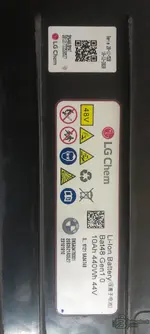
Battery Label: The label photo you attached shows a BMW 48V Mild Hybrid Battery. The specific part number and sеriаl number are visible, which are crucial for identifying the correct repair files.
2.
MCU: You have an
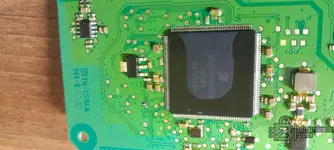
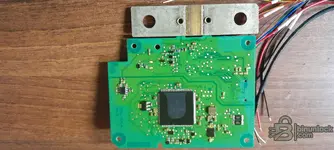
STMicroelectronics SPC5746C MCU on the BMS board. This is different from the Renesas or NXP MCUs often found in other BMW 48V systems.
3.
Tool: You are using
VVDI Prog.
4.
Status: The battery is locked.
For the SPC5746C MCU used in this particular LG battery variant, the crash data is typically stored within the
Flash memory. The EEPROM often contains configuration data and may not require direct manipulation for crash data reset, but it's good practice to back it up.
Regarding file variations:
- Production Years: While the core MCU (SPC5746C) and the general logic for crash data might be similar across some production years for this specific LG battery model, the exact flash dumps can vary due to software updates, component revisions, or regional differences.
- Always use a file specific to your exact battery part number and MCU type. Using a generic file from a different battery variant or even a different production batch could lead to further issues or bricking the BMS.
Procedure with VVDI Prog:
1.
Identify the MCU: Confirm the SPC5746C is correctly identified by VVDI Prog.
2.
Wiring: You will need to find the correct pinout for the SPC5746C on the BMS board for reading and writing with VVDI Prog. This usually involves connecting to specific MCU pins (like VCC, GND, CLK, DIO, etc.) or using a dedicated adapter if one exists for this MCU type.
3.
Read Flash: Perform a full read of the Flash memory.
4.
Clean/Reset: You will need a "clean" or "virgin" flash file specifically for your SPC5746C BMS with the crash data removed. This file needs to be obtained from a reliable source or prepared using specialized software. If you have access to the "Resource" mentioned earlier, check if it contains files for the SPC5746C MCU.
5.
Write Clean Flash: Write the clean flash file back to the BMS.
6.
Backup EEPROM: It is highly recommended to read and save the EEPROM data before writing the new flash, even if it's not directly modified for crash data.
To proceed, you will need:
- The correct wiring diagram for SPC5746C on your BMS board with VVDI Prog.
- A known-good, clean flash file specifically for the SPC5746C MCU used in your battery model.
If the "Resource" you downloaded earlier contains files for SPC5746C, that would be the place to start looking for a clean file. If not, you might need to search for a specialized repair service or file provider.