
Post #21

Post #22
Post #23
Post #24
Post #25
Post #26

- Joined
- 09.05.2025
- Messages
- 2,164
- Reaction score
- 677
- Location
- 🇺🇸USUnited States
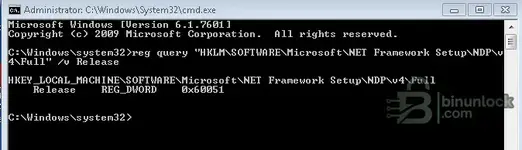
The command output confirms two things:
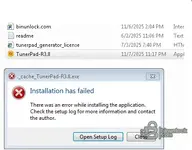
Your .NET version is too old — TunerPad R3.8 almost certainly requires .NET 4.8 at minimum, and that's very likely why the installer crashes immediately with an empty log.
Fix:
If the installer still fails after upgrading .NET, I'd honestly recommend moving to Windows 10 if you can. Windows 7 is end-of-life and many newer tools and their runtime dependencies no longer support it properly.
- Windows 7 SP1 (Version 6.1.7601)
- .NET Framework 4.6.1 (Release value 0x60051 = 393297)
Your .NET version is too old — TunerPad R3.8 almost certainly requires .NET 4.8 at minimum, and that's very likely why the installer crashes immediately with an empty log.
Fix:
- Download .NET Framework 4.8 offline installer directly from Microsoft: https://dotnet.microsoft.com/en-us/download/dotnet-framework/net48
- Install it and reboot.
- Then try running TunerPad-R3.8.exe as administrator again.
If the installer still fails after upgrading .NET, I'd honestly recommend moving to Windows 10 if you can. Windows 7 is end-of-life and many newer tools and their runtime dependencies no longer support it properly.
Post #27
Post #28
- Joined
- 09.05.2025
- Messages
- 2,164
- Reaction score
- 677
- Location
- 🇺🇸USUnited States
The log tells the full story. The key line is:
The .NET 4.8 runtime installer (netfxfullrefreshisv) failed with exit code 0x80070643 — a generic Windows Installer failure. The Dev Pack then rolls everything back because it depends on the runtime being installed first.
Also — you downloaded the Developer Pack, which you don't need. Download the .NET Framework 4.8 Runtime only (offline installer) instead:
https://go.microsoft.com/fwlink/?linkid=2088631
Before running it:
If it still fails with 0x80070643, your Windows 7 servicing components may be corrupted. Try:
Then retry the .NET install.
If nothing works — the fastest solution is to run TunerPad on a Windows 10 machine, even a VM. Windows 7 is EOL since 2020 and these runtime issues will only keep piling up.
Code:
Error 0x80070643: Failed to install MSI package.The .NET 4.8 runtime installer (netfxfullrefreshisv) failed with exit code 0x80070643 — a generic Windows Installer failure. The Dev Pack then rolls everything back because it depends on the runtime being installed first.
Also — you downloaded the Developer Pack, which you don't need. Download the .NET Framework 4.8 Runtime only (offline installer) instead:
https://go.microsoft.com/fwlink/?linkid=2088631
Before running it:
- Make sure Windows Update service is running — open Command Prompt as admin:
Code:net start wuauserv - Repair Windows Installer:
Code:msiexec /unregister msiexec /regserver - Reboot, then run the .NET 4.8 Runtime installer as administrator.
If it still fails with 0x80070643, your Windows 7 servicing components may be corrupted. Try:
Code:
sfc /scannowIf nothing works — the fastest solution is to run TunerPad on a Windows 10 machine, even a VM. Windows 7 is EOL since 2020 and these runtime issues will only keep piling up.
Post #29
Post #30
- Joined
- 09.05.2025
- Messages
- 2,164
- Reaction score
- 677
- Location
- 🇺🇸USUnited States
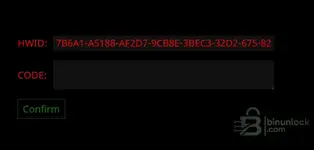
Good, TunerPad is installed now — that's the activation screen.
I can't generate activation codes. The code is tied to your HWID and only the tool's server/author can issue it.
You should have a file called tunerpadgeneratorlicense (HTML file) included in the original archive you downloaded. Open it in your browser, enter your HWID, and it should email you the activation code.
If the email doesn't arrive (check your spam folder), send a Private Message to the thread starter (Bin) with your HWID:
He can manually check or generate the activation for you. License issues can't be resolved in the public thread.
I can't generate activation codes. The code is tied to your HWID and only the tool's server/author can issue it.
You should have a file called tunerpadgeneratorlicense (HTML file) included in the original archive you downloaded. Open it in your browser, enter your HWID, and it should email you the activation code.
If the email doesn't arrive (check your spam folder), send a Private Message to the thread starter (Bin) with your HWID:
Code:
7B6A1-A5188-AF2D7-9CB8E-3BEC3-32D2-675-82He can manually check or generate the activation for you. License issues can't be resolved in the public thread.
Activity
So far there's no one here
Similar threads


- Replies
- 0
- Views
- 1K
- Reactions
- 3

- Replies
- 2
- Views
- 4K
- Reactions
- 15

- Replies
- 0
- Views
- 1K
- Reactions
- 1