Description
 xdfkit v0.0.8 — ECU Map Converter for Windows#
 KP ↔ XDF conversion, map analysis, and ECU definition management — now with a user-friendly graphical interface!#
No command-line tools or complicated manual configuration required. Simply select a file, choose the desired operation, configure the settings, and get your results directly within the application.Introducing an unofficial Windows GUI build of the open-source project xdfkit by nyetlabs.
The original application is a command-line utility. For this release, a dedicated English-language graphical interface and a complete Windows installer have been developed.
 The key advantage — all the features of the original xdfkit 0.0.8 are now accessible through a standard Windows graphical interface.
 What Can the Program Do?#
 1. WinOLS KP ↔ TunerPro XDF#
Convert ECU calibration map definitions between WinOLS KP and TunerPro XDF formats.Supports additional .meta.json metadata and an original KP template to improve definition reconstruction accuracy during reverse conversion.
 2. JSON, YAML, and CSV#
 Read and write definitions in JSON/YAML formats. Convert KP/XDF definitions into structured data formats. Export map lists to CSV for further analysis, including use in Excel.
 3. Merge — Combine Map Definitions#
Merge information from two definition files.The Update addresses and sizes mode allows you to transfer corrected addresses and dimensions while preserving the original map names, conversion factors, and measurement units.
Particularly useful when comparing different definitions for the same ECU firmware or processing map detection results.
 4. Lint — Detect KP Errors#
Check KP files for supported structural errors using the corresponding BIN file.The program helps identify certain issues related to axis definitions, map addresses, and dimensions.
 5. Fix — Repair KP Definitions#
Fix supported errors according to the rules implemented in the original xdfkit engine, with configurable processing options. 6. Verify — File Integrity Verification#
Verify integrity markers in JSON/YAML files to determine whether a file has been modified since it was generated. What's New in the Windows Version?#
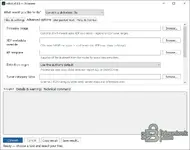
This build includes a dedicated graphical interface that allows you to use the original tool's features without manually entering commands.Available features in the interface:
Convert a definition file — standard file conversion. Batch convert — quick conversion workflows. Combine two definitions — merge definition files. Check a KP file for problems — analyze KP definitions. Fix problems in a KP file — repair KP definitions. Check whether a file was edited — verify file integrity. Advanced options — additional configuration settings. Output / Details & warnings — view results and warnings. Technical command — display the technical command used for the operation. Easy Installation#
The package includes a Windows Setup.exe installer.The program installs like a regular Windows application, complete with an application icon, desktop and Start menu shortcuts, and standard uninstallation support.
No separate installation of Python, Go, or .NET Runtime is required.
 Who Is This Tool For?#
 ECU tuning and calibration specialists. WinOLS and TunerPro users.
 Developers of automotive ECU firmware analysis tools.
 Anyone working with KP/XDF files, comparing map definitions, or organizing ECU calibration data.
 How to Use It#
1. Install the application using Setup.exe.2. Launch xdfkit Windows.
3. Select the desired operation from the dropdown menu at the top.
4. Choose the source file and the required output format.
5. Open Advanced options if additional settings are needed.
6. Click Convert to process the file and obtain the result.
Certain operations may require a corresponding BIN file, KP template, or metadata file.
 Technical Information#
Application: xdfkit Windows GUIVersion: 0.0.8
Operating System: Windows 10/11 x64
Interface Language: English
Installer: Setup.exe
Original Engine: xdfkit by nyetlabs
Original Project License: LGPL-3.0-or-later
Build Type: Unofficial Windows GUI adaptation.
 Important Limitations#
The application works with ECU calibration map definitions but is not a full-featured BIN firmware editor.It does not read or write ECU data through diagnostic interfaces, nor does it automatically transfer calibration values between firmware files.
Format compatibility depends on the capabilities of the original xdfkit 0.0.8 engine.
A2L and DAMOS imports are not supported in this version. These features were introduced in a later release of the original project.
Newer KP variants, including certain files generated by WinOLS 5, may not be compatible.
It is recommended to verify converted and repaired definitions before using them in real-world applications.
 My Other Software and Releases#
In addition to this Windows build, I have previously published several other tools on BinUnlock for automotive workshops, diagnostics, and ECU-related tasks. AutoTech Manager 2.10.37#
My own original software development.An application for managing customers, vehicles, service histories, service records, and generating PDF documents.
 https://binunlock.ru/t/autotech-manager-2-10-37-klienty-avtomobili-uslugi-pdf-i-istoria-rabot.2587/
 Denso ECU Toolkit — Windows EXE#
A ready-to-use Windows build of a tool for viewing, analyzing, and comparing Denso SH705x calibration maps. https://binunlock.ru/t/denso-ecu-to...ie-kart-denso-sh705x-gotovaa-exe-sborka.2701/ IC204 SecurityAccess Tool — Windows GUI#
A graphical Windows version of a Seed-Key tool for Mercedes IC204, based on the original algorithm from an open-source project. https://binunlock.ru/t/ic204-securi...mercedes-ic204-31-versia-po-gotovyj-exe.2708/ Credits and License#
The original xdfkit software engine was developed by nyetwurk / nyetlabs.Original project:
https://github.com/nyetlabs/xdfkit
The Windows GUI and installer package have been created as an unofficial adaptation to make the original tool easier and more convenient to use.
The author of this release does not claim ownership or original authorship of the underlying conversion algorithms.
All rights to the original source code and its distribution terms are governed by the LGPL-3.0-or-later license.