BimmerUtility – BMW/MINI Coding & Diagnostics

BimmerUtility - BMW OBD2 Diagnostic and Retrofit Solution 1.14.07

Sign in to download for free
BimmerUtility – BMW/MINI Coding & Diagnostics
BimmerUtility - BMW OBD2 Diagnostic and Retrofit Solution 1.14.07
Sign in to download for free

Bin

Thread Owner
Administrator
Joined
03.05.2025
Messages
1,797
Reaction score
23,649
New release thread for BimmerUtility – BMW/MINI Coding & Diagnostics: discuss, share feedback, and get help.


BimmerUtility – BMW/MINI Coding & Diagnostics​

Android BMW/MINI toolkit — BimmerUtility v1.14.07 (11407): coding, retrofits, scans, live data & ser

BimmerUtility — mobile coding and diagnostics for BMW/MINI📱

What it does
BimmerUtility turns your Android device into a powerful workshop assistant for modern BMW and MINI platforms. Pair a reliable OBD interface (BLE/USB or ENET where supported) to unlock popular options, perform retrofits, scan and clear faults across multiple ECUs, and stream live data with logging.


Highlights
  • One-click features & retrofits: quickly enable popular...

Frequently Asked Questions​

Which Windows version is recommended?
For maximum stability during ECU flashing and diagnostics, a clean installation of Windows 10 (64-bit) is recommended.
Is it compatible with J2534 PassThru?
Most modern software versions support standard J2534 interfaces like Scanmatik 2 Pro, OpenPort 2.0, and specific VCI adapters.

What's inside:
  • Overview & screenshots
  • Version history and compatibility
  • Download link and setup notes

👉 View full details and download — BimmerUtility – BMW/MINI Coding & Diagnostics
 
is it working ? no need to pay ?

Yes, it works. You do not need to pay for a liсеnsе with this release. Just make sure to follow the installation instructions provided in the archive.
 
Hi there was no installation instructions provided,can u help?
 

Attachments

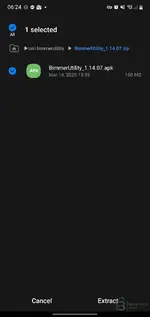
  • Screenshot_20260211-062408_My Files.webp
    Screenshot_20260211-062408_My Files.webp
    35 KB · Views: 43
Hi there was no installation instructions provided,can u help?

Since this is the Android version, the installation is usually standard for third-party apps:

  1. Extract the downloaded archive.
  2. Transfer the .apk file to your Android device (if you downloaded it on a PC).
  3. Open your File Manager on the device and tap the APK file to start the installation.
  4. If prompted, allow installation from unknown sources in your security settings.

If the archive contains a folder (often named com.bimmerutility... or similar) alongside the APK, you likely need to move that folder to your OBB directory here:

Code:
/Android/obb/

Otherwise, just installing the APK should be enough.
 
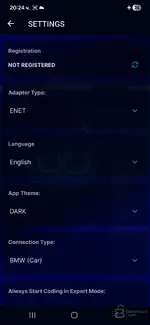
after installation in the application when I enter the settings it says not registered. and when I click to code some function show login with google or apple. what should i do?
 
after installation in the application when I enter the settings it says not registered. and when I c...

Make sure you completely uninstalled any previous versions of the app before installing this one.

Try these steps to reset the app state:
  • Go to your phone's Settings > Apps > BimmerUtility > Storage.
  • Tap Clear Data and Clear Cache.
  • Launch the app again.

Do not try to log in with Google or Apple. If the раtсh is working correctly, you should be able to use the coding functions without a real account. If it still forces a login, try enabling Airplane Mode (then manually turn on WiFi to connect to your adapter) to prevent the app from checking the liсеnsе server.
 
i dont need wifi i use enet cable with otg

That is actually better for stability.

However, the suggestion to use Airplane Mode was not for the adapter connection, but to block the app from accessing the internet.

If the app has internet access (via 4G/5G or WiFi), it will try to verify the liсеnsе with the server and fail, showing you the "not registered" message.

Try this:
  • Turn off Mobile Data and WiFi completely.
  • Connect your ENET cable.
  • Open the app.

The goal is to force the app to run offline so it doesn't check for a valid subscription.
 
Ja sam brate na kraju kupio licencu nisam mogao da cekam

To je verovatno i najbolje rešenje. Barem si sada miran što se tiče ažuriranja i stabilnosti. Krekovane verzije znaju biti nepouzdane, a kod kodiranja je sigurnost najbitnija da ne napraviš štetu na autu.

Srećno!
 
Ja imam svasta. esys na laptop bimmer code i bimer link na tel cisto sam mislio da dodam i bimmer ut...

Iskreno, vredi svakog dinara, pogotovo ako već koristiš E-Sys na laptopu.

BimmerUtility je zapravo "game changer" jer radi kao najbolji launcher za E-Sys. Evo zašto je dobra investicija u odnosu na ono što već imaš:

  • U odnosu na E-Sys: BU ti omogućava da dekodiraš CAFD fajlove u letu. Umesto da gledaš u werne_01 i comment (kao u "golom" E-Sysu), on ti prevede sve opcije na engleski. Pretraga je brutalna, možeš naći bilo koju funkciju za par sekundi bez da kopaš po forumima tražeći "сhеаt sheet".
  • U odnosu na BimmerCode: BimmerCode je super za brze "one-click" izmene. Međutim, njegov "Expert Mode" je prilično ograničen i nepregledan. BU mobilna aplikacija ti daje skoro istu moć kao E-Sys, ali sa opisima funkcija, što BimmerCode nema u Expert modu.

Ukratko: Ako samo pališ/gasiš Start-Stop i Video in Motion, BimmerCode ti je dovoljan. Ali ako planiraš da radiš retrofit, kodiraš module farova, ili neka specifična napredna kodiranja, BimmerUtility u kombinaciji sa E-Sysom je trenutno najbolji alat na tržištu.
 
Hello. thanks for software
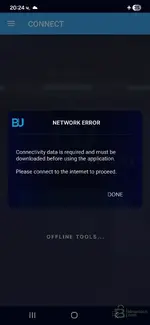
i clear all data , cache , everythink . uninstall apk file. Ariplane mode / stop all wifi 5g etc..
install apk and in settings is status not register
attach pictures
any help will be good :))
 

Attachments

  • 1.webp
    1.webp
    29.3 KB · Views: 1
  • 2.webp
    2.webp
    27.7 KB · Views: 1
Hello. thanks for software
i clear all data , cache , everythink . uninstall apk file. Ariplane mоd...

This is a "Catch-22" situation common with these releases.

The Problem:
The app is 168MB, but it still needs to download the "Connectivity Data" (which contains the actual ECU mapping files, CAFDs, etc.) from the server to function.
1. If you stay Offline, it can't download the data, so it gives the "Network Error".
2. If you go Online, it might check the liсеnsе server and block you because you are "Not Registered".

The Solution (Try in this order):

1. Check the ZIP file again
Double-check the original ZIP file you downloaded. Did it contain only the APK?
Usually, working "offline" cracks come with a folder named com.bimmerutility.app that you must manually copy to /Android/data/ or /Android/obb/. If that folder is missing, the сrаск is likely incomplete.

2. The "Risk" Method (Connect to WiFi)
If there is no data folder provided, the app *must* download the data to work.
  • Turn on WiFi.
  • Open the app and let it try to download the connectivity data.
  • Scenario A: It downloads the data and lets you in. (This means the раtсh works and bypasses the liсеnsе check).
  • Scenario B: It immediately asks for a Google/Apple login or says "Invalid liсеnsе". (This means the сrаск is fake or not working).

3. "Not Registered" Status
In many patched apps, it is normal for the Settings menu to say "Not Registered". As long as the coding features work, you can ignore that label. But you first need to get past that download screen.

Summary:
Try connecting to the internet *once* to see if it downloads the data. If it forces a login screen that you can't skip, then this specific APK file is likely just the original installer and not a working сrаск.
 
no , not include nothing only apk file . turn on wifi and download files . then stop wifi.. When connect to car ask me a google password for login in software. So i cannot bypasses the liсеnsе check . Any solution ? thanks
 
Back