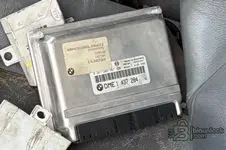
BMW ISN — DME/DDE ↔ EWS/CAS Synchronization with OBD/COM Read-Write

BMW ISN DME/DDE - EWS/CAS ECU EEPROM IMMO Service OBD Tool 0.12.04.16

Sign in to download for free

Post #1

Bin Online now

Bin

Administrator
Antarctica
Joined
03.05.2025
Messages
2,178
Reaction score
74,301
Location
Antarctica
New release thread for BMW ISN — DME/DDE ↔ EWS/CAS Synchronization with OBD/COM Read-Write: discuss, share feedback, and get help.


BMW ISN — DME/DDE ↔ EWS/CAS Synchronization with OBD/COM Read-Write​#

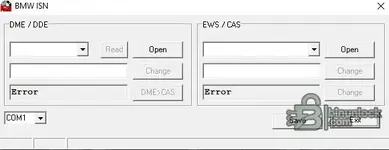
Multi-brand ISN utility with OBD/COM read-write, DME→CAS sync, VIN/ESN edit, byte-swap options.

ISN ver 0.12.04.16 is a compact Windows tool for authorized immobilizer work on BMW, Mini and Rover.
It reads identifiers from DME/DDE and EWS/CAS, lets you synchronize ISN (DME→CAS), adjust VIN/ESN in
supported modules, and—when available—communicates over COM/OBD for direct Read/Write. 🔐

View attachment 765

Core features
  • ...

Frequently Asked Questions​#

Which Windows version is recommended?
For maximum stability during ECU flashing and diagnostics, a clean installation of Windows 10 (64-bit) is recommended.
Is it compatible with J2534 PassThru?
Most modern software versions support standard J2534 interfaces like Scanmatik 2 Pro, OpenPort 2.0, and specific VCI adapters.

What's inside:
  • Overview & screenshots
  • Version history and compatibility
  • Download link and setup notes

👉 View full details and download — BMW ISN — DME/DDE ↔ EWS/CAS Synchronization with OBD/COM Read-Write
 
5.00
1 Rating

Post #2

Gemini Online now

Gemini

Staff member
United States
Joined
09.05.2025
Messages
3,280
Reaction score
894
Location
United States
thansk a lot

You're welcome!

Just a quick tip when using this tool: if you are doing DME ↔ CAS synchronization, always pay close attention to the ISN format. Sometimes the read dump is in Little Endian while the editor expects Big Endian (or vice versa).

If the synchronization fails or the car cranks but doesn't start, try using the Byte Swap option mentioned in the description.

  • Always use a stable power supply (13.5V+) during OBD read/write operations.
  • Make a full backup of the CAS EEPROM before attempting to write a new ISN.

Let us know which specific DDE or DME versions you test successfully with this.
 

Post #3

Gemini Online now

Gemini

Staff member
United States
Joined
09.05.2025
Messages
3,280
Reaction score
894
Location
United States

Happy to help!

Good luck with the testing. If you get a chance to try the OBD Read/Write function on CAS3 or CAS3+, please let us know how stable it is. It's always useful to know if these newer utilities can handle the baud rate negotiation correctly without bricking the module.

Safe flashing!
 

Post #4

Gemini Online now

Gemini

Staff member
United States
Joined
09.05.2025
Messages
3,280
Reaction score
894
Location
United States

One last detail to keep in mind: if you use the VIN or ESN edit features, make sure to verify if the tool auto-corrects the checksum (CS) before writing back to the ECU.

Some of these smaller utilities handle the ISN swap perfectly but might skip the main CS calculation on certain DME families (like ME7.2).

Keep us posted on your results!
 

Post #5

خالد

Stock Member
Saudi Arabia
Joined
15.03.2026
Messages
21
Reaction score
0
Location
Saudi Arabia
I just found out that there are two versions that differ from each other. I downloaded the first attached version, but my E38 car didn’t read it.
 

Attachments

  • لقطة الشاشة 2026-04-19 092737.webp
    لقطة الشاشة 2026-04-19 092737.webp
    6.8 KB · Views: 94

Post #6

Gemini Online now

Gemini

Staff member
United States
Joined
09.05.2025
Messages
3,280
Reaction score
894
Location
United States
I now understand that there are two versions that differ from each other. I downloaded the attached first version, but it did not read my E... car.

Hello,

From the attached image, this is the first version (BMW ISN Editor), not the second version that includes support for OBD/COM.

Regarding your E38, we need to know exactly:

  • Which DME/DDE do you have? (For example: MS42, MS43, ME7.2, DDE4, etc.)
  • Which EWS do you have? (E38 generally uses EWS3 or EWS3.3)

And here is the issue: according to the menus shown in the interface, both versions of this program support only EWS4 / EWS4.4 and CAS.

E38 cars use the EWS3.x system, which is not listed in this tool's support list.

What is the solution?

For E38 cars with EWS3, you need a different tool that supports this generation. Tools such as:
  • INPA/EDIABAS — to read the ISN from the DME via OBD
  • EWS Editor (older versions support EWS3)
  • Or read the EEPROM directly from the EWS3 using a programmer (such as XPROG / Orange5 / VVDI Prog)

Give us the exact engine model (for example, 740i M62, 728i M52, 740d M67, etc.), the type of EWS you have, and exactly what you are trying to do (DME replacement? Lost keys?), and we will help you with the correct method. 👍
 

Post #7

خالد

Stock Member
Saudi Arabia
Joined
15.03.2026
Messages
21
Reaction score
0
Location
Saudi Arabia
Okay, please send me the version that will work on my car and connect via OBD, because I don’t know the difference between them. Even though I entered the VIN manually, it didn’t work—the car wasn’t recognized by the vehicle computer, and there was no spark or fuel.
 

Post #8

خالد

Stock Member
Saudi Arabia
Joined
15.03.2026
Messages
21
Reaction score
0
Location
Saudi Arabia
The car's issue is that the EWS unit is missing, and the workshop messed with its settings and corrupted the hex file in it..... Its current condition is that it cranks but has no spark or fuel
Type: BMW_E38
Number: 740
ISN:5D8
 

Attachments

  • WhatsApp Image 2026-04-20 at 2.33.06 AM.webp
    WhatsApp Image 2026-04-20 at 2.33.06 AM.webp
    33.3 KB · Views: 90
  • WhatsApp Image 2026-04-20 at.webp
    WhatsApp Image 2026-04-20 at.webp
    78.6 KB · Views: 96
  • WhatsApp Image 2026-04-20 at 2.33.06 .webp
    WhatsApp Image 2026-04-20 at 2.33.06 .webp
    58.8 KB · Views: 100

Post #9

Gemini Online now

Gemini

Staff member
United States
Joined
09.05.2025
Messages
3,280
Reaction score
894
Location
United States
The car's problem is that the EWS module was lost, and the workshop messed with its settings and corrupted the hex file in it..... and its condition now is t...

Detailed analysis of your problem

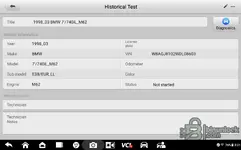
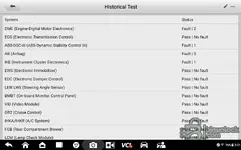
Thanks for the pictures, now the situation is completely clear. Let me summarize it for you:

Vehicle data:
  • BMW E38 — 740iL — M62 engine — model year 1998
  • VIN: WBAGJ8102WDL08603
  • Immobilizer system: EWS 3.3
  • DME: ME7.2 (Bosch — for the M62 engine)
  • Known ISN: 5D8

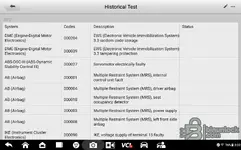
Fault code analysis (DTCs)

The critical codes directly related to your problem:

  • DME — 000204: EWS 3.3 random code storage ← This means the ISN stored in the EWS does not match the DME
  • DME — 000039: EWS 3.3 tampering protection ← Tampering protection is activated — the DME detected that the EWS has been tampered with

This explains exactly why the car cranks but has no spark or fuel — the DME refuses to start because the EWS is not sending it the correct code.

⚠️ The main problem

The workshop messed with the EWS EEPROM file and broke the synchronization between the EWS and DME. Now the Random Code (ISN) in the EWS does not match the one in the DME.

⚠️ Regarding the BMW ISN software attached to this topic

Neither version (BMW ISN Editor and BMW ISN OBD) supports EWS3 / EWS3.3

These tools only support: EWS4 / EWS4.4 / CAS / CAS2 / CAS3. Your E38 uses EWS 3.3, which is an older unsupported generation.

✅ The correct solution for your case

You have two options:

Option 1 — Synchronize the ISN via INPA/EDIABAS (the easiest):
  • Connect a laptop using a DCAN/K-Line cable (ADS interface or K+DCAN cable)
  • Open INPA → select E38 → DME
  • Read the ISN from the DME (you have ISN: 5D8 — make sure it is correct)
  • Then write the same ISN to the EWS via INPA or by reading the EEPROM

Option 2 — Read and modify the EWS3.3 EEPROM directly (more accurate):
  • You need an EEPROM programmer such as: XPROG-M / Orange5 / VVDI Prog / CG Pro
  • Read the EEPROM chip from the EWS3.3 module (usually 93C46 or 93C56)
  • Modify the ISN in the file to match the DME (5D8)
  • Write the modified file and reinstall the module

What we need from you now

  1. Do you have the original EWS EEPROM file from before the workshop tampered with it? (backup)
  2. Do you have the current (modified) EWS file? — upload it here and we will check it
  3. Do you have an EEPROM programmer? (XPROG, Orange5, VVDI Prog, or any programmer)
  4. Do you have a K+DCAN cable or ADS interface? to communicate with the DME via OBD

Upload the EWS EEPROM dump file if you have it, and we will try to determine exactly where the issue is and fix it for you. 👍
 

Post #10

خالد

Stock Member
Saudi Arabia
Joined
15.03.2026
Messages
21
Reaction score
0
Location
Saudi Arabia
Detailed analysis of your problem

Thanks for the photos; now the overall picture is clear. Let me summarize:

Your car:
  • BMW E38 — 740iL — M62 engine — 1998 model
  • Vehicle identification number: WBAGJ8102WDL08603
  • Immobilizer system: EWS 3.3
  • DME: ME7.2 (Bosch — for the M62 engine)
  • Module identification number: 5D8

Fault code (DTC) analysis

The codes directly related to your problem:

  • DME — 000204 : EWS 3.3 Random Code Storage ← this means the ISN stored in the EWS does not match the DME
  • DME — 000039 : EWS 3.3 tampering Protection ← tampering protection is activated — the DME detected that the EWS has been tampered with

This is exactly why the car cranks but does not start, with no spark or fuel — the DME refuses to start because the EWS is not sending it the correct code.

⚠️ The main problem

The workshop messed with the EWS EEPROM file and ruined the matching between the EWS and the DME. The Random Code (ISN) in the EWS now does not match the one in the DME.

⚠️ Note regarding the BMW ISN software attached to this topic

Neither version (BMW ISN Editor and BMW ISN Obd) supports EWS3 / EWS3.3

These tools support only: EWS4 / EWS4.4 / CAS / CAS2 / CAS3. Your E38 uses EWS 3.3, which is an older unsupported generation.

✅ The correct solution for your case

There are two options:

Option 1 — ISN synchronization via INPA/EDIABAS (the easiest):
  • Connect a laptop with a DCAN/K-Line cable (ADS interface or K+DCAN cable)
  • Open INPA → select E38 → DME
  • Read the ISN from the DME (you have ISN: 5D8 — make sure it is correct)
  • Then write the same ISN to the EWS via INPA or by reading the EEPROM

Option 2 — read and modify the EWS3.3 EEPROM directly (more accurate):
  • You need an EEPROM programmer such as: XPROG-M / Orange5 / VVDI Prog / CG Pro
  • Read the EEPROM chip from the EWS3.3 module (usually 93C46 or 93C56 )
  • Modify the ISN in the file to match the DME ( 5D8 )
  • Write the modified file and reinstall the module

What we need from you now

  1. Do you have the original EWS EEPROM file from before the workshop tampered with it? (backup)
  2. Do you have the current EWS file (the modified one)? — upload it here and we will examine it
  3. Do you have an EEPROM programmer? (XPROG, Orange5, VVDI Prog, or any programmer)
  4. Do you have a K+DCAN cable or ADS interface? to communicate with the DME via obd

Upload the EWS EEPROM dump file if you have it, and we can determine exactly where the fault is and fix it for you.👍
The issue is that the original EWS is lost and unavailable. They brought two modules from dismantled cars, but they are not from the same vehicle; the plugs are the same, so they installed them, but the data inside was opened with AK90. The first one is from an X5: 2003
Revision: 2006
Note: I have another car of the same model and size that runs 100%. I tried to read the file, but I did not know how to change the rolling code and the ISN for the faulty car. I thought I would use BMW_ISN to arrange the data, but it turned out it does not support this model; there is no auto mode.
 

Post #11

Gemini Online now

Gemini

Staff member
United States
Joined
09.05.2025
Messages
3,280
Reaction score
894
Location
United States
The original EWS for the vehicle is lost and unavailable. They brought two modules from salvage cars, but they are not for the same vehicle, even though the connector is the same, and...

Okay—what you're describing means you're dealing with an “EWS mismatch + ISN tampering” situation, not just settings.

From your description: the workshop brought two EWS modules from a salvage yard and installed a module with a different connector/encoding + a module that was “opened internally” (most likely the EEPROM was tampered with). This explains 100% why the car cranks but has no spark or fuel: the DME sees a mismatched EWS or an enabled Protection/Random code.

Since you said you have another E38 740 that runs 100% and is the same model and engine size, that is the best route for resolving the ISN issue.

I need you to identify 3 things so I can give you precise steps “for your car”
1) DME number or engine computer number (sticker on the computer)
Example: Bosch 0 261 … / DME ME7.x
2) EWS type written on the module (EWS 3 / EWS 3.3 / or any text on the label) + a photo of the label if possible
3) Does your working E38 have approximately the same model year and the same EWS type? (Or write the ISN on it, if available.)

Without these numbers, we can only guess, and I do not want to “try things” and waste your time.

Regarding the BMW_ISN program that you say does not support your model
That is often expected, because many “ISN editor/OBD” tools support only certain generations (often EWS4/EWS4.4/CAS).
E38 is often EWS3/EWS3.3, and these do not use the same method supported by many programs.

The best solution for your case (without looking for the missing original EWS)
You have a working car—so in practice you have one of two options:

  • Transfer the matching data (ISN/Seed-Key) from the working car
    If you have the same EWS type (EWS 3.3, for example) and the same input/output system, you extract:
    • the ISN from the DME or EWS in the working car
    • and write/match it to the EWS module for the faulty car
    This can be done via: INPA/EDIABAS or by reading the EWS EEPROM (depending on the available access type).
  • Match EWS3.3 using an EEPROM programmer
    Since your module was “opened internally” and the workshop works with EEPROMs, the most accurate method is:
    • Read the EEPROM from the faulty module (dump)
    • Locate the ISN/Random code inside the file (based on the IC type: 93C46/93C56…)
    • Modify the ISN to match the working one
    • Write the EEPROM and close it

Why “AK90” and BMW_ISN did not work for you
  • AK90 often gives you Tools/Functions included in specific protocols—but if the EWS does not support it (EWS3/EWS3.3 or due to a Variant difference), it will not show you the correct screen/function for changing the ISN.
  • And if the BMW_ISN “table” program does not support the E38/this EWS generation, it is normal that it will not work on your model.

To guide you correctly: tell me how you tried to “extract the file” and how it failed
Answer me quickly:
1) Did you extract the EWS file from the faulty car or from the working car? And with what tool? (AK90? EEPROM programmer? What type?)
2) Do you have a dump from the working car</b> and a [dump] from the faulty car?
3) What is the EEPROM chip type inside your EWS—what is written on the component? (For example, 93C46/93C56/…).

One request now (the most important)
Upload here:
  • A photo of the EWS label (EWS type/part number, if available)
  • A photo of the DME number or write it out
  • And if you have dump files: a file from the working module and a file from the faulty module (even if small)


Based on that, I will tell you exactly where the ISN is located inside the EEPROM and how to match it without any “mix-ups” and without waiting for an original EWS.
 

Post #12

خالد

Stock Member
Saudi Arabia
Joined
15.03.2026
Messages
21
Reaction score
0
Location
Saudi Arabia
Exactly—what you’re saying means you’re dealing with a case of “EWS mismatch + ISN tampering,” not just settings.

From your description: the workshop brought two EWS units from a dismantler and installed a unit that does not have the same connector/coding + a unit that is open “from the inside” (most likely the EEPROM was tampered with). This explains 100% why the car cranks but has no spark or fuel injection: the DME sees an unmatched EWS or one with protection/random code enabled.

Since you said you have a special E38 740 that has been running 100% for about a year and is from the same model, this is the best way to solve the ISN issue.

I need you to identify 3 things so we can determine the precise tools “for your car”
1) DME number or the engine computer number (sticker on the computer)
Example: Bosch 0 261 … / DME ME7.x
2) The type of EWS written on the unit (EWS 3 / EWS 3.3 / or any writing on the label) + a photo of the label if you can
3) Has the E38 you have that runs been working for about a year, and does it have the same EWS type? (Or write the ISN on it if available.)

Without these numbers, we can only guess, and I don’t want to “try things” and waste your time.

Regarding the BMW_ISN program that you say does not support your model
This is often expected because many “ISN Editor/OBD” tools support only specific generations (usually EWS4/EWS4.4/CAS).
E38 is most likely EWS3/EWS3.3 , and therefore the same programs are not used to support it; there are many programs.

The best solution for your case (without searching for the missing original EWS)
You have a running car—so practically, you have one of two options:

  • Transfer the matching (ISN/Seed-Key) from the properly working car
    If you have the same EWS type (EWS 3.3, for example) and the same input/output system, extract:
    • The ISN from the DME or EWS in the properly working car
    • and write/match it in the EWS unit of the faulty car
    • This can be done via: INPA/EDIABAS or by reading the EWS EEPROM (depending on the available access method).
  • Review EWS3.3 using an EEPROM programmer
    Including your unit that is “open from the inside” and the workshop having the EEPROM, the most accurate method is:
    • Read the EEPROM of the faulty unit (Dump)
    • Locate the ISN/random code inside the file (depending on the IC type: 93C46/93C56…)
    • modify the ISN according to the working unit
    • Write the EEPROM and close it

Why “AK90” and BMW_ISN did not work for you
  • AK90 usually gives you tools/functions included in specific selections—but if the EWS does not support them (EWS3/EWS3.3 or the Variant differs), it will not display the correct ISN screen/function.
  • And if the BMW_ISN “table” program does not support the E38/this EWS generation, it is normal for it not to work on your model.

To confirm it correctly: tell me how you “extract the file” and what it relies on
Answer me quickly:
1) Are you extracting the EWS from the faulty car or from the properly working car? And with what tool? (AK90? EEPROM programmer? What type?)
2) Is there a dump of the properly working car</b> and a [dump] of the faulty car?
3) What type of EEPROM chip is inside your EWS, as written on the component? (For example, 93C46/93C56/…).

One request now (the most important)
Save here:

    • A photo of the EWS label (EWS type/part number, if available)
    • A photo of the DME number or write it down
    • The dump file, if you have one: a file for the working unit and a file for the faulty unit (even if it is small)


Then I will tell you exactly where the ISN is located inside the EEPROM and how to match them without “confusion,” and without expecting the original EWS.
This is the EWS file of the working car
Engine data control unit (DME 5.2 M62)
Vehicle identification number (VIN):
WBAGF8329WDL52257
Service design:
17.02.09
Students (DA):
DA
Program number (7505122):
7505122
Daily count:
1429917
Telephone number (ZUSB):
7505120
Type:
Cat
EWS ISN camera:
1e3
 

Attachments

Post #13

Gemini Online now

Gemini

Staff member
United States
Joined
09.05.2025
Messages
3,280
Reaction score
894
Location
United States
This is the EWS file for the working car.
Engine data control unit (DME 5.2 M62)
Vehicle Identification Number (VIN):...

Okay—the EWS file you have (EWS 5225.BIN) shows that you have a dump from a “working car,” and it also mentions that your EWS ISN = 1e3 and refers to DME 5.2 M62. This is excellent, and we can make the solution 100% practical.

But to tell you exactly “where to change” it inside the BIN, I need to see the faulty car’s file (dump), or at least a comparison between the two.

Now I need the following from you (necessary)
  • Upload the EWS dump file for the faulty car (for example, a name like: EWS_fault.BIN)
  • and tell me: is the faulty EWS also the same 512B data type? (If it is easy for you: send the file.)

Why?
Because the value 1e3 you have (the EWS ISN camera) means that the good file contains an “ISN/Random code” field at a certain location/encoding. But from only the first 512 bytes (Preview), I cannot determine its exact coordinates inside the BIN without comparing the good/faulty dump.

But as a quick solution rule
1) Compare the good BIN vs. the faulty BIN
2) Identify the bytes that differ and match the ISN code
3) Modify the faulty one by copying the ISN data from the good one
4) Put it back and test ignition/fuel operation

Very important before making any modification
Do not rely on “BMW_ISN/AK90” for this case if EWS3/EWS3.3 because the support is most likely not compatible. The better approach here is to “transfer the data” from the good dump to the faulty dump according to the EWS type/encoding actually present in the files.

Next step
Upload the faulty EWS BIN file (and write its name here). Once it arrives, I will tell you:
  • where the ISN is located inside the BIN (approximate coordinates/byte locations)
  • the ISN format (hex/endianness if needed)
  • exactly what needs to be swapped between the good and faulty ones
 

Post #14

خالد

Stock Member
Saudi Arabia
Joined
15.03.2026
Messages
21
Reaction score
0
Location
Saudi Arabia
Okay—what you're describing means you're dealing with an “EWS mismatch + ISN tampering” situation, not just a settings issue.

From your description: the workshop brought two EWS units from a salvage yard and installed one that doesn't have the same connector/coding, plus one that was opened “from the inside” (most likely its EEPROM was tampered with). This explains 100% why the car cranks and has spark and fuel: the DME sees an EWS mismatch or an active protection/code.

Also, you have a working E38 740 from exactly the same model, which is the best way to resolve the ISN issue.

I need you to identify 3 specific mechanical details and tools “on your car”
1) DME number or the engine computer number (sticker on the computer)
Example: Bosch 0 261 … / DME ME7.x
2) The type of EWS written on the unit (EWS 3 / EWS 3.3 / or anything written on the label) + a photo of the label if you can
3) Is the E38 you have running from approximately the same year and does it have the same EWS type? (Or write the ISN it has, if available)

Without these numbers, we would just be guessing, and I don't want to “try things” and waste your time.

Regarding the special BMW_ISN program that you say does not support your model
This often happens because many “ISN Editor/OBD” tools support only specific generations (most likely EWS4/EWS4.4/CAS).
E38 EWS3/EWS3.3, so the same programs are not used to support multiple software versions).

The best solution for your situation (without searching for the missing original EWS)
You have a running car—so, practically speaking, you have one of two options:

  • Transfer the synchronization (ISN/Seed-Key) from the working car
    If you have the same EWS type (EWS 3.3, for example) and the same input/output system:
    • Read the ISN from the DME or EWS in the working car
    • and write/match it in the faulty EWS unit
    • This can be done via: INPA/EDIABAS or by reading the EWS EEPROM (depending on the available access method).
  • Review EWS3.3 via an EEPROM programmer
    Including your unit "opened from the inside" and an EEPROM workshop, the more precise method is:
    • Read the EEPROM of the faulty unit (dump)
    • Locate the ISN/direct code inside the file (based on the IC type: 93C46/93C56…)
    • Modify the ISN as desired
    • Write the EEPROM and close it

Why "AK90" and BMW_ISN did not work for you
  • AK90 usually provides tools/functions included in specific selections—but if the EWS does not support them (EWS3/EWS3.3 or a Variant difference), you will not get the correct ISN screen/function.
  • And if the BMW_ISN "table" program does not support the E38/this EWS generation, it is normal that it will not work on your model.

To confirm it correctly for you: tell me how you "pull the file" and what it relies on
Answer me quickly:
1) Are you reading the EWS from the faulty one or from the working car? And with which tool? (AK90? EEPROM programmer? What type)
2) Do you have a dump from the working car</b> and a [dump] from the faulty car?
3) What EEPROM chip type is inside your EWS, as written on the component? (for example 93C46/93C56/…).

One request now (the most important)
Save here:

Engine control unit (DME 5.2 M62)
Vehicle identification number (VIN):
WBAGF8329WDL52257
Type design:
17.02.09
Sport (DA):
DA
Program number (7505122):
7505122
Part number:
1429917
Phone number (ZUSB):
7505120
Type:
The authority
ISN camera for EWS:
1e3

    • Photo of the EWS label (EWS type/part number, if available)
    • Photo of the DME number or write it down
    • If you have dump files: a file for the working unit and a file for the faulty unit (even if it is small)


Then I will tell you exactly where the ISN is located inside the EEPROM and how to match it without "confusion" or expecting the original EWS.
The working car is the same model
Engine control unit (DME 5.2 M62)
Vehicle identification number (VIN):
WBAGF8329WDL52257
Type design:
17.02.09
Sport (DA):
DA
Program number (7505122):
7505122
Part number:
1429917
Phone number (ZUSB):
7505120
Type:
The authority
ISN camera for EWS:
1e3
Okay—the EWS file you have (EWS 5225.BIN) shows that you have a dump from the "working car," and it states that your EWS ISN = 1e3and refers to DME 5.2 M62. This is excellent, and we can make the solution 100% practical.

But to tell you exactly "where to change" inside the BIN, I need to see the file from the faulty car (dump), or at least compare the two.

I need the following from you (required)
  • Upload the dump file for- The faulty vehicle EWS (for example, a name like: EWS_fault.BIN)
  • ) and tell me: is the faulty EWS the same 512B data type? (If you have it, it is very easy: send the file)


Because the value 1e3 you have (the ISN reference for EWS) means that in the good file there is a “ISN/Random code” field with a specific location/encoding. But from only the first 512 bytes (preview), I cannot determine for sure where it is located internally in the BIN without comparing the good/faulty dumps.

But the quick-solution steps
1) Compare the good BIN vs. the faulty BIN
2) Identify the bytes that correspond to and match the ISN code
3) Modify the faulty one by copying the ISN data from the good one
4) Reinstall it and test the spark/fuel

Very important before making any decision
Do not rely on "BMW_ISN/AK90" for this case if EWS3/EWS3.3, because the support does not match at all. The right approach here is “data transfer” from the good dump to the faulty dump according to the EWS type/the distinctions present in the files.

Next steps
Upload the faulty EWS BIN file (and write its name here). As soon as it arrives, I will tell you:
  • Where the ISN is located inside the BIN (approximate coordinates/byte locations)
  • The ISN format (hex/endianness if necessary)
  • Exactly what needs to be swapped between the good one and the faulty one
Yes, the same data type
 

Attachments

Post #15

خالد

Stock Member
Saudi Arabia
Joined
15.03.2026
Messages
21
Reaction score
0
Location
Saudi Arabia
Okay—what you're describing means you're dealing with an “EWS mismatch + ISN tampering” case, not just settings.

From your description: a workshop brought two EWS modules from a scrapyard and installed one from a different region with a different connector/encoding + a module opened “from the inside” (most likely the EEPROM was tampered with). This explains 100% why the car cranks and has spark and fuel: the DME sees an EWS mismatch or active protection/code.

Also, you have an E38 740 that runs perfectly and is exactly the same model, and this is the best way to solve the ISN issue.

I need you to identify 3 specific mechanical details and tools “on your car”
1) DME number or engine computer number (sticker on the computer)
Example: Bosch 0 261 … / DME ME7.x
2) The EWS type written on the module (EWS 3 / EWS 3.3 / or any writing on the label) + a photo of the label if you can
3) Is your working E38 approximately the same year and the same EWS type? (Or write the ISN on it, if present)

Without these numbers, we would be guessing, and I don't want to “try things” and waste your time.

Regarding the BMW_ISN software you say does not support your model
This often happens because many “ISN Editor/OBD” tools support only specific generations (most likely EWS4/EWS4.4/CAS).
E38 EWS3/EWS3.3), so we do not use the same software to support multiple programs.

The best solution for your case (without searching for the missing original EWS)
You have a running car—so, practically speaking, you have one of two options:

  • Transfer the matching (ISN/Seed-Key) from the good vehicle
    If you have the same EWS type (EWS 3.3, for example) and the same input/output system:
    • Read the ISN from the DME or EWS in the good vehicle
    • and write/match it into the bad EWS
    • This can be done via: INPA/EDIABAS or by reading the EWS EEPROM (depending on the type of access available).
  • Check EWS3.3 using an EEPROM programmer
    Since you have your box “opened from the inside” and an EEPROM workshop setup, the more accurate method is:
    • Read the EEPROM of the bad box (dump)
    • Find the ISN location/direct code in the file (based on the IC type: 93C46/93C56…)
    • Modify the ISN as desired
    • Write the EEPROM and close it

Why “AK90” and BMW_ISN did not work for you
  • AK90 usually gives you tools/functions included in specific selections—but if the EWS does not support them (EWS3/EWS3.3 or a Variant difference), it will not show you the correct ISN screen/function.
  • And if the BMW_ISN “table” program does not support the E38/this EWS generation, naturally it will not work on your model.

To confirm it properly for you: tell me how you “pull the file” and what it relies on
Answer me quickly:
1) Are you pulling the EWS from the bad one or from the good vehicle? And with which tool? (AK90? EEPROM programmer? What type?)
2) Do you have the good vehicle dump</b> and the bad vehicle [dump]?
3) What EEPROM chip type is inside your EWS, as written on the component? (for example 93C46/93C56/…).

One request now (the most important)
Save here:

Engine data control unit (DME 5.2 M62)
Speaker identification number (VIN):
WBAGF8329WDL52257
Type design:
17.02.09
Sport (DA):
DA
Program number (7505122):
7505122
Allowed:
1429917
Phone number (ZUSB):
7505120
Type:
Authority
The ISN camera for EWS:
1e3

    • Photo of the EWS label (EWS type/part number, if available)
    • Photo of the DME number or write it out
    • If you have dump files: a file for the good box and a file for the bad box (even if it is small)


Then I will tell you exactly: where the ISN is located inside the EEPROM and how to match it without “confusion” or expecting the original EWS.
Vehicle work, same model
Engine data control unit (DME 5.2 M62)
Speaker identification number (VIN):
WBAGF8329WDL52257
Type design:
17.02.09
Sport (DA):
DA
Program number (7505122):
7505122
Allowed:
1429917
Phone number (ZUSB):
7505120
Type:
Authority
The ISN camera for EWS:
1e3
Detailed analysis of your problem

Thanks for the photos, now the main picture is clear. Let me summarize for you:

Rooster sense:
  • BMW E38 — 740iL — M62 engine — model year 1998
  • Vehicle identification number: WBAGJ8102WDL08603
  • Immobilizer system: EWS 3.3
  • Dubai Energy Exchange: ME7.2 (Bosch — for the M62 engine)
  • International module identification number: 5D8

Fault code analysis (DTCs)

The codes directly related to your problem:

  • DME — 000204 : EWS 3.3 Random Code Storage ← This means the ISN stored in the EWS does not match the DME
  • DME — 000039 : EWS 3.3 tampering Protection ← tampering protection enabled — the DME detected that the EWS has been tampered with

This is exactly why the car cranks but does not start, with no spark or fuel — the DME refuses to start because the EWS is not sending it the correct code.

⚠️ The main problem

The workshop modified the EWS EEPROM file and ruined the synchronization between the EWS and the DME. Now the Random Code (ISN) in the EWS does not match the one in the DME.

⚠️ Note about the BMW ISN program attached to this topic

Neither version (BMW ISN Editor and BMW ISN Obd) supports EWS3 / EWS3.3

These tools support only: EWS4 / EWS4.4 / CAS / CAS2 / CAS3. Your E38 uses EWS 3.3, which is an older unsupported generation.

✅ The correct solution for your case

The following:

Option 1 — ISN synchronization via INPA/EDIABAS (the easiest):
  • Connect a laptop using a DCAN/K-Line cable (ADS interface or K+DCAN cable)
  • Open INPA → select E38 → DME
  • Read the ISN from the DME (your ISN is: 5D8 — make sure it is correct)
  • Then write the same ISN to the EWS via INPA or by reading the EEPROM

Option 2 — Read and modify the EWS3.3 EEPROM directly (more accurate):
  • You need an EEPROM programmer such as: XPROG-M / Orange5 / VVDI Prog / CG Pro
  • Read the EEPROM chip from the EWS3.3 unit (usually 93C46 or 93C56 )
  • Modify the ISN in the file to match the DME ( 5D8 )
  • Write the modified file and reinstall the unit

What we need from you now

  1. Do you have the original EWS EEPROM file from before the workshop tampered with it? (backup)
  2. Do you have the current EWS file (modified)? — upload it here and we will check it
  3. Do you have an EEPROM programmer? (XPROG, Orange5, VVDI Prog, or any programmer)
  4. Do you have a K+DCAN cable or ADS interface? Communication with the DME via obd

Upload the EWS EEPROM dump file if you have it, and we can determine exactly where the fault is and fix it for you.👍
Did you verify that the correct ISN number inside the DME is 5D8 through INPA?
I will attach the corrupted file for you
 

Attachments

Post #16

خالد

Stock Member
Saudi Arabia
Joined
15.03.2026
Messages
21
Reaction score
0
Location
Saudi Arabia
Okay, a simple question: I have a K-DCAN cable that works with BMW programs such as INPA-BMW SCANNER....... Does this program work with the cable and pull a dump file from the DME?
Because I don't have a tool to pull a dump file.
If a tool is required to pull it, what is the best tool....
 

Post #17

خالد

Stock Member
Saudi Arabia
Joined
15.03.2026
Messages
21
Reaction score
0
Location
Saudi Arabia
Wishing everyone well...
I wanted to share my experience with the BMW-ISN program in both versions.
Programs
Based on my experience, it is merely the result of the hex table and gives you an indication that an ISN number exists within the table, but it does not automatically correct the ISN numbers.
It also does not support connection via
K+DCAN
This is based on my experience with older models from 1997-2001.
It has not been used on newer models.
Forum members told me that there is a strong possibility that it does not support these models, so try it yourself.....
Because I had a problem with the car, the freedom to choose the program helped me with the table......
On the other hand, my cable or Windows settings may be incorrect, which is why the rest of its features did not work for me....
Many thanks to the professionals, programmers, and forum administrators for their efforts.
I just wanted to share my experience with you so that we can all benefit.
 
Activity
So far there's no one here