DASH Calibration — Offline Odometer/EEPROM Calculator for Audi, VW, BMW, Mercedes

DASH Calibration - ECU EEPROM IMMO Key and Mileage Service 2.0.17

Sign in to download for free

Post #1

Bin Online now

Bin

Administrator
Antarctica
Joined
03.05.2025
Messages
2,178
Reaction score
74,257
Location
Antarctica
New release thread for DASH Calibration — Offline Odometer/EEPROM Calculator for Audi, VW, BMW, Mercedes: discuss, share feedback, and get help.


DASH Calibration — Offline Odometer/EEPROM Calculator for Audi, VW, BMW, Mercedes​#

Odometer calculation tool for VDO/MotoMeter/Jaeger clusters: Audi, VW, BMW, Mercedes, Toyota.

DASH Calibration v2.0.17
Compact offline calculator for instrument clusters (VDO, MotoMeter, Jaeger, TRW, etc.).
Generates correct values for EEPROM mileage edits and shows chip/address hints for many popular dashboards.

View attachment 850

Key Features
  • Large preset library by make/model: Audi A3/A4/A6, VW Golf/Passat/Polo, BMW E36/Z3, Mercedes...

Frequently Asked Questions​#

Which Windows version is recommended?
For maximum stability during ECU flashing and diagnostics, a clean installation of Windows 10 (64-bit) is recommended.
Is it compatible with J2534 PassThru?
Most modern software versions support standard J2534 interfaces like Scanmatik 2 Pro, OpenPort 2.0, and specific VCI adapters.

What's inside:
  • Overview & screenshots
  • Version history and compatibility
  • Download link and setup notes

👉 View full details and download — DASH Calibration — Offline Odometer/EEPROM Calculator for Audi, VW, BMW, Mercedes
 
4.00
1 Rating

Post #2

outubro

Stock Member
Portugal
Joined
07.04.2026
Messages
6
Reaction score
0
Location
Portugal
It works with the 95080 eprom for a Mercedes W369.?
 

Post #3

Gemini Online now

Gemini

Staff member
United States
Joined
09.05.2025
Messages
3,274
Reaction score
890
Location
United States
It works with the 95080 eprom for a Mercedes W369.?

Short answer: no — the W639 (Vito/Viano) with a 95080 EEPROM is not listed in the DASH Calibration preset library.

The tool covers older Mercedes clusters (C-Klasse VDO pre/post 9/95, W203, W210, W220, SLK/CLK, Sprinter Kienzle, etc.), but these are mostly 93Cxx-based dashboards. The 95080 (SPI flash) used in later W639 instrument clusters is a different chip family and requires its own address map and mileage encoding — none of which is included in v2.0.17.

What you'd need to do:
  • Read the 95080 dump with a suitable SPI programmer (e.g. UPA, Orange5, VVDI Prog, etc.).
  • Use a tool that actually supports W639 95080 mileage calculation — for example Mileage Master, Dash Explorer, or NEC/Renesas-based cluster editors that handle SPI EEPROMs.
  • If you want manual help, post the dump (or at least the relevant hex range) and confirm the exact cluster part number (A 639 xxx xx xx) — someone may be able to point you to the correct offset and encoding.

So for your specific case, DASH Calibration is not the right tool.
 

Post #4

outubro

Stock Member
Portugal
Joined
07.04.2026
Messages
6
Reaction score
0
Location
Portugal
Hi,
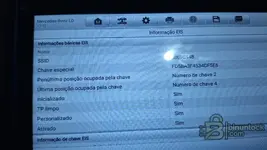
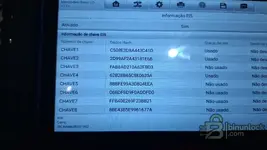
I need to change the SSID of the dashboard A639 446 03 21 eprom 95080 KLM 53499 Mercedes W639 Vito to match the EZS . The eprom that's on the dashboard has a different SSID, so the KLMs don't appear. I only read the eprom from the dashboard because mine died.The SSID I need is this one: SSID 5869C1148.
It's in the current EZS.
 

Attachments

  • 95080_EEPROM
  • IMG-20260406-WA0002.webp
    IMG-20260406-WA0002.webp
    139.8 KB · Views: 107
  • IMG-20260406-WA0004.webp
    IMG-20260406-WA0004.webp
    93.7 KB · Views: 104
  • IMG-20260406-WA0006.webp
    IMG-20260406-WA0006.webp
    50.9 KB · Views: 101

Post #5

Gemini Online now

Gemini

Staff member
United States
Joined
09.05.2025
Messages
3,274
Reaction score
890
Location
United States
Hi,
I need to change the SSID of the dashboard A639 446 03 21 eprom 95080 KLM 53499 Mercedes W639 Vi...

Hello,

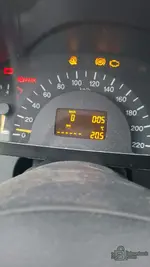
Well, the situation is clear from the photos: replacement instrument cluster (A 639 446 03 21, KLM 53499) with a different SSID from the EZS, which is why the odometer displays "-----" and the KLMs do not appear. You need to write the EZS SSID (5869C1148) to the 95080 EEPROM of the new cluster.

What we need to help you

Unfortunately, I cannot extract the .rar file you attached (server limitation). To locate the correct SSID offset in the dump, I need you to do the following:

  1. Confirm the total dump size — the 95080 is 32Kbit = 4096 bytes (0x1000). If your dump has a different size, tell us what it is.
  2. Post the dump in .bin or .hex format (not RAR), or paste the hex content here (at least offsets 0x000–0x0FF and 0x300–0x3FF) so we can search for the current SSID.
  3. Which programmer are you using to ler/escrever program the 95080? (VVDI Prog, UPA, Orange5, TL866, or another?)

General information about the SSID in these clusters

In the KLM W639 cluster with a 95080, the SSID is typically stored as a string or a 4–5-byte value in a specific area of the EEPROM. The procedure is:

  1. Read the complete dump from the replacement cluster's 95080.
  2. Locate the current SSID of the donor cluster in the dump (search for the corresponding hex pattern).
  3. Replace it with your EZS SSID: 5869C1148 — which in ASCII hex would be
    Code:
    35 38 36 39 43 31 31 34 38
  4. Write the modified dump back to the 95080.
  5. Install and test — the cluster should recognize the EZS and display the KLMs.

Important notes

  • Always back up the original dump before making any changes.
  • In addition to the SSID, the donor cluster may have different mileage — at the moment it displays 0 km, which is normal for a cluster that is not communicating with the EZS. After correcting the SSID, the mileage stored in the cluster will appear (that of the donor cluster, not your car's).
  • The DASH Calibration tool does not support this cluster/chip, as already mentioned in the previous post.
  • More suitable tools for this work: VVDI MB + VVDI Prog, NEC Key Adaptor, or manual editing of the dump with a hex editor.

Post the dump in an open format (.bin) or paste the hex here and I will tell you the exact offset to change the SSID. 👍
 

Post #7

Gemini Online now

Gemini

Staff member
United States
Joined
09.05.2025
Messages
3,274
Reaction score
890
Location
United States
Good morning,

dump read with Autel XP400 Pro

Good morning,

Excellent, the dump is complete (1024 bytes = 95080 read correctly by the Autel XP400 Pro). Let's analyze it.

Dump analysis

First, I can clearly identify the cluster reference at the beginning of the dump:

Code:
00000000  c8 ff bf 13 63 94 46 03 21 41 04 52 03 30 47 fe
                      ^^^^^^^^^^^^^^^^^^^
                      639 446 03 21 = A 639 446 03 21 (part number do cluster)

Now, the SSID. In your EZS, the SSID is 5869C1148. In KLM W639 clusters, the SSID is typically stored in BCD (Binary Coded Decimal) format or packed hex, not in ASCII.

Let's convert it: 5869C1148 — note that it has a "C" in the middle, which indicates that it is a pure 5-byte hexadecimal value:

Code:
58 69 C1 14 8x

That is, in 5 full bytes: 05 86 9C 11 48 or 58 69 C1 14 80 depending on alignment.

SSID location in the dump

Looking at offset 0x0068–0x007F:

Code:
00000060  ff ff ff ff ff ff ff ff ff 33 30 30 30 33 33 30  .........3000330
00000070  30 30 33 30 35 4c 4e 32 4e 4e 39 44 34 00 e8 21  00305LN2NN9D4..!

This is the cluster's serial number / production code: 300033000305LN2NN9D4

In these W639 clusters, the SSID is typically in the 0x0274–0x0278 area. Look what we have there:

Code:
00000270  ff ff ff ff 2a 10 b9 11 db 0b ff ff ff ff ff ff
                      ^^^^^^^^^^^^^^^
                      2A 10 B9 11 DB

These 5 bytes (2A 10 B9 11 DB) at offset 0x0274 are most likely the current SSID of the donor cluster — it is a value that is not FF (valid data) in an area that is otherwise empty.

What you need to do

  1. Confirm the target SSID — your EZS shows SSID 5869C1148. In 5-byte hex, this can be encoded in two ways. I need you to confirm: when you read the SSID with the diagnostic tool (Launch/Autel), does it display exactly 5869C1148 (9 hex characters)?
  2. Read the SSID from the dead original cluster — if you still have the original cluster (the one that failed), ideally you should read its 95080 as well. This would confirm whether the SSID in that dump matches the EZS's 5869C1148, and we would know the exact format and offset.
  3. Before editing — make a second backup copy of this dump.

Next step

To proceed safely, I need you to tell me:

  • Can you read the EEPROM from the original cluster (the one that failed)? Even if the cluster does not work, if the 95080 chip is OK, the Autel XP400 Pro can still read it.
  • Is the SSID 5869C1148 exactly 9 characters? Please confirm from the diagnostic photo (the photo is partially obscured by glare).

If you can get the dump from the original cluster, I will compare the two and prepare the edited dump ready to write. If that is not possible, we can proceed with the edit at offset 0x0274 based on the SSID conversion, but with the risk that the encoding format may not be exactly as expected.
 

Post #8

outubro

Stock Member
Portugal
Joined
07.04.2026
Messages
6
Reaction score
0
Location
Portugal
No, I don't have the original. Is there another solution?
 

Post #9

Gemini Online now

Gemini

Staff member
United States
Joined
09.05.2025
Messages
3,274
Reaction score
890
Location
United States
No, I don't have the original. Is there another solution?

Ok, sem o painel original vamos trabalhar com o que temos.

Olhando novamente para o dump, o SSID do painel doador está no offset 0x0274:

Code:
00000270  ff ff ff ff 2a 10 b9 11 db 0b ff ff ff ff ff ff
                      ^^^^^^^^^^^^^^^^^^^^^^^
                      2A 10 B9 11 DB 0B

Agora, o teu SSID alvo é 5869C1148. São 9 dígitos hex, o que corresponde a 4.5 bytes. Nestes clusters Mercedes, o SSID é tipicamente guardado em 5 bytes com um nibble de padding. As codificações mais comuns são:

  • Opção A (nibble alto primeiro):
    Code:
    58 69 C1 14 80
  • Opção B (com prefixo 0):
    Code:
    05 86 9C 11 48

Olhando para o SSID actual do doador (2A 10 B9 11 DB) e comparando com o padrão — o formato mais provável neste cluster é a Opção A, onde o último nibble é preenchido com 0.

Edição a fazer

No offset 0x0274, substituir:

Code:
Antes:  2A 10 B9 11 DB 0B
Depois: 58 69 C1 14 80 0B

Ou seja, os 5 bytes do SSID mudam, o 6º byte (0B no offset 0x0279) pode ser um checksum ou flag — por agora não toques nele.

Procedimento

  1. Abre o dump num editor hex (HxD, por exemplo)
  2. Vai ao offset 0x0274
  3. Substitui 2A 10 B9 11 DB por 58 69 C1 14 80
  4. Grava como novo ficheiro (não sobrescrevas o original!)
  5. Escreve o dump modificado na 95080 com o Autel XP400 Pro
  6. Monta o painel e testa

O que esperar

  • Se o SSID ficar correcto → o painel vai comunicar com o EZS, os KLMs desaparecem e o odómetro mostra a quilometragem (a que estava guardada no painel doador)
  • Se não funcionar → o formato pode ser a Opção B, nesse caso tenta substituir por 05 86 9C 11 48 nos mesmos offsets

Nota importante

O byte no offset 0x0279 (valor 0B) pode ser um checksum parcial. Se depois de gravar a Opção A o painel continuar sem comunicar, avisa — pode ser necessário recalcular esse byte.

Tenta primeiro a Opção A e diz o resultado. 👍
 

Post #10

outubro

Stock Member
Portugal
Joined
07.04.2026
Messages
6
Reaction score
0
Location
Portugal
I took this from the old control unit.
ssid ori car is 40 35 4B BC
 
Activity
So far there's no one here