DST VAG IMMO Tool - BCM2, ELV, EZS, MEDC17, Simos & TCU Suite

DST VAG IMMO Tool 4.0 - BCM2, Simos, MEDC17 & Module Support 4.0

Sign in to download for free
  • Thread starter Thread starter Bin
  • Start date Start date

Post #821

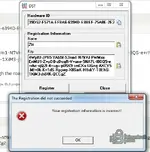
error "Your registration information is incorrect"

That error usually means the name/key pair isn't matching exactly what the tool expects, so check these before anything else:

  • Registration name must be entered exactly as Ztt - same case, no leading or trailing space.
  • Paste the key as one continuous string. Copying from the post can introduce a line break or a dropped character, especially with the + and = symbols in it.
  • Make sure your clipboard didn't trim anything - the key ends with ...jh84K-QCCgZ.
  • Run the tool as Administrator and confirm it can write its license file.

One thing worth ruling out: your HWID post had the text "You can activate it" in front of the ID. Please reopen the tool and post the HWID again exactly as the window shows it, nothing before or after. If the string differs from 39D52-F571A-EFBA6-6394D-E8BEF-75A8E-2E2EA-60EF8, the key was issued against the wrong ID and needs to be regenerated - a reissue for your own HWID doesn't cost you an activation slot.

Also tell me which version you're running, since a key generated for 4.0 won't validate in an older build.
 

Post #822

That error usually means the name/key pair isn't matching exactly what the tool expects, so check these before anything else:

  • Registration name must be entered exactly as Ztt - same case, no leading or trailing space.
  • Paste the key as one continuous string. Copying from the post can introduce a line break or a dropped character, especially with the + and = symbols in it.
  • Make sure your clipboard didn't trim anything - the key ends with ...jh84K-QCCgZ.
  • Run the tool as Administrator and confirm it can write its license file.

One thing worth ruling out: your HWID post had the text "You can activate it" in front of the ID. Please reopen the tool and post the HWID again exactly as the window shows it, nothing before or after. If the string differs from 39D52-F571A-EFBA6-6394D-E8BEF-75A8E-2E2EA-60EF8, the key was issued against the wrong ID and needs to be regenerated - a reissue for your own HWID doesn't cost you an activation slot.

Also tell me which version you're running, since a key generated for 4.0 won't validate in an older build.
 

Attachments

  • ошибка .webp
    ошибка .webp
    20.4 KB · Views: 2

Post #824

That error usually means the name/key pair isn't matching exactly what the tool expects, so check these before anything else:

  • Registration name must be entered exactly as Ztt - same case, no leading or trailing space.
  • Paste the key as one continuous string. Copying from the post can introduce a line break or a dropped character, especially with the + and = symbols in it.
  • Make sure your clipboard didn't trim anything - the key ends with ...jh84K-QCCgZ.
  • Run the tool as Administrator and confirm it can write its license file.

One thing worth ruling out: your HWID post had the text "You can activate it" in front of the ID. Please reopen the tool and post the HWID again exactly as the window shows it, nothing before or after. If the string differs from 39D52-F571A-EFBA6-6394D-E8BEF-75A8E-2E2EA-60EF8, the key was issued against the wrong ID and needs to be regenerated - a reissue for your own HWID doesn't cost you an activation slot.

Also tell me which version you're running, since a key generated for 4.0 won't validate in an older build.
What is version 4.0, and where can I download it?
 

Post #825

What is version 4.0, and where can I download it?

Good, the screenshot confirms the HWID in the tool matches what the key was issued against (39D52-F571A-EFBA6-6394D-E8BEF-75A8E-2E2EA-60EF8), and the name/key look correct. That means the data isn't the problem, so the version mismatch I mentioned is now the most likely cause.

Version 4.0 is the current release of this tool, the one this thread is attached to. You can download it from the resource page linked to this discussion (Resource #816, DST VAG IMMO Tool 4.0). Grab that build, install it, then open the Register window again and enter the same name and key. A key generated for 4.0 will not validate in an older build, which fits exactly what you're seeing.

Two quick notes for Windows 7:

  • Run the installer and the tool as Administrator so it can write its license file.
  • If 4.0 needs a newer .NET or VC++ runtime than your Win7 has, install that first or registration can fail silently.

Once you're on 4.0, if it still rejects the exact HWID/name/key combination, post back and we'll look at a reissue.
 

Post #826

Good, the screenshot confirms the HWID in the tool matches what the key was issued against (39D52-F571A-EFBA6-6394D-E8BEF-75A8E-2E2EA-60EF8), and the name/key look correct. That means the data isn't the problem, so the version mismatch I mentioned is now the most likely cause.

Version 4.0 is the current release of this tool, the one this thread is attached to. You can download it from the resource page linked to this discussion (Resource #816, DST VAG IMMO Tool 4.0). Grab that build, install it, then open the Register window again and enter the same name and key. A key generated for 4.0 will not validate in an older build, which fits exactly what you're seeing.

Two quick notes for Windows 7:

  • Run the installer and the tool as Administrator so it can write its license file.
  • If 4.0 needs a newer .NET or VC++ runtime than your Win7 has, install that first or registration can fail silently.

Once you're on 4.0, if it still rejects the exact HWID/name/key combination, post back and we'll look at a reissue.
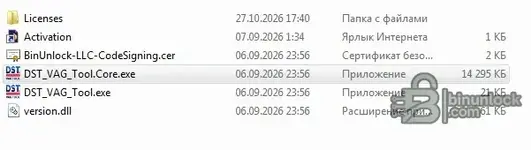
I downloaded this version of DST VAG IMMO Tool 4.0 — BCM2, Simos, MEDC17 & Module Support 4.0.
 
Activity
So far there's no one here